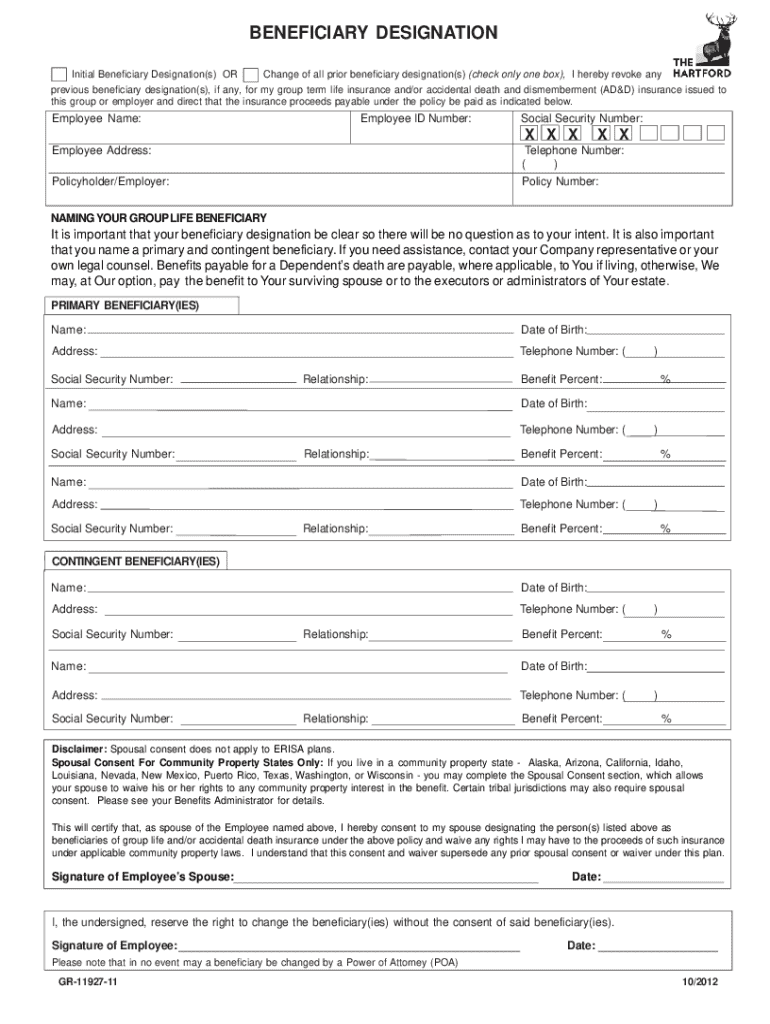
Die while covered by the plans. Please make sure that you also name a contingent beneficiary who would receive your benefit if your primary beneficiary dies first. The completion of this Beneficiary Form will revoke any previous beneficiary designation(s), if any, for your group term life insurance and/or accidental death and dismemberment (AD&D) insurance issued to this group/employer. Please make sure your beneficiary designation is clear so that there will be no question as to your meanin.

Open form follow the instructions

Easily sign the form with your finger

Send filled & signed form or save
How to fill out the The Hartford GR-11927 online
Filling out The Hartford GR-11927 beneficiary designation form online ensures that your preferred beneficiaries are designated clearly and accurately. This guide provides step-by-step instructions to help you navigate the form efficiently.
Follow the steps to complete your beneficiary designation form.
- Click the ‘Get Form’ button to obtain the form and open it in the editor.
- Select whether you are making an initial beneficiary designation or changing prior designations by checking the appropriate box. Keep in mind that completing this form will revoke any previous beneficiary designations.
- Enter your personal information in the designated fields, including your employee name, employee ID number, social security number, address, and telephone number.
- Provide details about the policyholder/employer and the policy number in the specified fields.
- List your primary beneficiaries by entering their names, dates of birth, addresses, telephone numbers, social security numbers, relationships to you, and percentages of the benefit they will receive. Ensure that the total of the percentages equals 100%.
- If there are contingent beneficiaries, repeat the process of entering their information in the provided spaces.
- If additional space is needed, write 'See attached' on the last beneficiary line and attach a separate sheet with all necessary beneficiary details, signed and dated by you.
- Have your spouse sign the spousal consent section if required by your state's community property laws, and add the date.
- Sign and date the form yourself, confirming that you reserve the right to change beneficiaries without their consent.
- Review all the information you have entered to ensure accuracy before proceeding. Save your changes, download, print, or share the completed form as needed.
Complete your beneficiary designation form online today to ensure your preferences are accurately documented.
Experience a faster way to fill out and sign forms on the web. Access the most extensive library of templates available.
Use professional pre-built templates to fill in and sign documents online faster. Get access to thousands of forms.
If you believe that this page should be taken down, please follow our DMCA take down process here.
This form is available in several versions. Select the version you need from the drop-down list below.