Loading
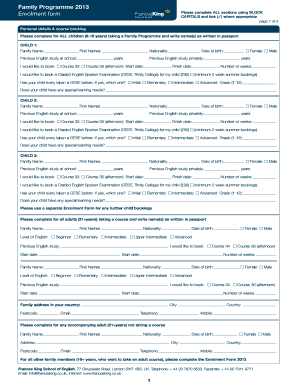
Get Enrolment Form Family Programme 2013 - Frances King School Of ...
How it works
-

Open form follow the instructions
-

Easily sign the form with your finger
-

Send filled & signed form or save
How to fill out the Enrolment Form Family Programme 2013 - Frances King School Of ... online
Filling out the Enrolment Form for the Family Programme 2013 at the Frances King School of English can be a straightforward process when guided step by step. This comprehensive guide provides you with the necessary instructions to complete the form online with clarity and efficiency.
Follow the steps to successfully complete your enrolment form.
- Press the ‘Get Form’ button to obtain the enrolment form and open it for editing.
- Begin by completing the 'Personal details & course booking' section for each child attending the Family Programme. Provide their names as listed in their passports, indicating family name and first names.
- Fill in the 'Previous English study' sections by selecting the appropriate options that reflect each child's past English instruction.
- Select the desired courses for each child by indicating 'Course 33' or 'Course 35' for the afternoon session, along with the corresponding start and finish dates.
- For testing, indicate if you want to book a Graded English Spoken Examination (GESE) with Trinity College, and specify if they have previously taken a GESE exam.
- Continue by completing the fields related to special learning needs for each child, if applicable.
- For adult participants aged 21 and older, ensure to fill out their names, level of English, previous study, and requested courses in the designated sections.
- Complete the 'Accommodation booking' section to indicate whether you will arrange your own accommodation or require assistance from the school. Fill in required details related to arrival and departure.
- Indicate any preferences regarding accommodation, including special requests regarding allergies or dislikes.
- Review the transfer arrangements by specifying whether you want the school to arrange transfers from airports or stations.
- Click on 'Medical, Travel and Course Insurance' to acknowledge understanding of insurance requirements and indicate your preference for arranging insurance.
- Address any visa requirements by specifying if you need to apply for visas before entering the UK and, if necessary, the type of visas.
- Complete the 'Payment' section by detailing your payment method and indicating any necessary deposits or total amounts.
- Finally, read and agree to the declaration regarding the accuracy and integrity of the information provided. Sign and date the form.
- After thoroughly reviewing the completed form for accuracy, you can save your changes, download, print, or share the form as needed.
Start completing your enrolment form online today to secure your child's place in the Family Programme.
Industry-leading security and compliance
US Legal Forms protects your data by complying with industry-specific security standards.
-
In businnes since 199725+ years providing professional legal documents.
-
Accredited businessGuarantees that a business meets BBB accreditation standards in the US and Canada.
-
Secured by BraintreeValidated Level 1 PCI DSS compliant payment gateway that accepts most major credit and debit card brands from across the globe.