Loading
Get Customer Credit Application - Rs Duncan Plant Hire
How it works
-

Open form follow the instructions
-

Easily sign the form with your finger
-

Send filled & signed form or save
How to fill out the Customer Credit Application - RS Duncan Plant Hire online
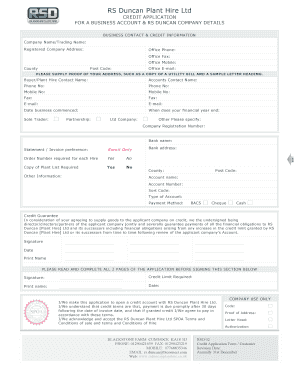
This guide provides step-by-step instructions for completing the Customer Credit Application for RS Duncan Plant Hire. Follow these directions to ensure your application is filled out accurately and efficiently.
Follow the steps to complete your application successfully.
- Click the ‘Get Form’ button to obtain the Customer Credit Application and open it in your editing tool.
- Begin by providing your company name or trading name in the designated field. Ensure that you enter the legal name under which your business operates.
- Input your registered company address, including the county and post code. This information is crucial for establishing your business identity.
- Fill in your office contact details: office phone, fax, mobile, and email. Make sure these details are accurate for effective communication.
- Provide details about your primary contacts. Include the names, phone numbers, and email addresses for both the buyer or plant hire contact and the accounts contact.
- State the date your business commenced and the end date of your financial year. This helps assess the financial stability of your business.
- Select your business structure by checking the appropriate box: sole trader, partnership, limited company, or other. If 'other,' specify the type of business.
- Enter your company registration number. This information is necessary for verification purposes.
- Provide the name of your bank, along with the bank's address, and choose your payment method from the options provided (BACS, cheque, cash).
- Indicate preferences for statements and invoices, as well as if a copy of the plant list is required. This ensures your correspondence preferences are noted.
- Under the Credit Guarantee section, ensure all directors or partners sign and date as required. Their signatures signify their agreement to the terms outlined.
- Review the entire application form to ensure all sections are completed accurately before signing at the designated area.
- Finally, save your changes, and you have the option to download, print, or share the completed application form as needed.
Complete your Customer Credit Application online today to ensure a swift processing of your business credit account.
Industry-leading security and compliance
US Legal Forms protects your data by complying with industry-specific security standards.
-
In businnes since 199725+ years providing professional legal documents.
-
Accredited businessGuarantees that a business meets BBB accreditation standards in the US and Canada.
-
Secured by BraintreeValidated Level 1 PCI DSS compliant payment gateway that accepts most major credit and debit card brands from across the globe.