Loading
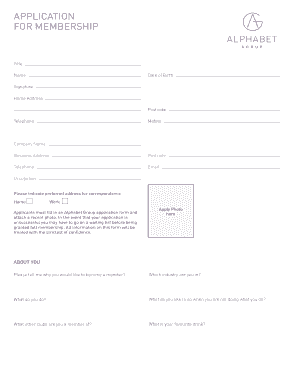
Get Download Membership Application - Alphabet Group
How it works
-

Open form follow the instructions
-

Easily sign the form with your finger
-

Send filled & signed form or save
How to use or fill out the Download Membership Application - Alphabet Group online
Filling out the Download Membership Application for the Alphabet Group online is a straightforward process. This guide provides clear, step-by-step instructions to help users complete the application accurately and efficiently.
Follow the steps to complete the membership application online.
- Press the ‘Get Form’ button to access the application form and open it in your chosen editor.
- Begin by entering your full name in the designated field. This section requires your legal name as it appears on official documents.
- Fill in your date of birth. Ensure the format is consistent with any instructions given.
- Provide your signature in the appropriate section. This confirms your agreement to the terms outlined in the application.
- Enter your home address, including the postcode. It is essential for correspondence purposes.
- List your telephone number and mobile number. This information helps the organization contact you.
- If applicable, enter your company name and business address, along with the corresponding postcode and telephone number.
- Include your email address; it will be used for any correspondence related to your application.
- Indicate your occupation, providing clarity on your professional background.
- Select your preferred address for correspondence, either home or work.
- Attach a recent photo in the designated area of the form.
- Answer the questions about yourself, such as reasons for wanting to become a member, your industry, activities you enjoy outside of work, other club memberships, and your favorite drink.
- Review the membership fees for each club option and select your preferred payment method, whether by credit/debit card or standing order.
- Fill out the payment details accurately, including card number, valid from date, expiry date, security code, and issue number if applicable.
- Complete Section A if setting up a standing order, filling in all payment-related information as required.
- Make sure to sign and date the form. If multiple signatures are needed, ensure all necessary parties have signed.
- Check that all relevant sections are fully completed, as incomplete forms cannot be processed.
- Finally, save your changes, and you can choose to download, print, or share the completed form as needed.
Complete your membership application online today for a smooth and efficient process!
Industry-leading security and compliance
US Legal Forms protects your data by complying with industry-specific security standards.
-
In businnes since 199725+ years providing professional legal documents.
-
Accredited businessGuarantees that a business meets BBB accreditation standards in the US and Canada.
-
Secured by BraintreeValidated Level 1 PCI DSS compliant payment gateway that accepts most major credit and debit card brands from across the globe.