Loading
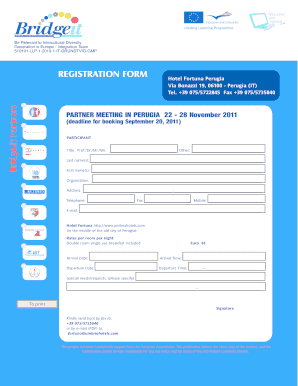
Get Registration Form Pg Nov 2011.cdr - Bridge-it
How it works
-

Open form follow the instructions
-

Easily sign the form with your finger
-

Send filled & signed form or save
How to fill out the Registration Form Pg Nov 2011.cdr - Bridge-it online
This guide provides clear and concise instructions on how to effectively complete the Registration Form Pg Nov 2011.cdr for the Bridge-it project. By following these steps, you will ensure that you provide all required information accurately and efficiently.
Follow the steps to successfully complete your registration form.
- Click the ‘Get Form’ button to obtain the Registration Form Pg Nov 2011.cdr and open it in your preferred document editing software.
- Begin filling out the form by entering your title in the designated field. Select 'Prof.', 'Dr.', 'Mr.', or 'Ms.' as applicable, and specify any other title under 'Other'.
- Provide your last name in the 'Last name(s)' section. Ensure that you write it clearly, as this will be used for identification purposes.
- Next, enter your first name(s) in the 'First name(s)' field. This should be your preferred name for the event.
- Fill in the 'Organisation' field with the name of the organization you are representing or affiliated with.
- Complete the 'Address' section with your current address. Ensure the information is precise, including any relevant details such as street number and apartment.
- Enter contact numbers in the 'Telephone', 'Fax', and 'Mobile' fields, ensuring that all entries are correct and up to date.
- Provide your email address in the designated field. This will be used for correspondence regarding the event.
- Indicate your arrival date and time in the relevant fields to assist with scheduling.
- Fill in your departure date and time information similarly to ensure a smooth end to your stay.
- If you have any special needs or requests, please specify them in the 'Special needs/requests' section to ensure accommodations are met.
- Before finalizing the form, ensure that all required fields are completed accurately. Once satisfied, you may save your changes.
- Download the form in PDF format, or print it directly for submission.
- Submit the completed form via fax to +39 075/5735040 or email (PDF) to fortuna@umbriahotels.com as directed.
Complete your registration online today to ensure your place at the event!
Industry-leading security and compliance
US Legal Forms protects your data by complying with industry-specific security standards.
-
In businnes since 199725+ years providing professional legal documents.
-
Accredited businessGuarantees that a business meets BBB accreditation standards in the US and Canada.
-
Secured by BraintreeValidated Level 1 PCI DSS compliant payment gateway that accepts most major credit and debit card brands from across the globe.