Loading
Form preview
  • US Legal Forms
  • Form Library
  • More Forms
  • More Multi-State Forms
  • Student Photo

Get Student Photo

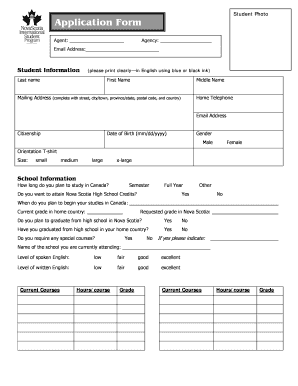
Telephone (complete with street, city/town, province/state, postal code, and country) Email Address Citizenship Date of Birth (mm/dd/yyyy) Gender Male Female Orientation T-shirt Size: small medium large x-large School Information How long do you plan to study in Canada? Semester Full Year Do you want to attain Nova Scotia High School Credits? Other Yes No When do you plan to begin your studies in Canada: Requested grade in Nova Scotia: Current grade in home country: Do you.

How it works

  1. Open form

    Open form follow the instructions

  2. Easily sign form

    Easily sign the form with your finger

  3. Share form

    Send filled & signed form or save

How to fill out the Student Photo online

Filling out the Student Photo form correctly is essential for a smooth application process. This guide provides clear instructions on each section, ensuring that you understand what information to provide for your enrollment in the Nova Scotia International Student Program.

Follow the steps to complete your Student Photo form effectively.

  1. Click ‘Get Form’ button to obtain the form and open it in the editing interface.
  2. Begin with the agent and agency information. Enter the name of the agent and agency as applicable.
  3. Fill in your email address. Ensure it is correct, as this will be used for communication.
  4. In the Student Information section, provide your last name, first name, and middle name clearly. Use blue or black ink if filling out by hand.
  5. Complete your mailing address. Include street, city or town, province or state, postal code, and country. Make sure all components are accurate.
  6. Enter your home telephone number and email address. Provide your citizenship and date of birth in the mm/dd/yyyy format.
  7. Indicate your gender by checking the appropriate box (Male or Female).
  8. Select your orientation t-shirt size from the options provided (small, medium, large, x-large).
  9. In the School Information section, specify how long you plan to study in Canada and indicate your semester or full-year preference.
  10. Respond to whether you wish to attain Nova Scotia High School Credits and state your planned start date for studies.
  11. Provide your requested and current grade levels, along with information on your high school graduation status.
  12. If applicable, detail any special courses you may require, as well as your level of spoken and written English.
  13. Fill in the Parent Information section for both parents, addressing last names, first names, occupations, birthdates, and contact information. Note the custody details if necessary.
  14. List any siblings you may have, including their names and ages. Attach additional pages if there is more information to provide.
  15. In the Language Training section, indicate whether you have received ESL training and if you are interested in ESL summer camp.
  16. Respond to the questions in the Personal Data section, providing insights that may be relevant to your application.
  17. Ensure you have all required attachments listed, including transcripts, photos, and the application fee.
  18. Read and sign the Participation Terms section, ensuring you understand the responsibilities and regulations before submitting.
  19. After completing all sections, review the form for accuracy before saving your changes. You can then download, print, or share the completed form as needed.

Complete your Student Photo form online now to start your journey in the Nova Scotia International Student Program.

Get form

Experience a faster way to fill out and sign forms on the web. Access the most extensive library of templates available.
Get form

Related content

FAQs on Photos and Videos under FERPA
A photo or video of a student is an education record, subject to specific exclusions, when...
Learn more
MyLifetouch
Start shopping your student's school pictures, Please enter your email to access your...
Learn more
Sample photo consent form
Below is a photo consent form template designed for use by community groups in Brighton...
Learn more

Related links form

Form 81 Initiate Card And Instructions Form 81-3 Modulo Delega Richiesta Cartella Clinica How To Fill Up Wbsedcl Form Field Trip Permission Slip Chuck E Cheesexls

Questions & Answers

Get answers to your most pressing questions about US Legal Forms API.

Contact support

As soon as your Lifetouch digital image is ready, you'll receive an email directing you to shutterfly.com. If you already have a Shutterfly account, you'll simply log in to access your Lifetouch digital images. If you do not have a Shutterfly account, the email will direct you to create one.

Once on your personalized Lifetouch page, select the desired thumbnail image and click on 'Download Selected' to download the image in full resolution.

Make sure it's clear and well-focused, It has to show your whole face, and all of your facial features must be visible, including beauty marks; The photo should show who you really are, so it should not be altered by any software that changes your appearance; A plain and light background is recommended.

Without this purchase, Lifetouch has a copyright policy designed to protect the images we take. While you do purchase portraits of your child, the original image remains the property of Lifetouch. This image cannot be photocopied or reproduced without the company's express written consent.

If you are a Lifetouch Customer, our goal is to make the photos we create available to you for years to come, and we will endeavor to retain a digital copy of one or more of your current and future school photos for you to claim and archive in your Shutterfly account for as long as that account remains active.

Online services like Classmates.com, FamilySearch.org, and E-yearbook.com allow you to search their archives for physical scans of yearbooks as well as photographs, dates, and student names.

From the Shutterfly website: When signed in to Shutterfly, click on 'My Photos', click on Albums, then click on Lifetouch from your folder list. ... When viewing your personalized Lifetouch page, you can see all of your Lifetouch images in one place with personalized product creations made just for you.

Smile and look natural – remember that you'll be showing your ID card a lot, you want to give off a good impression. Stick to your school's dress code if there is one. Go for a reasonable groom – make sure your hair and makeup (if you're wearing any) look nice and clean. Sit or stand against a white or gray background.

Get This Form Now!

Use professional pre-built templates to fill in and sign documents online faster. Get access to thousands of forms.
Get form
If you believe that this page should be taken down, please follow our DMCA take down processhere.

Industry-leading security and compliance

US Legal Forms protects your data by complying with industry-specific security standards.
  • In businnes since 1997
    25+ years providing professional legal documents.
  • Accredited business
    Guarantees that a business meets BBB accreditation standards in the US and Canada.
  • Secured by Braintree
    Validated Level 1 PCI DSS compliant payment gateway that accepts most major credit and debit card brands from across the globe.
Get Student Photo
Get form
  • Adoption
  • Bankruptcy
  • Contractors
  • Divorce
  • Home Sales
  • Employment
  • Identity Theft
  • Incorporation
  • Landlord Tenant
  • Living Trust
  • Name Change
  • Personal Planning
  • Small Business
  • Wills & Estates
  • Packages A-Z
  • Affidavits
  • Bankruptcy
  • Bill of Sale
  • Corporate - LLC
  • Divorce
  • Employment
  • Identity Theft
  • Internet Technology
  • Landlord Tenant
  • Living Wills
  • Name Change
  • Power of Attorney
  • Real Estate
  • Small Estates
  • Wills
  • All Forms
  • Forms A-Z
  • Form Library
  • Legal Hub
  • About Us
  • Help Portal
  • Legal Resources
  • Blog
  • Affiliates
  • Contact Us
  • Delete My Account
  • Site Map
  • Industries
  • Forms in Spanish
  • Localized Forms
  • State-specific Forms
  • Forms Kit
  • Real Estate Handbook
  • All Guides
  • Notarize
  • Incorporation services
  • For Consumers
  • For Small Business
  • For Attorneys
  • USLegal
  • FormsPass
  • pdfFiller
  • signNow
  • altaFlow
  • DocHub
  • Instapage
Form Packages
  • Adoption
  • Bankruptcy
  • Contractors
  • Divorce
  • Home Sales
  • Employment
  • Identity Theft
  • Incorporation
  • Landlord Tenant
  • Living Trust
  • Name Change
  • Personal Planning
  • Small Business
  • Wills & Estates
  • Packages A-Z
Form Categories
  • Affidavits
  • Bankruptcy
  • Bill of Sale
  • Corporate - LLC
  • Divorce
  • Employment
  • Identity Theft
  • Internet Technology
  • Landlord Tenant
  • Living Wills
  • Name Change
  • Power of Attorney
  • Real Estate
  • Small Estates
  • Wills
  • All Forms
  • Forms A-Z
  • Form Library
Customer Service
  • Legal Hub
  • About Us
  • Help Portal
  • Legal Resources
  • Blog
  • Affiliates
  • Contact Us
  • Delete My Account
  • Site Map
  • Industries
  • Forms in Spanish
  • Localized Forms
  • State-specific Forms
  • Forms Kit
Legal Guides
  • Real Estate Handbook
  • All Guides
Prepared for you
  • Notarize
  • Incorporation services
Our Customers
  • For Consumers
  • For Small Business
  • For Attorneys
Our Sites
  • USLegal
  • FormsPass
  • pdfFiller
  • signNow
  • altaFlow
  • DocHub
  • Instapage
Social Media
Call us now toll free:
+1 833 426 79 33
As seen in:
© Copyright 1999-2026 airSlate Legal Forms, Inc. 3720 Flowood Dr, Flowood, Mississippi 39232
  • Your Privacy Choices
  • Terms of Service
  • Privacy Notice
  • Content Takedown Policy
  • Bug Bounty Program