Loading
Form preview
  • US Legal Forms
  • Other Templates
  • Miscellaneous Forms
  • Multi-State Miscellaneous Forms
  • Pse Electric Service Application Residential Plat Development 300e 2012

Get Pse Electric Service Application Residential Plat Development 300e 2012-2026

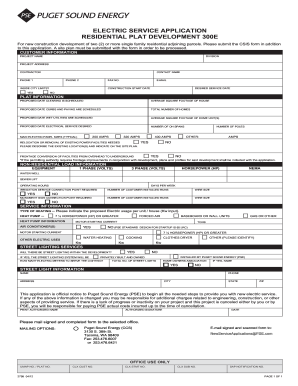
to this application. A site plan must be submitted with the form in order to be processed. CUSTOMER INFORMATIONPARCEL / PROJECT NAME DIVISION PROJECT ADDRESS CONTACT NAME CONTRACTOR PHONE 1 PHONE 2 FAX NO. INSIDE CITY LIMITS? YES E-MAIL CONSTRUCTION START DATE DESIRED SERVICE DATE NO PLAT INFORMATION PROPOSED DATE CLEARING IS SCHEDULED AVERAGE SQUARE FOOTAGE OF HOUSE PROPOSED DATE CURBS AND PAVING ARE SCHEDULED TOTAL NUMBER OF HOMES PROPOSED DATE WET UTILITIES ARE SCHEDULED AVE.

How it works

  1. Open form

    Open form follow the instructions

  2. Easily sign form

    Easily sign the form with your finger

  3. Share form

    Send filled & signed form or save

How to use or fill out the PSE Electric Service Application Residential Plat Development 300E online

The PSE Electric Service Application Residential Plat Development 300E is essential for new construction projects involving two or more single-family residential parcels. This guide will provide you with a clear, step-by-step approach to accurately complete the form online, ensuring you meet all necessary requirements.

Follow the steps to effectively fill out the application online:

  1. Click 'Get Form' button to obtain the form and open it in the editor.
  2. Begin by entering your customer information. Fill out fields including the parcel or project name, project address, and contact details. Ensure that you specify if the project is inside city limits.
  3. Provide details related to the contractor, including their name, phone numbers, and email address. This will help streamline communication.
  4. Fill out the construction schedule with the expected start date and desired service date. Accurate timing information is crucial for service planning.
  5. Next, navigate to the plat information section. Include the proposed dates for clearing, curbs and paving, and wet utilities, along with the average square footage of the homes planned.
  6. Indicate the total number of homes and specify the desired electrical service size options such as 200, 320, or 400 amps.
  7. If applicable, denote whether there is a need for relocation or removal of existing power facilities and describe existing locations on the site plan.
  8. Proceed to fill out the non-residential load information, including any equipment specifications and irrigation service connection requirements.
  9. Indicate any other service information regarding heating types and electric usages per unit, ensuring to provide the details for air conditioning, water heating, and any electric appliances.
  10. If street lighting is involved within the development, specify how many street lights will be present and who will install them.
  11. Finally, review the entire application to ensure all information is accurate and complete. Print the application, sign where indicated, and prepare it for submission.
  12. Choose to save your changes, download, or share the form as needed, and follow the stated mailing options for submission.

Complete your application online to ensure prompt electric service for your development.

Get form

Experience a faster way to fill out and sign forms on the web. Access the most extensive library of templates available.
Get form

Related content

EXH. DJL-10T DOCKETS UE-240004/UG-240005 ...
Sep 18, 2024 — services in plat developments without the detailed application process...
Learn more
VIRTUAL POWER PLANTS & SUPPORTING DISTRIBUTED ...
Feb 1, 2025 — The U.S. Department of Energy (DOE) recently defined VPPs as...
Learn more
RESIDENTIAL SPRINKLER SYSTEM
Installation tips have also been placed throughout the guide to assist you in planning a...
Learn more

Related links form

S Medial Words Ovhc Claim Form TUTORING REPORT - Wchcsorg To Kill A Mockingbird Worksheets Pdf

Questions & Answers

Get answers to your most pressing questions about US Legal Forms API.

Contact support

The electric meter is generally installed on the outside of your house, often near the ground and close to the main power line. For new developments, the location can vary based on design plans. As you think about your PSE Electric Service Application Residential Plat Development 300E, make sure to confirm the meter’s location with your contractor or developer.

Electric smart meters are installed in place of traditional meters, typically on the exterior of your home. They can be positioned in the same areas as traditional meters but may require additional space for their technology. Keep this in mind when considering upgrades as part of your PSE Electric Service Application Residential Plat Development 300E.

An electric meter should be placed in a location that is easily accessible for readings and maintenance. Ideally, it should be on the front or side of the building, away from any obstructions. Prioritize meter placement to streamline processes when you fill out the PSE Electric Service Application Residential Plat Development 300E.

PSE sources its electricity from a mix of renewable and conventional energy sources, including hydro, wind, and natural gas. This diverse energy portfolio supports the growing demand for power and sustainability. Understanding this can be beneficial when you complete your PSE Electric Service Application Residential Plat Development 300E.

Your electricity meters are usually found on the outer wall of your residence, near the utility pole. In cases of new developments, the specific location might differ based on the layout of the property. Ensure you include accurate meter placement when submitting your PSE Electric Service Application Residential Plat Development 300E.

PSE electric meters are typically located on the exterior of your home, close to the main electrical service entrance. In residential plat development, the positioning complies with local codes to ensure accessibility. If you're applying for services, consider these locations when filling out the PSE Electric Service Application Residential Plat Development 300E.

For inquiries related to new construction, you can reach PSE at their dedicated new construction number: 1-800-562-1482. This line is essential during your PSE Electric Service Application Residential Plat Development 300E, where specialists guide you through every step. Do not hesitate to call them for clarification on procedures or to answer any questions you may have. They are there to assist you in making your project a success.

RESOURCE PLANNING Integrated Resource Plan. Acquiring energy. Electricity supply. Hydro power. Thermal power. Wind power. Solar power. Natural gas supply.

For existing natural gas or electric service that requires modification, upgrading, or relocation of a service line or meter, including temporary removal and re-installation, please contact one of our representatives at 1-888-321-7779.

Creating an online account is easy. Visit the PSE.com home page and click Create Online Account under the blue sign-in button. How do I view my past bills online? You can view up to 24 months of past bill on an active account by visiting Payment History.

Get This Form Now!

Use professional pre-built templates to fill in and sign documents online faster. Get access to thousands of forms.
Get form
If you believe that this page should be taken down, please follow our DMCA take down processhere.
Get PSE Electric Service Application Residential Plat Development 300E
Get form
  • Adoption
  • Bankruptcy
  • Contractors
  • Divorce
  • Home Sales
  • Employment
  • Identity Theft
  • Incorporation
  • Landlord Tenant
  • Living Trust
  • Name Change
  • Personal Planning
  • Small Business
  • Wills & Estates
  • Packages A-Z
  • Affidavits
  • Bankruptcy
  • Bill of Sale
  • Corporate - LLC
  • Divorce
  • Employment
  • Identity Theft
  • Internet Technology
  • Landlord Tenant
  • Living Wills
  • Name Change
  • Power of Attorney
  • Real Estate
  • Small Estates
  • Wills
  • All Forms
  • Forms A-Z
  • Other Templates
  • Legal Hub
  • About Us
  • Help Portal
  • Legal Resources
  • Blog
  • Affiliates
  • Contact Us
  • Delete My Account
  • Site Map
  • Industries
  • Forms in Spanish
  • Localized Forms
  • State-specific Forms
  • Forms Kit
  • Real Estate Handbook
  • All Guides
  • Notarize
  • Incorporation services
  • For Consumers
  • For Small Business
  • For Attorneys
  • USLegal
  • FormsPass
  • pdfFiller
  • signNow
  • altaFlow
  • DocHub
  • Instapage
Form Packages
  • Adoption
  • Bankruptcy
  • Contractors
  • Divorce
  • Home Sales
  • Employment
  • Identity Theft
  • Incorporation
  • Landlord Tenant
  • Living Trust
  • Name Change
  • Personal Planning
  • Small Business
  • Wills & Estates
  • Packages A-Z
Form Categories
  • Affidavits
  • Bankruptcy
  • Bill of Sale
  • Corporate - LLC
  • Divorce
  • Employment
  • Identity Theft
  • Internet Technology
  • Landlord Tenant
  • Living Wills
  • Name Change
  • Power of Attorney
  • Real Estate
  • Small Estates
  • Wills
  • All Forms
  • Forms A-Z
  • Other Templates
Customer Service
  • Legal Hub
  • About Us
  • Help Portal
  • Legal Resources
  • Blog
  • Affiliates
  • Contact Us
  • Delete My Account
  • Site Map
  • Industries
  • Forms in Spanish
  • Localized Forms
  • State-specific Forms
  • Forms Kit
Legal Guides
  • Real Estate Handbook
  • All Guides
Prepared for you
  • Notarize
  • Incorporation services
Our Customers
  • For Consumers
  • For Small Business
  • For Attorneys
Our Sites
  • USLegal
  • FormsPass
  • pdfFiller
  • signNow
  • altaFlow
  • DocHub
  • Instapage
Social Media
Call us now toll free:
+1 833 426 79 33
As seen in:
© Copyright 1999-2026 airSlate Legal Forms, Inc. 17 Station Street, Suite 303, Brookline, MA 02445
  • Your Privacy Choices
  • Terms of Service
  • Privacy Notice
  • Content Takedown Policy
  • Bug Bounty Program