Loading
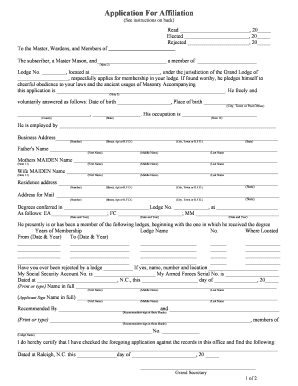
Get Application For Affiliation - Clemmons Masonic Lodge
How it works
-

Open form follow the instructions
-

Easily sign the form with your finger
-

Send filled & signed form or save
How to fill out the Application For Affiliation - Clemmons Masonic Lodge online
Filling out the Application For Affiliation for the Clemmons Masonic Lodge online can seem daunting, but with clear guidance, the process can become straightforward and manageable. This guide walks you through each section of the application to ensure you provide all necessary information accurately and efficiently.
Follow the steps to complete your application seamlessly.
- Press the ‘Get Form’ button to access the online version of the Application For Affiliation.
- Begin by reading the instructions carefully. Note the specific requirements and attachments necessary to support your application.
- Enter the date you are filling out the application in the designated field.
- Include your elected date and, if applicable, the rejection date. This information helps the lodge track your application history.
- In the section addressed to the Master, Wardens, and Members, write the name of the lodge you are applying to join.
- Fill in your full name, ensuring you clearly indicate that you are a Master Mason. Provide the name of your current lodge and its number.
- Input your date and place of birth, including the city, town, or post office, as well as the county and state.
- Specify your occupation and your employer's name along with their business address.
- Provide your father's name and your mother’s maiden name in the designated fields.
- Complete the section regarding your wife’s maiden name, if applicable.
- Fill in your residence address, ensuring accuracy in the street number, city, and state.
- Indicate where you would like to receive mail by providing the complete mailing address.
- List the degrees you have received, along with the dates and the lodge numbers where you were conferred these degrees.
- Document your membership history with previous lodges, including the length of membership and relevant dates.
- If you have been rejected by a lodge, provide the necessary details in the specified field.
- Input your Social Security Account Number and Armed Forces Serial Number, ensuring these details are correct.
- Date the application, and clearly print or type your full name in the provided section.
- Sign the application in the designated area, ensuring your signature matches the printed name.
- Include the names of your recommenders, making sure they sign where required.
- Finally, review your completed application thoroughly. Make any necessary corrections before saving, downloading, or printing the form for submission.
Take the next step in your Masonic journey by completing your Application For Affiliation online today.
A man who wants to join a Lodge must be recommended by two Master Masons in good standing in any Lodge recognized by the Grand Lodge of Virginia. He must understand that his character will be investigated. After approval by the members of that Lodge, he will be accepted as an applicant for membership in Freemasonry.
Industry-leading security and compliance
US Legal Forms protects your data by complying with industry-specific security standards.
-
In businnes since 199725+ years providing professional legal documents.
-
Accredited businessGuarantees that a business meets BBB accreditation standards in the US and Canada.
-
Secured by BraintreeValidated Level 1 PCI DSS compliant payment gateway that accepts most major credit and debit card brands from across the globe.