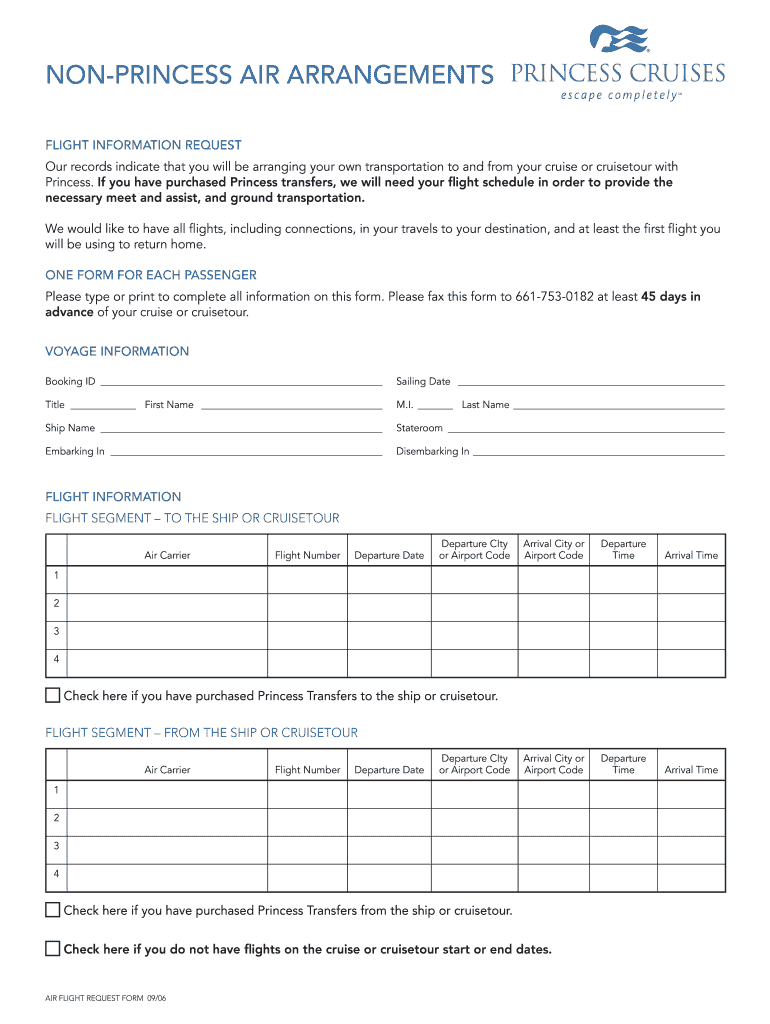
D Princess transfers, we will need your flight schedule in order to provide the necessary meet and assist, and ground transportation. We would like to have all flights, including connections, in your travels to your destination, and at least the first flight you will be using to return home. ONE FORM FOR EACH PASSENGER Please type or print to complete all information on this form. Please fax this form to 661-753-0182 at least 45 days in advance of your cruise or cruisetour. VOYAGE INFORMATIO.

Open form follow the instructions

Easily sign the form with your finger

Send filled & signed form or save
How to fill out the Princess Cruises Air Flight Request Form online
Filling out the Princess Cruises Air Flight Request Form is a crucial step for travelers arranging their own transportation to and from their cruise or cruisetour. This guide will provide you with clear, step-by-step instructions to ensure you complete the form accurately and effectively.
Follow the steps to complete the form with ease.
- Click ‘Get Form’ button to obtain the form and open it in your editor.
- Begin by filling in your voyage information, including your Booking ID and the sailing date. Make sure to include your personal details such as title, first name, middle initial, and last name.
- Enter the ship name and your stateroom number. It is important to also indicate where you will be embarking and disembarking.
- In the flight information section, fill out the details for your flight segment to the ship or cruisetour. You will need to provide the air carrier, flight number, departure date, departure city or airport code, and arrival city or airport code.
- For your flight segment to the ship, you will also need to include departure and arrival times. Ensure to provide this information for all intended flight segments, as indicated.
- If you have purchased Princess transfers to the ship or cruisetour, check the appropriate box to indicate this.
- Next, fill out the flight information for your return flight segment from the ship or cruisetour. Provide similar details: air carrier, flight number, and dates, along with the departure and arrival cities or airport codes.
- If you have purchased Princess transfers from the ship or cruisetour, check the corresponding box.
- If there are no flights on the cruise or cruisetour start or end dates, make sure to check the final box indicating this.
- Once you have completed all sections of the form, review your entries for accuracy. After confirming that all information is correct, you can save changes, download, print, or share the completed form.
Take the first step towards your travel plans by completing the Princess Cruises Air Flight Request Form online now.
Experience a faster way to fill out and sign forms on the web. Access the most extensive library of templates available.
Related content
To get specific details, you must contact your cruise line directly 1-855-732-4023 or...
Economy air rate and schedule are applicable for groups of 10 or more traveling on the...
The Air Staging Platform (ASP) is a complete refueling and repair platform designed to...
Get answers to your most pressing questions about US Legal Forms API.
How do you get priority boarding on Princess Cruises?
To get priority boarding on Princess Cruises, consider booking a suite or enrolling in the MedallionClass experience. These options often come with benefits like expedited boarding, ensuring you start your cruise smoothly. Utilizing the Princess Cruises Air Flight Request Form will also enable you to plan your trip efficiently, making the boarding process even easier.
Can I carry on my own luggage to Princess cruise?
Yes, you can carry on your own luggage to a Princess cruise, but keep in mind there are specific guidelines. Make sure your luggage meets the size and weight requirements set by Princess Cruises to avoid issues during boarding. Ultimately, having the right luggage ready will enhance your boarding experience.
How to print out luggage tags for Princess cruise?
To print out luggage tags for your Princess cruise, first complete the Princess Cruises Air Flight Request Form to finalize your travel plans. Once you've secured your booking, you will find the luggage tag option in your cruise details. Following the provided instructions will lead you through the printing process smoothly.
How do I print out cruise luggage tags?
Printing out your cruise luggage tags is straightforward. After filling out the Princess Cruises Air Flight Request Form, you will receive instructions on how to access and print your tags. Ensure your printer is ready, then follow the on-screen prompts to get your luggage tags prepared and ready for your cruise adventure.
Can I book flights through Princess Cruises?
Yes, you can book flights through Princess Cruises using the Princess Cruises Air Flight Request Form. This form simplifies the flight booking process, providing you with convenient options that coordinate perfectly with your cruise schedule. You can enjoy peace of mind knowing your travel plans align seamlessly with your cruise itinerary.
Can I print my luggage tag at home?
Yes, you can print your luggage tag at home when using the Princess Cruises Air Flight Request Form. This feature allows you to prepare for your trip in advance and ensure your luggage is correctly tagged. Simply access your booked cruise details, locate the luggage tag section, and print it out easily from your device.
How to get boarding pass for Princess Cruises?
To acquire your boarding pass for Princess Cruises, visit their website and complete the online check-in. Once you have provided your reservation details, you can download and print your boarding pass. Make sure you complete this step before your departure for a smoother boarding experience.
How do you get your boarding pass?
To ensure you receive your boarding pass, use the Princess Cruises website for online check-in. After entering your reservation details, you will have the option to print your boarding pass or to retrieve it digitally. It's a straightforward process that helps to simplify your travel experience.
How do I get my cruise boarding pass?
You can obtain your cruise boarding pass by visiting the Princess Cruises online check-in portal. Upon entering your booking information, follow the instructions to complete the process. This will allow you to print your boarding pass or save it on your mobile device.
Are flights included with Princess Cruises?
Flights are typically not included with your Princess Cruise package. However, you can book flights directly through Princess Cruises using the Princess Cruises Air Flight Request Form. This form allows you to request flights that suit your schedule and connects seamlessly with your cruise itinerary.
Use professional pre-built templates to fill in and sign documents online faster. Get access to thousands of forms.
If you believe that this page should be taken down, please follow our DMCA take down process here.