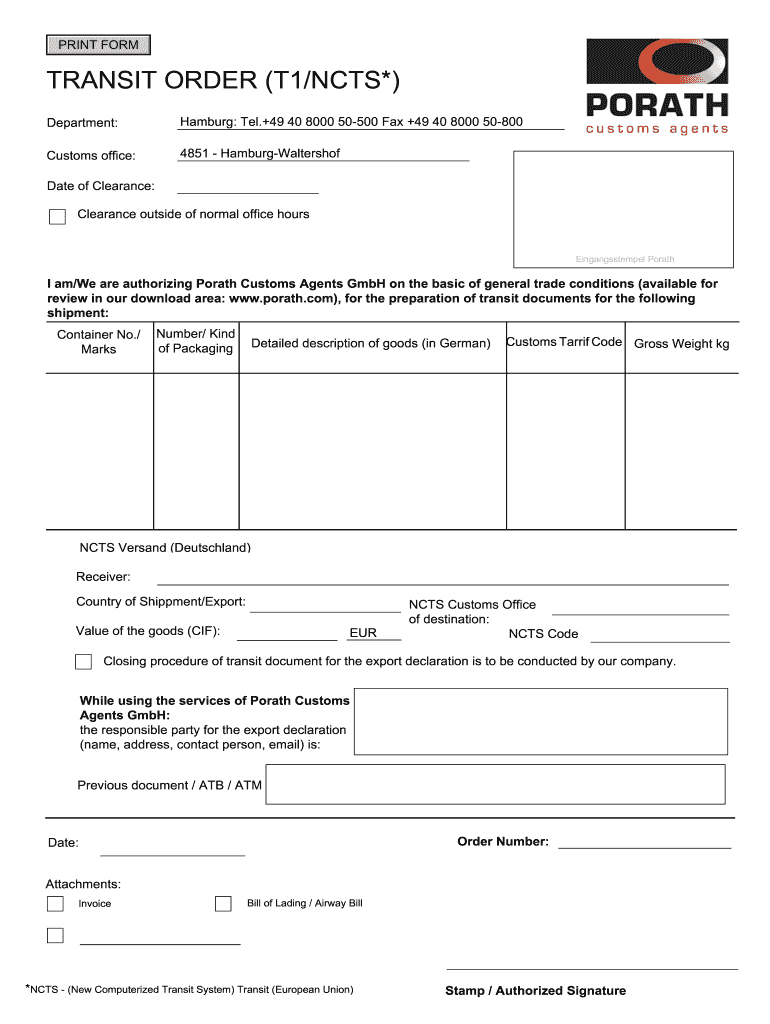
Fice hours Eingangsstempel Porath I am/We are authorizing Porath Customs Agents GmbH on the basic of general trade conditions (available for review in our download area: www.porath.com), for the preparation of transit documents for the following shipment: Container No./ Marks Number/ Kind of Packaging Detailed description of goods (in German) Customs Tarrif Code Gross Weight kg NCTS Versand (Deutschland) Receiver: Country of Shippment/Export: Value of the goods (CIF): EUR NCTS Customs O.
Loading

Open form follow the instructions

Easily sign the form with your finger

Send filled & signed form or save
How to fill out the Porath T1/NCTS online
Completing the Porath T1/NCTS online form is essential for effective transit documentation. This guide will walk you through each section of the form to ensure that you provide accurate information for your shipment.
Follow the steps to successfully complete the Porath T1/NCTS online form.
- Press the ‘Get Form’ button to access the Porath T1/NCTS online form and open it in your chosen editor.
- Enter the department information to direct your form appropriately. Include relevant contact details for any inquiries.
- Specify the customs office by inputting '4851 - Hamburg-Waltershof' for your shipment.
- Fill in the 'Date of Clearance', which represents when you are planning to clear your goods.
- Indicate if clearance will occur outside of normal office hours by checking the appropriate box.
- Provide your authorization for Porath Customs Agents GmbH. You may need to attach general trade conditions as necessary.
- Detail your shipment by filling out the 'Container No./Marks', 'Number/Kind of Packaging', and 'Detailed description of goods' in German.
- Input the customs tariff code and the gross weight of the goods in kilograms.
- Specify the NCTS shipping details for Germany, including the intended customs office of destination and the NCTS code.
- Fill in the details of the responsible party for the export declaration, including their name, address, contact person, and email.
- Enter the previous document information, order number, date, and any attachments such as invoices or bills of lading.
- Once all sections are complete, save your changes. You can download, print, or share the completed document as required.
Take action now and complete your Porath T1/NCTS online for a seamless transit experience.
Experience a faster way to fill out and sign forms on the web. Access the most extensive library of templates available.
Related content
by EJ Gubbins · 1991 — NS1.T1, California. Dr. Gina Schack. University of Louisville...
Get answers to your most pressing questions about US Legal Forms API.
Why is a T1 document required?
A T1 is a transit document which allows for goods which originated outside the European Union to move freely within the European Union. The accompanying document ensures that no customs duties or taxes are payable as the shipment moves from one country to the next within the European Union.
What does T1 status mean?
A T1 transport document refers to products that are produced in or for use outside the EU. Products with a T1 status may only be sold outside the EU for circulation. Before VATs and import duties are paid, these goods can't be traded. By drawing up a T1 document, you can clear the goods domestically.
What is NCTS code T1?
Customs use this transit system, the New Computerised Transit System (NCTS), for T1 electronic transit declaration. Within the transit system, the declaration entails sending an electronic message to customs. As the notifying party, you must enter the data for the transit declaration into the transit system yourself.
What is the difference between T1 and T2 customs?
The difference between a T1 customs document and a T2 customs document is, besides the actual content of the cargo, about where you can sell the goods. Products with a T1 customs status can only be sold outside the EU. Goods that have a T2 status can be sold both within and outside the EU.
What is T1 customs clearance?
The T1 shipping note is a customs document used in the cross-border movement of goods for transporting customs goods from one customs office to another. Basically, the T1 note is used to carry non-EU goods within the EU territory.
How do I get a T1 customs document?
In order to make an application for a T1 shipping note the principal or their representative must lodge an IE015 electronic declaration to the New Computerised Transit System at the goods' Office of Departure. This can be done via email using XML, EDCS or the Web Portal of the NCTS itself.
Who generates a T1 document?
The T1 Customs Procedure The T1 procedure is started at the country of departure by the relevant customs authority. You will then have a maximum of seven days, from the initiation of customs to present your cargo to the relevant customs office, where they will examine the goods and perform identity checks.
What is the T1 transit procedure?
What is a T1 transit procedure? As already mentioned, the T1 customs documents is a type of transit procedure. It ensures crossing boarders without import charges within the EU, the EFTA-states and further contracting parties. These charges are not due until the goods are arriving at the destination country.
Use professional pre-built templates to fill in and sign documents online faster. Get access to thousands of forms.
If you believe that this page should be taken down, please follow our DMCA take down process here.