Loading
Get Nz Ir23bs 2019-2026
How it works
-

Open form follow the instructions
-

Easily sign the form with your finger
-

Send filled & signed form or save
How to fill out the NZ IR23BS online
The NZ IR23BS form allows users to apply for a tailored tax code or tax rate. Completing this form accurately is essential for ensuring that your tax obligations are manageable. This guide provides clear, step-by-step instructions for filling out the form online.
Follow the steps to complete your NZ IR23BS application.
- Click 'Get Form' button to obtain the form and open it in the editor.
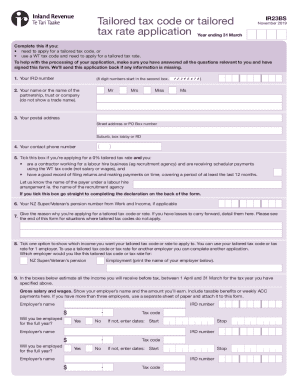
- Enter your IRD number. This is an 8-digit number that will start in the second box.
- Provide your name or the name of the partnership, trust, or company. Do not include a trade name.
- Fill in your postal address, including street address or PO Box number, suburb, box lobby, or RD.
- Enter your contact phone number in the designated fields.
- If applying for a 0% tailored tax rate, check the box confirming your eligibility and provide the name of the payer under the labour hire arrangement.
- State your NZ Super or Veteran’s pension number from Work and Income, if applicable.
- Explain the reason for applying for a tailored tax code or tax rate. Include any losses you wish to carry forward.
- Indicate which income the tailored tax code or rate will apply to by selecting the appropriate option and entering your employer's name.
- Estimate all income you will receive before tax for the specified tax year. Provide details for each employer and include income from NZ Super, commissions, dividends, and any other relevant sources.
- Sign the declaration to confirm that all information provided is accurate and complete.
- Once you have completed the form, save your changes, and download or print a copy for your records.
Complete the NZ IR23BS form online today to ensure your tax code is tailored to your needs.
You can apply for a tailored tax code in myIR or complete a Tailored tax code application (IR23BS) form. Go to .ird.govt.nz (search keyword: IR23BS). 10. If you need help choosing your tax code go to .ird.govt.nz or contact us on 0800 227 774.