Loading
Get Ne Silver Lake Public Schools Yearbook Ad Order Form 2015-2026
How it works
-

Open form follow the instructions
-

Easily sign the form with your finger
-

Send filled & signed form or save
How to fill out the NE Silver Lake Public Schools Yearbook Ad Order Form online
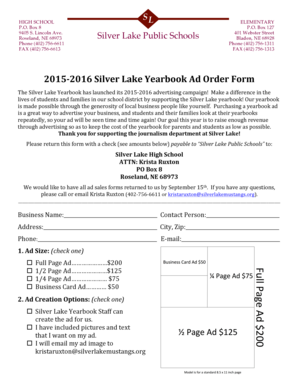
Filling out the NE Silver Lake Public Schools Yearbook Ad Order Form online is a straightforward process. This guide provides you with the necessary steps to ensure that your ad placement is completed efficiently and accurately.
Follow the steps to successfully complete your yearbook ad order form online.
- Click ‘Get Form’ button to obtain the form and open it for editing.
- Enter the business name in the designated field.
- Provide the contact person's name to ensure clear communication.
- Fill in the complete address, along with the city and zip code.
- Input the phone number for contact purposes.
- Add the email address for sending additional materials, if necessary.
- Select the ad size you wish to purchase by checking one of the options provided.
- Choose how you would like to create your ad by checking one of the creation options available.
- Review all the information entered to ensure accuracy.
- Upon completion, save your changes and consider downloading, printing, or sharing the form to finalize your order.
Complete your yearbook ad order form online today!