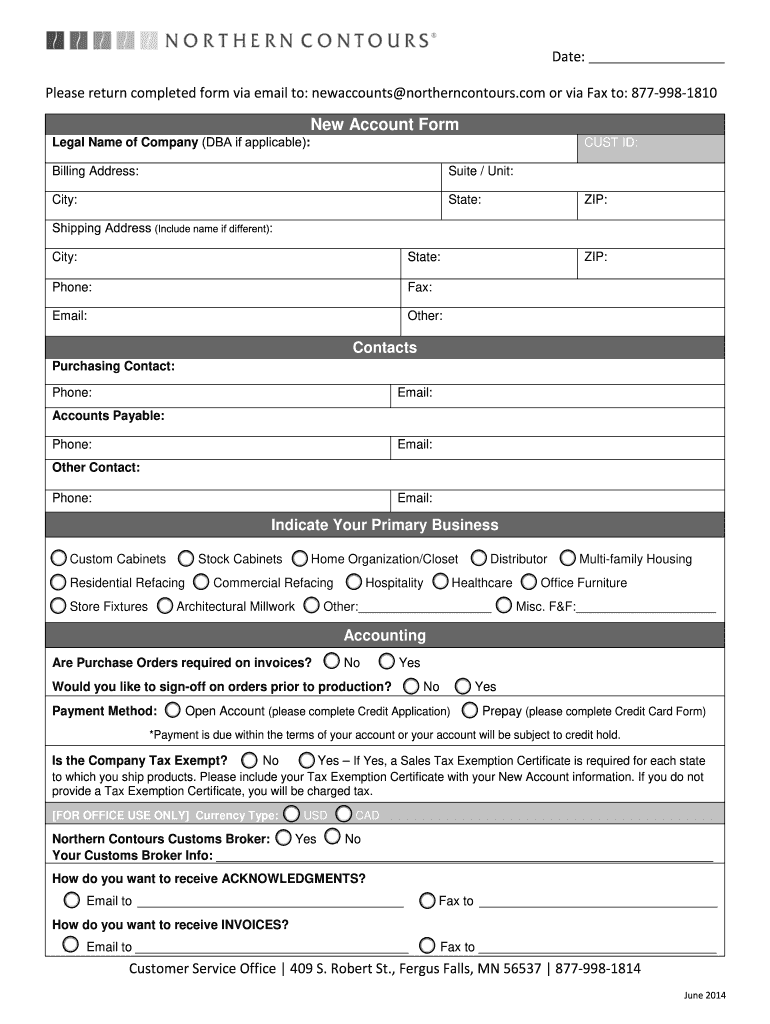
Billing Address: Suite / Unit: City: State: ZIP: Shipping Address (Include name if different): City: State: Phone: Fax: Email: Other: ZIP: Contacts Purchasing Contact: Phone: Email: Accounts Payable: Phone: Email: Other Contact: Phone: Email: Indicate Your Primary Business □ Custom Cabinets □ Stock Cabinets □ Home Organization/Closet □ Distributor □ Multi-family Housing □ Residential Refacing □ Commercial Refacing □ Hospitality □ Healthcare □ Office Furni.
Loading

Open form follow the instructions

Easily sign the form with your finger

Send filled & signed form or save
How to fill out the Northern Contours New Account Form online
This guide provides clear, step-by-step instructions for completing the Northern Contours New Account Form online. Whether you are a first-time user or need a refresher, this comprehensive overview will help you navigate each section with confidence.
Follow the steps to complete your new account form successfully.
- Click the ‘Get Form’ button to access the Northern Contours New Account Form and open it in your preferred online document editor.
- Begin by entering the legal name of your company in the designated field. If applicable, include any 'Doing Business As' (DBA) name for clarity.
- Fill in the 'CUST ID' field if you have one; if not, you may leave this blank.
- Complete the billing address section with the suite or unit number, city, state, and ZIP code to ensure accurate correspondence.
- If your shipping address is different from your billing address, provide that information in the shipping address section. Include the city, state, ZIP code, and any relevant contact details.
- Under 'Contacts,' enter the purchasing contact, accounts payable contact, and any other relevant contacts, including their phone numbers and email addresses.
- Indicate your primary business by checking the appropriate boxes for options such as custom cabinets, stock cabinets, or healthcare.
- In the accounting section, indicate whether you would like to sign off on orders prior to production and specify your preferred payment method.
- Mention if your company is tax exempt by checking 'Yes' or 'No.' If tax-exempt, make sure to include the Sales Tax Exemption Certificate.
- State your preferences for packaging instructions, shipping and delivery requirements, and preferred carriers as necessary.
- Provide details on how you learned about Northern Contours and fill in the authorized representative signature.
- Once you have completed all sections of the form, review your information for accuracy, and save your changes. You may download, print, or share the completed form as required.
Begin filling out your Northern Contours New Account Form online today and streamline your account setup process.
Experience a faster way to fill out and sign forms on the web. Access the most extensive library of templates available.
Related content
My Account | cart contains: · Sign In Create Account. Order Shipping Status. Currently...
THIS POSITION IS ONSITE IN FERGUS FALLS, MN. Provides a wide range of administrative...
Feb 23, 2023 — create a new account on the sign in page on TV. 1 - On the sign-in page...
Get answers to your most pressing questions about US Legal Forms API.
Who owns Northern Contours?
Northern Contours was founded in 1992 in Fergus Falls, Minnesota by Mike Rone & Duaine Miranowski with the goal of bringing “membrane pressing” to the US market.
What does Northern Contours do?
Northern Contours is a leading manufacturer of cabinet components for the Kitchen & Bath industry as well as specialty components for Office, Healthcare, and other Commercial industries. Employing nearly 500 people covering six locations in the United States, and in Canada!
Use professional pre-built templates to fill in and sign documents online faster. Get access to thousands of forms.
If you believe that this page should be taken down, please follow our DMCA take down process here.