Loading
Get Ny Ef-10 2009-2026
How it works
-

Open form follow the instructions
-

Easily sign the form with your finger
-

Send filled & signed form or save
How to fill out the NY EF-10 online
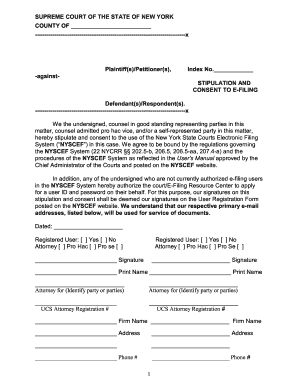
The NY EF-10 form, also known as the stipulation and consent to e-filing, is a key document for those involved in legal proceedings in New York. This guide provides clear, step-by-step instructions on how to accurately fill out this form online, ensuring that users can successfully complete the necessary information with ease.
Follow the steps to complete the NY EF-10 online.
- Click the ‘Get Form’ button to obtain the NY EF-10 form and access it in your preferred online editor.
- Begin filling out the top section of the form, starting with the names of the plaintiff(s) or petitioner(s) and the defendant(s) or respondent(s). Be sure to list all parties involved and their respective roles in the proceeding.
- In the section labeled ‘Index No.’, input the unique index number assigned to the case. This number is critical for the identification of the specific legal matter.
- Next, verify whether the undersigned individuals are registered users in the NYSCEF System. Check the appropriate box under ‘Registered User: [ ] Yes [ ] No’.
- Indicate the status of each undersigned individual by selecting one of the options: ‘Attorney’, ‘Pro Hac’, or ‘Pro Se’. Ensure that this accurately reflects their representation in the case.
- Proceed to collect signatures from all undersigned individuals in the designated spaces provided. Ensure that the signatures correspond with the names and roles indicated above.
- Fill in the professional information for each attorney, such as UCS Attorney Registration Number, firm name, address, and phone number. This information is vital for official communications.
- Enter the primary email addresses for each undersigned individual. This will be used for service of documents, so ensure accuracy.
- Optionally, include secondary and tertiary email addresses if applicable. This can help in ensuring that all relevant parties receive necessary documentation.
- Once all sections are completed, review the information for accuracy. After verifying, save the changes to the document, and download or print a copy for your records before submission.
Complete your legal documentation online with confidence!
Generally, if the complaint has been sworn to (verified), then the answer must be verified as well (CPLR §3020). The answer must be served upon the Plaintiff and all other parties (every Plaintiff and Defendant). In contrast to service when initiating a lawsuit, service by mail is sufficient.