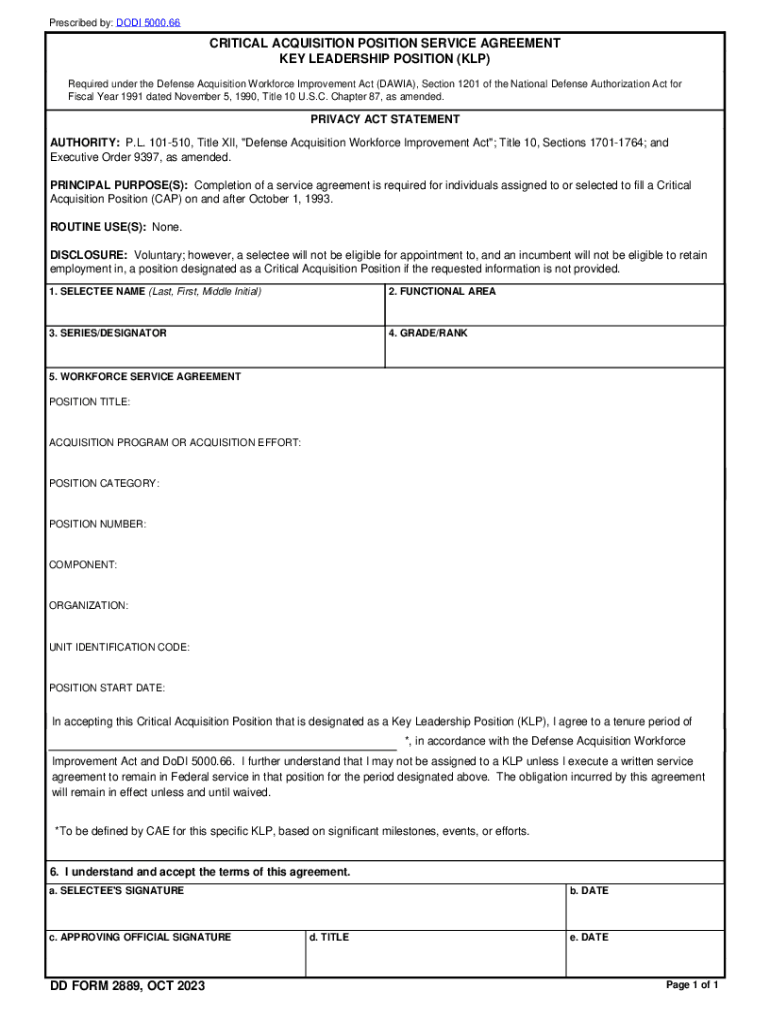
He National Defense Authorization Act for Fiscal Year 1991 dated November 5, 1990, Title 10 U.S.C. Chapter 87, as amended. PRIVACY ACT STATEMENT AUTHORITY: P.L. 101-510, Title XII, "Defense Acquisition Workforce Improvement Act"; Title 10, Sections 1701-1764; and Executive Order 9397, as amended. PRINCIPAL PURPOSE(S): Completion of a service agreement is required for individuals assigned to or selected to fill a Critical Acquisition Position (CAP) on and after October 1, 1993. ROUTINE USE(S): N.
Loading

Open form follow the instructions

Easily sign the form with your finger

Send filled & signed form or save
How to fill out the DD 2889 online
The DD 2889 form is a critical acquisition position service agreement required under the Defense Acquisition Workforce Improvement Act. This guide provides a clear and comprehensive approach to filling out the form online, making the process straightforward for users across varying levels of experience.
Follow the steps to complete the DD 2889 online effectively.
- Press the ‘Get Form’ button to access the DD 2889 form and open it in your chosen digital editor.
- Complete the first section by entering the selectee's name in the format of last name, first name, and middle initial.
- Select the functional area related to the acquisition position you are applying for.
- Indicate the corresponding series or designator for your position.
- Fill in your grade or rank as it pertains to your current position.
- In the workforce service agreement section, provide your position title.
- Detail the acquisition program or acquisition effort you will be involved in.
- Specify the position category relevant to your role.
- Enter your position number.
- Identify the component responsible for your position.
- Fill in the organizational information related to your position.
- Provide the unit identification code as required.
- Record the position start date.
- Agree to the tenure period as designated by the appropriate official based on project milestones and events.
- Indicate your understanding and acceptance of the agreement terms by signing where required.
- Include the approving official's signature and date, along with their title.
- Finally, review all entries for accuracy, save your changes, and proceed to download or print the completed form as necessary.
Begin filling out your DD 2889 online today to ensure compliance with acquisition position requirements.
Experience a faster way to fill out and sign forms on the web. Access the most extensive library of templates available.
Related content
DIRECTIONS: This form collects supplemental information pertaining to an applicant for an...
Mar 4, 2022 — This position requires a 3-year tenure agreement. Must sign DD Form 2889...
Jan 28, 2020 — ... DD X739, “Civilian Employee's Military Reserve, Guard, or. Retiree...
Get answers to your most pressing questions about US Legal Forms API.
How do I get my DD214 corrected?
If you believe an error or injustice exists in your military record, you may complete and submit a DD Form 149, Application for Correction of Military Record, along with sufficient evidence of the probable material error or justice, to your Service Board for Correction of Military/Naval Records (BCM/NR).
How do I request a correction on my military record?
Submit DD Form 149, Application for Correction of Military Records to the relevant service branch. (You can either view and download the form, or right-click the form and select "Save link as" or otherwise save the file and then open it.)
How do you correct a military discharge?
Individuals who left the military with a discharge that's less than fully honorable retain the right to upgrade that discharge even years later through their own military department's Discharge Review Board or through their military department's Board for Correction of Military/Naval Records.
How do I order a DD form 2501?
TO OBTAIN A COPY OF THIS FORM, PLEASE CONTACT THE UNDER SECRETARY OF DEFENSE FOR INTELLIGENCE AND SECURITY (I&S).
How can I get my military discharge upgraded?
A correction board may consider applications for correction of a military record, including a review of a discharge issued by courts martial.To apply for consideration of discharge upgrade, complete and submit a copy of the DD Form 293, Application for the Review of Discharge or Dismissal from the Armed Forces of the ...
How long does it take to correct a DD 214?
It takes a few months to a year to have your request processed. If the Board for Correction hasn't reached a decision on your request, you may contact the military branch ingly. For requests to the Army Review Board Agency, you may send an e-mail request to ARMY.ARBAINQUIRY@MAIL.MIL.
Use professional pre-built templates to fill in and sign documents online faster. Get access to thousands of forms.
If you believe that this page should be taken down, please follow our DMCA take down process here.