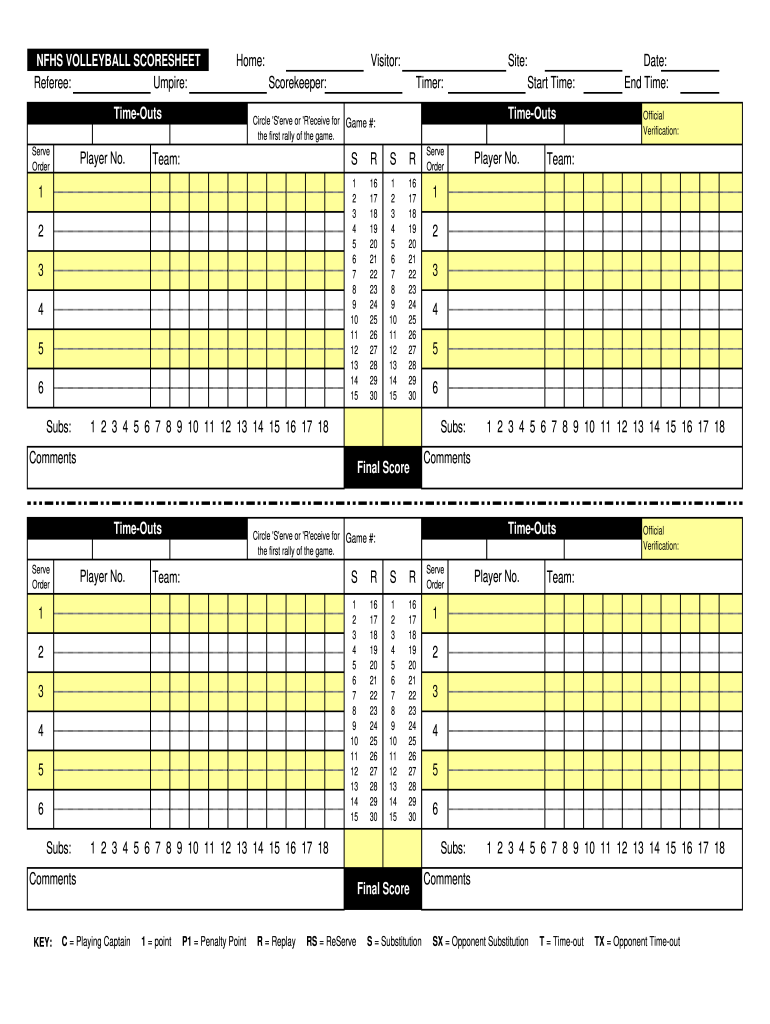
NFHS VOLLEYBALL SCORESHEET Referee: Umpire:Home:TimeOuts Serve OrderPlayer No.Visitor: Scorekeeper:Team:2 3 4 5 6SRSR1 2 3 4 5 6 7 8 9 10 11 12 13 14 1516 17 18 19 20 21 22 23 24 25 26 27 28 29 301 2 3 4 5 6 7 8 9 10 11 12 13 14 1516 17 18 19 20 21 22 23 24 25 26 27 28 29 30Player.
Loading

Open form follow the instructions

Easily sign the form with your finger

Send filled & signed form or save
How to fill out the NFHS Volleyball Scoresheet online
Filling out the NFHS Volleyball Scoresheet online is essential for tracking game progress and player performance. This guide provides a clear, step-by-step approach to ensure users can complete the scoresheet accurately and efficiently.
Follow the steps to complete the NFHS Volleyball Scoresheet online.
- Click ‘Get Form’ button to access the scoresheet and open it in the editor.
- Begin by entering the names of the referee and the umpire in the designated fields at the top of the scoresheet.
- Fill in the home team and visitor team names. Also, include the scorekeeper and timer’s details.
- For each player, enter their jersey number in the 'Player No.' section. Ensure that all players from both teams are included.
- Document any time-outs taken by each team in the appropriate spaces provided on the scoresheet.
- Use the 'Serve Order' section to indicate the sequence of players serving for each team.
- Record any substitutions made during the match alongside the relevant player numbers.
- At the end of the match, fill in the final scores for both teams.
- Review the completed scoresheet for accuracy. Once verified, you can save changes, download, print, or share the form.
Start completing your NFHS Volleyball Scoresheet online today!
Experience a faster way to fill out and sign forms on the web. Access the most extensive library of templates available.
Related content
Game Number: 1 2 3 4 5. Start Time: ______ End Time: ______. Scorekeeper. T = Time Out. Tx...
NFHS RULES GOVERN PLAY WITH THE FOLLOWING MODIFICATIONS. THE GAME. Players ... The first...
Get answers to your most pressing questions about US Legal Forms API.
Do you enter the Libero players on the scoresheet?
Yes, the Libero players must be listed on the NFHS Volleyball Scoresheet, as they play a crucial role in defensive strategies. Their substitutions are tracked to comply with official regulations. Ensuring the accurate entry of these players is vital for maintaining compliance with the sport's rules and providing a complete overview of the match.
How does high school volleyball score?
High school volleyball uses a rally scoring system, where a point is scored on every serve, regardless of which team served. Matches are typically played to 25 points, and teams must win by two points. The process is documented on the NFHS Volleyball Scoresheet, which allows for clear tracking of scores and game progress.
Who keeps track of the score throughout the volleyball game?
The scorekeeper, appointed by the home team's coaching staff, is responsible for maintaining the NFHS Volleyball Scoresheet during the match. They track points, substitutions, and timeouts, ensuring accurate scorekeeping. This role is essential for delivering accurate game summaries and maintaining proper flow throughout the game.
Who signs the scoresheet at the conclusion of a volleyball match?
At the end of the match, the officials will sign the NFHS Volleyball Scoresheet alongside both coaches. This action signifies that all parties agree on the match outcome and details as recorded. Securing these signatures keeps an official record and supports clear communication between teams and officials.
When should a scoresheet be supplied to the officials' table in volleyball?
The NFHS Volleyball Scoresheet should be submitted to the officials' table prior to the match starting. This allows referees to review the lineups and ensure all details are correct. Timely submission is crucial for smooth game management and helps prevent any last-minute changes.
Who signs the scoresheet in volleyball?
Typically, the coaches or team captains are responsible for signing the NFHS Volleyball Scoresheet. This signature confirms that the game details are correct as recorded. Having these signatures helps maintain accountability and provides a clear reference for any disputes that may arise post-match.
What is NFHS in volleyball?
NFHS stands for the National Federation of State High School Associations. It provides standardized rules, including the NFHS Volleyball Scoresheet, which is essential for tracking the progress of games. This scoresheet ensures each match is documented accurately, contributing to the integrity of high school volleyball competitions.
How do you record points in volleyball?
To record points in volleyball, you can use a scoresheet that clearly tracks each team's points and relevant match events, such as service errors or timeouts. Keeping the NFHS Volleyball Scoresheet handy allows you to log these points accurately, ensuring all details are captured throughout the game. Regular practice with the scoresheet will enhance your recording efficiency.
What does NFHS stand for?
NFHS stands for the National Federation of State High School Associations. This organization plays a critical role in establishing rules and guidelines for high school sports across the United States. When you utilize an NFHS Volleyball Scoresheet, you are engaging with standards that help maintain the integrity of the sport at the high school level.
What does NFHS stand for volleyball?
In the context of volleyball, NFHS stands for the National Federation of State High School Associations. This organization oversees and regulates high school sports, including volleyball, to ensure fair play and consistency. The NFHS Volleyball Scoresheet is essential for any team participating in NFHS sanctioned events, helping you adhere to their guidelines.
Use professional pre-built templates to fill in and sign documents online faster. Get access to thousands of forms.
If you believe that this page should be taken down, please follow our DMCA take down process here.