Loading
Get Enrolment Form 2012-2013 - Ipa
How it works
-

Open form follow the instructions
-

Easily sign the form with your finger
-

Send filled & signed form or save
How to fill out the Enrolment Form 2012-2013 - IPA online
This guide provides clear, step-by-step instructions for completing the Enrolment Form for the 2012-2013 academic year at the Institute of Public Administration. By following these guidelines, users can ensure that their form is filled out correctly and submitted successfully.
Follow the steps to complete the enrolment form online:
- Press the ‘Get Form’ button to access the enrolment form and open it for editing.
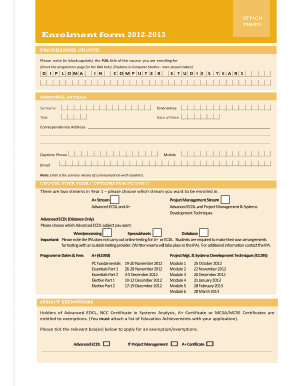
- In the 'Programme Choice' section, write the full title of the course you are enrolling for using block capitals. Make sure to refer to the provided programme page for the correct title.
- Fill in your personal details, including surname, forenames, title, date of birth, correspondence address, daytime phone number, mobile number, and email. Note that the email address will be the primary means of communication.
- In the 'Choose Your Year 1 Options for 2012/2013' section, select the appropriate stream you wish to enroll in. Choose either the A+ Stream or the Project Management Stream, as applicable.
- If selecting the Advanced ECDL (Distance Only), choose one subject from the options of Wordprocessing, Spreadsheets, or Database before proceeding.
- Complete the 'Programme Dates & Fees' section by entering the relevant fees based on your selected stream.
- If applicable, fill out the 'Subject Exemptions' section, ticking the boxes for any exemptions you wish to apply for, and ensure you attach the list of your education achievements.
- In the 'Employment Details' section, provide your employer's information, including their name, section, post/grade, and full office address.
- Indicate how the fees will be paid by selecting the appropriate option: Employer, Applicant, or Other. Attach a letter from your employer if the fees are to be covered by them.
- In the 'Education' section, include copies of all relevant education achievements. Fill in the dates, college details, awards, and corresponding grades.
- In the 'How Did You Hear About This Course?' section, tick the most appropriate box that applies to you.
- Review your form for completeness and accuracy. Once finished, save your changes, then download, print, or share the completed form as needed.
Complete your enrolment form online today and secure your place in the course!
Industry-leading security and compliance
US Legal Forms protects your data by complying with industry-specific security standards.
-
In businnes since 199725+ years providing professional legal documents.
-
Accredited businessGuarantees that a business meets BBB accreditation standards in the US and Canada.
-
Secured by BraintreeValidated Level 1 PCI DSS compliant payment gateway that accepts most major credit and debit card brands from across the globe.