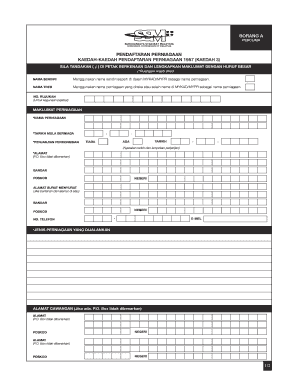
BORANG A PERCUMA PENDAFTARAN PERNIAGAAN KAEDAH-KAEDAH PENDAFTARAN PERNIAGAAN 1957 (KAEDAH 3) SILA TANDAKAN ( ? ) DI PETAK BERKENAAN DAN LENGKAPKAN MAKLUMAT DENGAN HURUF BESAR (*Ruangan wajib diisi).

How it works
  • Open form

    Open form follow the instructions

  • Easily sign form

    Easily sign the form with your finger

  • Share form

    Send filled & signed form or save

How to fill out the MY SSM Pendaftaran Perniagaan online

Filling out the MY SSM Pendaftaran Perniagaan form online is an essential step for those looking to register their business. This guide provides clear and supportive instructions to ensure you complete the form accurately.

Follow the steps to fill out your registration form seamlessly.

  1. Click the ‘Get Form’ button to access the MY SSM Pendaftaran Perniagaan form and open it in the editor.
  2. Begin by filling in your personal name as shown on your MYKAD/MYPR. This will serve as your business name.
  3. Input the 'nama tred' if you are using a different name for your business than the one on your identification.
  4. Fill in the reference number. This section is for office use and can be left blank.
  5. Indicate whether you have a partnership agreement by ticking the appropriate box and providing the date, if applicable, along with attaching any agreement.
  6. Provide your full business address, ensuring no P.O. Box is used. Also, include your city, postal code, and state.
  7. If your correspondence address differs from your business address, complete the relevant fields for your mailing address.
  8. Include a contact number and email associated with your business operations.
  9. If you have any branch addresses, fill in their details in the provided sections.
  10. Move on to the owner’s details. Here, enter your name and ID number as shown on your MYKAD/MYPR, along with your date of birth, citizenship status, and ethnic background.
  11. Fill in your home address, ensuring to provide the city, postal code, and state.
  12. Verify and confirm your details by signing at the end of the form, ensuring that all information provided is accurate. If applicable, additional partners must also fill in their details.
  13. Once completed, save your changes. You may then download, print, or share the form as needed.

Complete your MY SSM Pendaftaran Perniagaan online today to ensure your business is formally registered.

Get form

Experience a faster way to fill out and sign forms on the web. Access the most extensive library of templates available.

Related content

BILANGAN PENDAFTARAN PERNIAGAAN MENGIKUT NEGERI

BILANGAN PENDAFTARAN PERNIAGAAN MENGIKUT NEGERI. Followers: 0. Organization. my...

Learn more
SOP FASA 3 TARIKH KEMAS KINI: 17 SEPTEMBER 2021

Sep 17, 2021 — Aktiviti Tidak Dibenarkan. • Pergerakan keluar dan masuk kawasan. PPN...

Learn more
Questions & Answers

Get answers to your most pressing questions about US Legal Forms API.

Contact support

How do I check a business name availability?

To check a business name's availability, you should use the SSM's online platform that allows you to conduct a name search. This efficient tool will help you see if the name you prefer is already registered or if it is clear for use. By ensuring name availability, you can make the MY SSM Pendaftaran Perniagaan process smoother and avoid potential complications down the line.

Registering for SSM online in Malaysia is straightforward. You can visit the SSM e-Services portal and follow the prompts to complete your registration. The process is designed to be user-friendly, making it easier for you to navigate the necessary steps for MY SSM Pendaftaran Perniagaan and get your business started without unnecessary delays.

You can check company name availability in Malaysia through the official SSM portal. The portal offers an easy-to-use search function that lets you input your desired name and see if it's already in use. By utilizing this tool, you can simplify your MY SSM Pendaftaran Perniagaan journey and move confidently toward registering your new business.

To determine if a name is available for your company in Malaysia, visit the SSM website and use their name search feature. This service will list all registered names to help you find an available option. Choosing an available name is crucial for the MY SSM Pendaftaran Perniagaan process, ensuring you comply with legal requirements and establish a distinct brand identity.

You can check if a company name is already taken in Malaysia by using the SSM's online services. The SSM platform allows you to search for existing company names to avoid duplication. By conducting this search, you can ensure that your desired name is unique and compliant with local regulations, facilitating a smoother MY SSM Pendaftaran Perniagaan process.

To verify if a company is legitimate in Malaysia, you can visit the official Companies Commission of Malaysia (SSM) website. There, you can search for the company's registration number or name. This information will provide you with details about the company’s status, including whether it is registered, active, or has any legal issues. For comprehensive verification, consider using resources like MY SSM Pendaftaran Perniagaan, which help streamline the process.

Activating your SSM user ID is a straightforward process. First, visit the SSM portal and log in with your temporary ID and password. Follow the prompts to set up your permanent user ID and password, ensuring that you keep your information secure. If you encounter any difficulties, uslegalforms offers helpful resources to guide you through this activation.

Starting with SSM is simple. Begin by visiting the MY SSM Pendaftaran Perniagaan website to create an account. From there, you can register your business, submit necessary documents, and receive guidance for compliance. The platform provides comprehensive resources to support your launch into the business world.

Setting up a system manager involves defining roles and responsibilities within your business. Start by identifying the tasks that require management and assign specific individuals to oversee those areas. Additionally, utilizing tools available through MY SSM Pendaftaran Perniagaan can assist in streamlining your operations effectively.

To set up your SSM, begin by visiting the MY SSM Pendaftaran Perniagaan site. You need to create an account and provide essential details about your business. Follow the step-by-step instructions to submit your application, and ensure you have all required documents ready for a smooth setup experience.

Get This Form Now!

Use professional pre-built templates to fill in and sign documents online faster. Get access to thousands of forms.

If you believe that this page should be taken down, please follow our DMCA take down process here.

Get MY SSM Pendaftaran Perniagaan