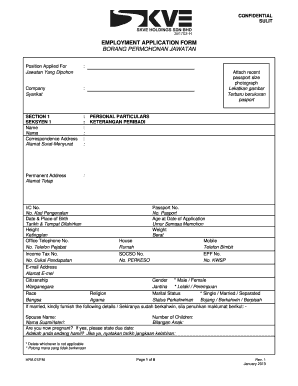
Lamat Surat-Menyurat : : : : : : Permanent Address Alamat Tetap : Attach recent passport size photograph Lekatkan gambar Terbaru berukuran pasport PERSONAL PARTICULARS KETERANGAN PERIBADI I/C No. Passport No. No. Kad Pengenalan No. Pasport Date & Place of Birth Age at Date of Application Tarikh & Tempat Dilahirkan Umur Semasa Memohon Height Weight Ketinggian Berat Office Telephone No. House Mobile No. Telefon Pejabat Rumah Telefon Bimbit Income Tax No. SOCSO No. EPF No. No. Cukai Pendapata.
Loading
Open form follow the instructions
Easily sign the form with your finger
Send filled & signed form or save
How to fill out the MY SKVE Holdings HRA 07/FM online
The MY SKVE Holdings HRA 07/FM is a comprehensive employment application form that facilitates gathering essential information from candidates seeking employment. This guide provides clear, step-by-step instructions on how to successfully fill out the form online, ensuring you complete each section accurately.
Follow the steps to complete the MY SKVE Holdings HRA 07/FM online effectively.
- Click ‘Get Form’ button to obtain the form and open it in your preferred editor.
- In Section 1, enter your name, correspondence address, and permanent address. Be sure to attach a recent passport-sized photograph as instructed.
- Provide your personal particulars, including identification numbers, date and place of birth, height, weight, contact numbers, email address, citizenship, gender, race, religion, marital status, and other details about your spouse and children.
- In Section 2, list details of a contact person for emergencies, including their name, relationship to you, and contact information.
- Complete Section 3 by providing your educational background. Include the names of institutions attended, qualifications achieved, occupations, and years of achievement.
- In Section 4, detail your employment history, starting with the most recent employer. Include this employer's name, your position, salary, reasons for leaving, service period, and if we may contact your current employer.
- Section 5 requests particulars of your current employment, including the employer's name, designation, salary, and any additional relevant particulars.
- Identify your referees in Section 6. Provide their occupation, telephone numbers, and duration of your acquaintance.
- Rate your language proficiency in Section 7 on a scale from 1 to 10 for Malay, English, and any other languages you know.
- Section 9 allows you to share your interests and hobbies. Provide details as requested.
- Answer the miscellaneous questions regarding your driving license and medical information carefully in Section 10 and 11.
- In Section 12, read the declaration carefully, ensure all information is accurate, then provide your signature and the date.
- Once all sections are complete, save your changes, download a copy for your records, or print it for submission.
Complete your MY SKVE Holdings HRA 07/FM form online today and secure your opportunity!
Experience a faster way to fill out and sign forms on the web. Access the most extensive library of templates available.
Related content
A monograph of the phyllopod crustacea of North America, with remarks on the order of...
Get answers to your most pressing questions about US Legal Forms API.
How do I fill out an HRA exemption?
Filling out an HRA exemption requires attention to detail and understanding of your plan's rules. Start by gathering necessary information regarding your MY SKVE Holdings HRA 07/FM and any required documentation. If you encounter difficulties, consider reaching out to your HR department or using resources like US Legal Forms to assist in ensuring all forms are completed accurately.
Can I get an HRA on my own?
Individuals typically cannot establish a health reimbursement account independently, as they are employer-sponsored plans. However, you can benefit from the MY SKVE Holdings HRA 07/FM if your employer provides one. If you are self-employed or run a small business, explore options for group plans that could offer similar benefits.
How do I set up an HRA for my employees?
To set up a health reimbursement account for your employees, begin by defining the eligibility criteria and funding levels. After establishing the MY SKVE Holdings HRA 07/FM details, you can create the necessary documentation and communicate the plan to your workforce. Platforms such as US Legal Forms offer resources that can help streamline this process, making it easier to implement a compliant and effective HRA.
What is the downside of HRA?
One potential downside of a health reimbursement account is that the employer controls the funding and reimbursements. Employees may face limitations based on what their MY SKVE Holdings HRA 07/FM plan allows, which can vary significantly from other types of accounts. Additionally, if an employee leaves the company, unused HRA funds may not be portable, leading to possible loss.
How do employers set up an HRA?
Employers can set up a health reimbursement account by determining the funding structure and plan details. They need to choose how much to contribute to the MY SKVE Holdings HRA 07/FM and what expenses will be eligible for reimbursement. Utilizing platforms like US Legal Forms can simplify the process, providing necessary documents and guidance for establishing an effective HRA.
How do I fund my HRA?
Funding your health reimbursement account is straightforward. Employers usually make contributions to the MY SKVE Holdings HRA 07/FM on behalf of their employees, either on a regular schedule or as needed. Employees cannot personally fund their HRA, but can benefit from the employer's contributions for eligible medical expenses.
Who sets the limits of a health reimbursement account?
The limits of a health reimbursement account (HRA) are typically set by the employer. Each employer decides the maximum amount available for reimbursement under their MY SKVE Holdings HRA 07/FM plan. This flexibility allows employers to tailor the HRA based on their budget and the needs of their employees, ensuring a customized approach to healthcare costs.
How to send documents to HRA NYC?
You can send documents to HRA NYC by mailing them to your local HRA office, or you can use the online submission options through the MY SKVE Holdings HRA 07/FM platform. Ensure that documents are complete and legible, which will help reduce delays in processing. Always check for specific directions based on your case.
How do I claim HRA funds?
To claim HRA funds, you need to submit a request for reimbursement through the MY SKVE Holdings HRA 07/FM system or directly to your employer's HRA administrator. Provide clear documentation for eligible expenses, and ensure you meet all deadlines. Following these steps will help secure your funds promptly.
How do I upload documents to food stamps in NY?
To upload documents for food stamps in New York, visit the ACCESS NYC website or use the MY SKVE Holdings HRA 07/FM platform if applicable. Follow the instructions to log in and select the option to upload documents. Make sure your files are clear and properly labeled to facilitate processing.
Use professional pre-built templates to fill in and sign documents online faster. Get access to thousands of forms.
If you believe that this page should be taken down, please follow our DMCA take down process here.