Loading
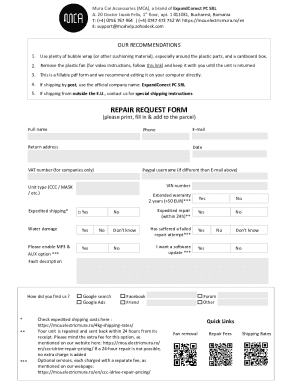
Get Mura Car Accessories Repair Request Form
How it works
-

Open form follow the instructions
-

Easily sign the form with your finger
-

Send filled & signed form or save
How to fill out the Mura Car Accessories Repair Request Form online
Completing the Mura Car Accessories Repair Request Form online is a straightforward process that ensures your car accessories repair needs are communicated effectively. This guide will walk you through each step to ensure you have all the necessary information ready for submission.
Follow the steps to complete the online form with ease.
- Click ‘Get Form’ button to access the form and open it for editing.
- Begin by entering your full name in the designated field. Ensure that your name is spelled correctly to prevent any issues with communication.
- Provide your phone number, including the area code, to facilitate contact regarding your repair request.
- Enter your email address. This will be used for any correspondence related to your request.
- Fill in the return address where you want your repaired unit sent back. This is critical for accurate delivery.
- If applicable, include your VAT number in the designated field for company-related requests.
- Input your PayPal username if it differs from the email provided earlier.
- Indicate the type of unit you are sending for repair by selecting from options like CCC or MASK.
- Provide the last seven characters of the VIN number to identify your unit accurately.
- Choose whether you require expedited shipping by selecting 'Yes' or 'No'.
- Indicate if there was water damage to the unit by selecting 'Yes', 'No', or 'Don't know'.
- Specify if you want the MP3 and AUX option enabled by selecting the appropriate checkbox.
- Describe the fault in detail in the provided field to help the technicians understand the issue.
- Choose if you want expedited repair, and note that this service is available for an additional fee.
- If applicable, indicate if the unit has suffered a failed repair attempt before.
- Note if you wish to have a software update by selecting 'Yes'.
- Review all entered information for accuracy before submitting the form.
- Once completed, save your changes to the document, then download, print, or share the form as needed.
Ensure your car accessories are repaired quickly by completing the form online today.