Loading
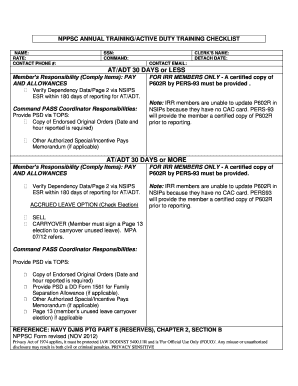
Get Nppsc 1571/1 2012
How it works
-

Open form follow the instructions
-

Easily sign the form with your finger
-

Send filled & signed form or save
How to fill out the NPPSC 1571/1 online
Filling out the NPPSC 1571/1 form online can be a straightforward process if you follow a few key steps. This guide is designed to provide you with clear instructions to ensure you complete the form accurately and efficiently.
Follow the steps to successfully complete the NPPSC 1571/1 form online.
- Press the ‘Get Form’ button to obtain the NPPSC 1571/1 and open it for editing.
- Fill in your name in the designated field at the top of the form.
- Enter your rate in the following field, ensuring it accurately represents your current classification.
- Provide your contact phone number to enable communication regarding your form.
- Include the clerk’s name responsible for processing your information.
- Indicate your detachment date to record your service timeframe.
- Enter your Social Security Number (SSN) in the specified section.
- Provide the name of your command as necessary for identification.
- Input your contact email address for official correspondence.
- For members with 30 days or less of active duty training, verify your dependency data through NSIPS ESR within 180 days of reporting.
- Ensure that the Command PASS Coordinator submits a copy of the endorsed original orders, noting the date and hour you reported.
- If you are an IRR member, include a certified copy of P602R issued by PERS-93, as they cannot update NSIPS.
- Select the accrued leave option by checking either 'Sell' or 'Carryover,' making sure to sign a Page 13 election if you choose to carry over leave.
- For members with 30 days or more of active duty, also check the necessary compliance items and ensure all documentation is complete.
- Review all entries for accuracy to prevent any delays in processing.
- Once completed, save the changes, and consider downloading, printing, or sharing the form as needed.
Complete your NPPSC 1571/1 form online today for a smoother process.
Get form
Experience a faster way to fill out and sign forms on the web. Access the most extensive library of templates available.
Get This Form Now!
Use professional pre-built templates to fill in and sign documents online faster. Get access to thousands of forms.