Loading
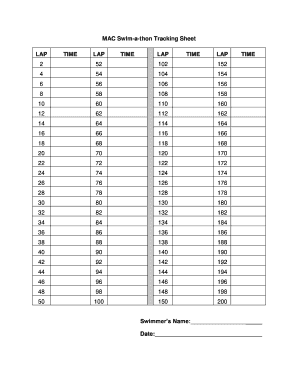
Get Mac Swim-a-thon Tracking Sheet
How it works
-

Open form follow the instructions
-

Easily sign the form with your finger
-

Send filled & signed form or save
How to fill out the MAC Swim-a-thon Tracking Sheet online
The MAC Swim-a-thon Tracking Sheet is an essential tool for tracking swim laps and their corresponding times during a swim-a-thon event. This guide provides a clear and detailed approach to filling out the form online, ensuring accurate record-keeping for all participants.
Follow the steps to complete the MAC Swim-a-thon Tracking Sheet with ease.
- Press the ‘Get Form’ button to access the MAC Swim-a-thon Tracking Sheet and open it in your preferred editor.
- In the designated field, input the swimmer’s name to identify the participant taking part in the swim-a-thon.
- Next, enter the date of the swim-a-thon in the provided field. This should reflect the correct date of the event for accurate tracking.
- The tracking sheet features multiple sections for laps and corresponding times. Begin entering lap numbers in the 'LAP' columns, followed by the recorded time for each lap in the 'TIME' columns. Make sure to fill in all relevant data as accurately as possible.
- Continue filling out each lap and its corresponding time until all your swim times have been documented.
- After completing all the required fields, you can save your changes, download a copy of the form, print it for physical records, or share it with relevant parties.
Start completing your MAC Swim-a-thon Tracking Sheet online today!
The distance of a Swimathon can range widely, but participants often swim between 1 and 10 kilometers. This variety allows swimmers of different levels to participate according to their capabilities. To effectively track individual distances and performance, the MAC Swim-a-thon Tracking Sheet is a valuable resource, making planning and execution simpler for organizers and participants.