Loading
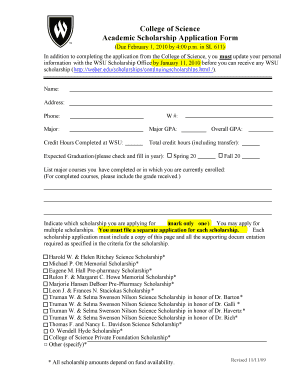
Get Credit Hours Completed At Wsu
How it works
-

Open form follow the instructions
-

Easily sign the form with your finger
-

Send filled & signed form or save
How to fill out the Credit Hours Completed At WSU online
Filling out the Credit Hours Completed At WSU form is an essential step for students seeking to track their academic progress. This guide will provide you with a clear and supportive roadmap to complete the form accurately and efficiently.
Follow the steps to successfully complete your form
- Press the ‘Get Form’ button to access the document and open it in your preferred editing tool.
- Begin by entering your personal information, which typically includes your name, address, and phone number. This ensures that your application is correctly associated with your identity.
- Next, fill in your W number, which is important for identification within the WSU system.
- Indicate your major and include your major GPA. This information helps determine your eligibility for specific scholarships.
- In the section titled 'Credit Hours Completed at WSU', input the total credit hours you have completed at Weber State University.
- Provide the total number of credit hours, including any transfer credits, to give a comprehensive view of your academic record.
- Fill in your overall GPA, which is crucial for evaluating your academic performance.
- Select your expected graduation term by checking the appropriate option, either Spring or Fall of the designated year.
- List major courses you have completed or are currently enrolled in, including any grades received for completed courses. This section showcases your academic engagement.
- Indicate which scholarship you are applying for by marking only one option. Remember that you may apply for multiple scholarships but must file a separate application for each one.
- Attach any required supporting documentation as specified in each scholarship's criteria to ensure a complete application.
- Once you have filled out all relevant sections and attached supporting documents, you can save your changes, download the form, or print it for submission.
Complete your application online today to ensure you meet all scholarship deadlines.
Look for your cumulative GPA on the last page of your transcript. At the very bottom of your transcript, you should see a section titled "Undergraduate Career Totals." In this section you can see your overall GPA and how many credit hours you attempted and earned over your entire undergraduate career.
Industry-leading security and compliance
US Legal Forms protects your data by complying with industry-specific security standards.
-
In businnes since 199725+ years providing professional legal documents.
-
Accredited businessGuarantees that a business meets BBB accreditation standards in the US and Canada.
-
Secured by BraintreeValidated Level 1 PCI DSS compliant payment gateway that accepts most major credit and debit card brands from across the globe.