Loading
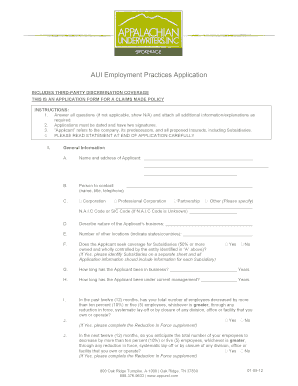
Get Aui Employee Practice App
How it works
-

Open form follow the instructions
-

Easily sign the form with your finger
-

Send filled & signed form or save
How to fill out the AUI Employee Practice App online
This guide offers clear instructions for users on how to effectively complete the AUI Employee Practice App online. It ensures that all required information is accurately provided, helping to facilitate the submission process.
Follow the steps to complete the application form online.
- Press the ‘Get Form’ button to access the form and open it in the editor.
- In the 'General Information' section, enter the name and address of the applicant. Provide the name of a contact person, including their title and telephone number.
- Identify the type of entity by selecting options such as Corporation, Professional Corporation, Partnership, or other. If applicable, specify the N.A.I.C code or SIC code.
- Describe the nature of the applicant's business and indicate the number of other locations in various states or countries.
- If applicable, indicate whether coverage for subsidiaries is sought and provide specific details on a separate sheet.
- Indicate how long the applicant has been in business and under current management.
- Respond to questions regarding employee reductions within the last twelve months and any anticipated decreases in the next twelve months by selecting 'Yes' or 'No'. If 'Yes', complete the Reduction In Force supplement.
- Fill in the financial information, including the applicant's total assets and gross revenues, as well as net income or loss and cash flow.
- Provide details about any wrongful employment practice claims made in the last five years and indicate if any circumstances could lead to a potential claim.
- Complete the sections pertaining to employees, including the number of employees, salary ranges, and details about full-time and part-time employees.
- Answer the questions related to the applicant's human resources practices, such as the existence of a personnel department, employee handbook, and training on discrimination.
- Review the third-party information section and respond to inquiries about customer complaints and ADA compliance.
- At the end of the form, ensure both required signatures are provided, alongside the date.
- After completing the form, you can save changes, download, print, or share the form as needed.
Complete your application online to ensure prompt processing.
Industry-leading security and compliance
US Legal Forms protects your data by complying with industry-specific security standards.
-
In businnes since 199725+ years providing professional legal documents.
-
Accredited businessGuarantees that a business meets BBB accreditation standards in the US and Canada.
-
Secured by BraintreeValidated Level 1 PCI DSS compliant payment gateway that accepts most major credit and debit card brands from across the globe.