We use cookies to improve security, personalize the user experience, enhance our marketing activities (including cooperating with our marketing partners) and for other business use.
Click "here" to read our Cookie Policy. By clicking "Accept" you agree to the use of cookies. Read less
Read more
Accept
Loading
Form preview
  • US Legal Forms
  • Form Library
  • More Forms
  • More Multi-State Forms
  • Download Required Form - Wake Forest University - Wfu

Get Download Required Form - Wake Forest University - Wfu

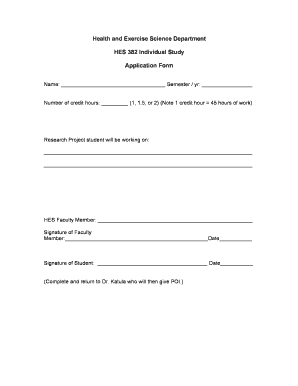
Faculty member in several aspects of the research process which may include data collection, intervention, data entry, analysis, literature review, etc. (as determined by the faculty member) Registration: Students are not able to pre-register for this course. Students are expected to add the course during the add period at the beginning of the semester. Students are responsible for contacting an HES faculty member and developing a plan for the individual study experience. The student and facult.

How it works

  1. Open form

    Open form follow the instructions

  2. Easily sign form

    Easily sign the form with your finger

  3. Share form

    Send filled & signed form or save

How to fill out the Download Required Form - Wake Forest University - Wfu online

Filling out the Download Required Form for individual study at Wake Forest University is a straightforward process that allows students to collaborate closely with faculty members. This guide provides step-by-step instructions to ensure you complete the form accurately and efficiently.

Follow the steps to successfully fill out the Download Required Form.

  1. Click ‘Get Form’ button to access the required form and open it in the designated tool.
  2. Enter your name in the designated field at the top of the form. Be sure to provide accurate information as this identifies you as the student applying for the individual study.
  3. Fill in the semester and year you are applying for in the corresponding field. This is important for record-keeping and to ensure you are enrolling in the correct term.
  4. Indicate the number of credit hours you wish to register for in the credit hours section. Choose either 1, 1.5, or 2, remembering that each credit hour corresponds to 45 hours of work.
  5. Describe the research project you will be working on in the provided space. Include sufficient detail so that the faculty member can understand your intended focus of study.
  6. Enter the name of your HES faculty member who will be overseeing your project in the designated field.
  7. The faculty member must sign the form in the corresponding section to give their official approval.
  8. Sign the form yourself and date it to finalize your application before submission.
  9. Submit the completed form to Dr. Katula. Upon submission, Dr. Katula will provide you with a POI number or slip necessary for registration.
  10. Once all steps are completed, save the changes to your document and ensure you have the option to download, print, or share the form as needed.

Complete the Download Required Form online today to ensure your participation in the individual study program.

Get form

Experience a faster way to fill out and sign forms on the web. Access the most extensive library of templates available.
Get form

Related content

Wake Forest University
WFU School of Medicine. Institutional Review Board ... download and install the iPlum app...
Learn more
Forms - Deacon Health - Wake Forest University
Upload your completed form to your Deacon Health Portal or email deaconhealth@wfu.edu...
Learn more
BDWM
WFU: Wake Forest University (NC). 29. WM: College of William and Mary (VA). 30 ... of...
Learn more

Related links form

Gldd Pagcor 3d Cell Model Project Rubric The Lazy Editor The Curse Of The Hope Diamond Answer Key Scholarship Application Form - JSA

Questions & Answers

Get answers to your most pressing questions about US Legal Forms API.

Contact support

Wake Forest University's ranking in the 2024 edition of Best Colleges is National Universities, #47. Its tuition and fees are $64,758.

Early Action showed a 73-percent acceptance rate, versus 64 percent for regular applications. In announcing its nonbinding early-action option, Wake Forest said it lowered barriers that first-generation students encounter in navigating admissions decisions.

Wake Forest ranks the following five categories as being “very important” to the admissions process: rigor of secondary school record, class rank, GPA, application essays, and character/personal qualities. Recommendations, an interview, extracurricular activities, and talent/ability are rated as “important.”

Wake Forest University supports the decision of students not to use alcohol and other drugs. The University observes all applicable federal, state, and local laws regarding alcohol and other drug use and holds students and student organizations accountable for their choices.

Take advanced-level courses. While there is no official Wake Forest GPA requirement, aim for a Wake Forest GPA of above 3.9. Also, plan to take AP and IB courses. Think about your academic strengths and choose courses that will play to them.

The acceptance rate at Wake Forest is 21.4%. In other words, of 100 students who apply, 21 are admitted. This means the school is quite selective.

Wake Forest also requires an additional Teacher Recommendation Form. This should be completed by a teacher who has been your instructor in an academic subject, preferably from junior or senior year. The writer should send the form directly to the Office of Undergraduate Admissions.

Is Wake Forest University or University of North Carolina at Chapel Hill (UNC) Harder to get into? Which school is easier to get into? If you're looking at acceptance rate alone, then Wake Forest University is more difficult to get into.

Get This Form Now!

Use professional pre-built templates to fill in and sign documents online faster. Get access to thousands of forms.
Get form
If you believe that this page should be taken down, please follow our DMCA take down processhere.

Industry-leading security and compliance

US Legal Forms protects your data by complying with industry-specific security standards.
  • In businnes since 1997
    25+ years providing professional legal documents.
  • Accredited business
    Guarantees that a business meets BBB accreditation standards in the US and Canada.
  • Secured by Braintree
    Validated Level 1 PCI DSS compliant payment gateway that accepts most major credit and debit card brands from across the globe.
Get Download Required Form - Wake Forest University - Wfu
Get form
Form Packages
Adoption
Bankruptcy
Contractors
Divorce
Home Sales
Employment
Identity Theft
Incorporation
Landlord Tenant
Living Trust
Name Change
Personal Planning
Small Business
Wills & Estates
Packages A-Z
Form Categories
Affidavits
Bankruptcy
Bill of Sale
Corporate - LLC
Divorce
Employment
Identity Theft
Internet Technology
Landlord Tenant
Living Wills
Name Change
Power of Attorney
Real Estate
Small Estates
Wills
All Forms
Forms A-Z
Form Library
Customer Service
Terms of Service
Privacy Notice
Legal Hub
Content Takedown Policy
Bug Bounty Program
About Us
Help Portal
Legal Resources
Blog
Affiliates
Contact Us
Delete My Account
Site Map
Industries
Forms in Spanish
Localized Forms
State-specific Forms
Forms Kit
Legal Guides
Real Estate Handbook
All Guides
Prepared for You
Notarize
Incorporation services
Our Customers
For Consumers
For Small Business
For Attorneys
Our Sites
US Legal Forms
USLegal
FormsPass
pdfFiller
signNow
airSlate WorkFlow
DocHub
Instapage
Social Media
Call us now toll free:
+1 833 426 79 33
As seen in:
  • USA Today logo picture
  • CBC News logo picture
  • LA Times logo picture
  • The Washington Post logo picture
  • AP logo picture
  • Forbes logo picture
© Copyright 1997-2025
airSlate Legal Forms, Inc.
3720 Flowood Dr, Flowood, Mississippi 39232
Form Packages
Adoption
Bankruptcy
Contractors
Divorce
Home Sales
Employment
Identity Theft
Incorporation
Landlord Tenant
Living Trust
Name Change
Personal Planning
Small Business
Wills & Estates
Packages A-Z
Form Categories
Affidavits
Bankruptcy
Bill of Sale
Corporate - LLC
Divorce
Employment
Identity Theft
Internet Technology
Landlord Tenant
Living Wills
Name Change
Power of Attorney
Real Estate
Small Estates
Wills
All Forms
Forms A-Z
Form Library
Customer Service
Terms of Service
Privacy Notice
Legal Hub
Content Takedown Policy
Bug Bounty Program
About Us
Help Portal
Legal Resources
Blog
Affiliates
Contact Us
Delete My Account
Site Map
Industries
Forms in Spanish
Localized Forms
State-specific Forms
Forms Kit
Legal Guides
Real Estate Handbook
All Guides
Prepared for You
Notarize
Incorporation services
Our Customers
For Consumers
For Small Business
For Attorneys
Our Sites
US Legal Forms
USLegal
FormsPass
pdfFiller
signNow
airSlate WorkFlow
DocHub
Instapage
Social Media
Call us now toll free:
+1 833 426 79 33
As seen in:
  • USA Today logo picture
  • CBC News logo picture
  • LA Times logo picture
  • The Washington Post logo picture
  • AP logo picture
  • Forbes logo picture
© Copyright 1997-2025
airSlate Legal Forms, Inc.
3720 Flowood Dr, Flowood, Mississippi 39232