Loading
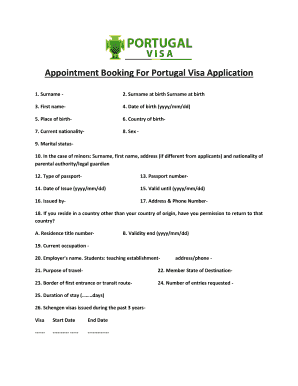
Get Uk Appointment Booking For Portugal Visa Application 2016-2026
How it works
-

Open form follow the instructions
-

Easily sign the form with your finger
-

Send filled & signed form or save
How to fill out the UK Appointment Booking For Portugal Visa Application online
This guide provides a clear and supportive overview of how to complete the UK Appointment Booking For Portugal Visa Application online. Following these steps will help ensure that all necessary information is accurately submitted, making the application process smoother.
Follow the steps to complete your application effectively.
- Click ‘Get Form’ button to obtain the form and open it in your browser.
- Enter your surname in the designated field. Ensure that you fill this section accurately as it appears in your passport.
- Provide your surname at birth in the appropriate field, if it differs from your current surname.
- Input your first name as it appears in your legal documents.
- Fill in your date of birth in the format yyyy/mm/dd.
- Specify your place of birth, including city and any relevant details.
- Indicate your country of birth from the dropdown menu.
- Select your current nationality from the list provided.
- Choose your sex from the available options.
- Select your marital status from the predefined choices.
- If applicable, provide the surname, first name, address (if different from your own), and nationality of your parental authority or legal guardian.
- Identify the type of passport you possess.
- Enter your passport number accurately as it is printed.
- Input the date your passport was issued in the format yyyy/mm/dd.
- Provide the validity end date of your passport in the same format.
- Mention the authority that issued your passport.
- Fill in your current address and phone number.
- If you reside in a country other than your country of origin, confirm if you have permission to return to that country. If yes, provide your residence title number and validity end date.
- Describe your current occupation.
- Enter the name of your employer or educational institution if you are a student, along with its address and phone number.
- State your purpose for travel.
- Indicate the member state of your destination.
- Specify the border you will be entering or your transit route.
- Select the number of entries requested for your visa.
- Provide the total duration of your stay, measured in days.
- Disclose any Schengen visas issued to you in the past three years alongside their start and end dates.
- Indicate if your fingerprints have been collected previously for a Schengen visa application.
- Specify your planned date of arrival in the Schengen area.
- Specify your planned date of departure from the Schengen area.
- Provide the name and surname of the person inviting you, or the hotel or temporary accommodation details, including their contact information.
- If applicable, provide the name and surname of the company or organization inviting you, along with their contact details.
- Indicate who will cover your travel expenses and subsistence during your stay.
- If relevant, fill in the personal data of your family member who is a citizen of the EU, EEA, or CH, including their surname, name, birth date, nationality, and passport number.
- Describe your family relationship with the EU, EEA, or CH citizen.
- Once all sections are completed, review your entries for accuracy, and then proceed to save your changes, download, print, or share the form as needed.
Complete your application form online today for a successful visa booking experience.
Visa appointment requests, or any other visa related communication, must be sent exclusively to the following e-mail: sconsular.islamabad@mne.pt.