Loading
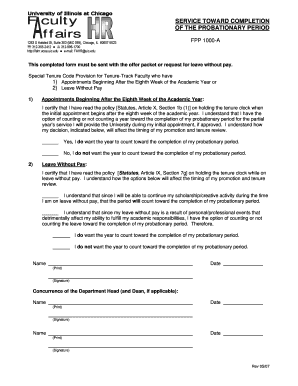
Get Service Toward Completion Of The Probationary Period
How it works
-

Open form follow the instructions
-

Easily sign the form with your finger
-

Send filled & signed form or save
How to fill out the Service Toward Completion Of The Probationary Period online
This guide provides clear instructions for users on how to accurately fill out the Service Toward Completion Of The Probationary Period form online. By following these steps, you can complete the necessary documentation with ease.
Follow the steps to successfully complete the form online.
- Click ‘Get Form’ button to access the form and open it in your preferred online editor.
- Begin by filling in your name in the designated area. Ensure that you print your name clearly for identification purposes.
- Next, select the appropriate option regarding your tenure clock if your appointment begins after the eighth week of the academic year. You can choose either 'Yes, I do want the year to count toward the completion of my probationary period' or 'No, I do not want the year to count toward the completion of my probationary period.'
- If applicable, indicate whether you are on leave without pay. Review the policy details carefully, and select one of the options that reflects your situation.
- Below the leave options, you will need to decide if you want the time on leave without pay to count toward your probationary period completion. Choose accordingly.
- Input the current date in the specified field and make sure you verify that it matches the submission date.
- Please sign the form where indicated, as a signature is essential for validation.
- If required, obtain the concurrence of the department head and dean (if applicable), including their names, signatures, and the dates they sign.
- Finally, save your changes, download a copy for your records, and print or share the completed form as needed.
Complete your documents online today for a smoother process.
Six Strategies for Passing Your Probation Make a Great First Impression. First impressions count. ... Measure Your Progress. First, read through your job description and the organization's probation policy thoroughly. ... Find Opportunities to Shine. ... Build a Network. ... Consider the Bigger Picture. ... Look After Yourself.
Industry-leading security and compliance
US Legal Forms protects your data by complying with industry-specific security standards.
-
In businnes since 199725+ years providing professional legal documents.
-
Accredited businessGuarantees that a business meets BBB accreditation standards in the US and Canada.
-
Secured by BraintreeValidated Level 1 PCI DSS compliant payment gateway that accepts most major credit and debit card brands from across the globe.