Loading
Get Registration Override - University Of Hawaii At Hilo
How it works
-

Open form follow the instructions
-

Easily sign the form with your finger
-

Send filled & signed form or save
How to fill out the REGISTRATION OVERRIDE - University Of Hawaii At Hilo online
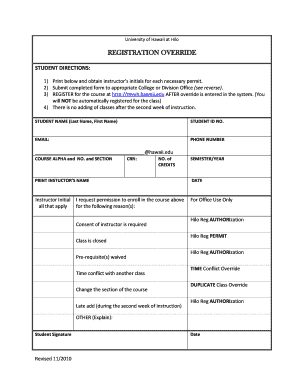
The REGISTRATION OVERRIDE form at the University of Hawaii at Hilo allows students to request permission to enroll in courses under specific circumstances. This guide will provide detailed steps on how to fill out the form correctly and efficiently, ensuring a smooth registration experience.
Follow the steps to successfully complete the REGISTRATION OVERRIDE form online.
- Click ‘Get Form’ button to obtain the form and open it in the editing interface.
- Fill in your student name, student ID number, email address, and phone number at the top of the form.
- Complete the course information section by entering the course alpha, course number, section, and CRN (Course Registration Number).
- Specify the number of credits for the course you are requesting an override for, along with the semester and year you intend to register.
- Print the instructor's name and date, then obtain their initials for each necessary permit required based on your request.
- Indicate the reason for your override request from the provided options, which may include consent of instructor, class closure, prerequisite waiver, time conflict, section change, or late addition.
- If applicable, provide further explanation in the 'OTHER' section for reasons not listed.
- Sign the form and include the date alongside your signature to finalize the document.
- Find the appropriate College or Division Office that corresponds to your course and submit the completed form there.
- After the override is entered into the system, remember to register for the course through the online registration system. Note that you will not be automatically enrolled.
Complete your REGISTRATION OVERRIDE form online today for a seamless registration experience!
If you think you might not have received your official diploma and/or certificate, please contact our office at (808) 932-7447, email uhhro@hawaii.edu, or stop by the Student Services Center, Room 101 with a photo ID and we will be happy to assist you.
Industry-leading security and compliance
US Legal Forms protects your data by complying with industry-specific security standards.
-
In businnes since 199725+ years providing professional legal documents.
-
Accredited businessGuarantees that a business meets BBB accreditation standards in the US and Canada.
-
Secured by BraintreeValidated Level 1 PCI DSS compliant payment gateway that accepts most major credit and debit card brands from across the globe.