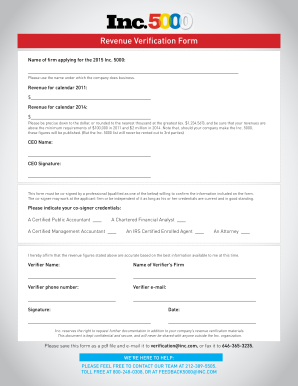
Get Inc.5000 Europe Revenue Verification Form 2015
How it works
-

Open form follow the instructions
-

Easily sign the form with your finger
-

Send filled & signed form or save
How to fill out the Inc.5000 Europe Revenue Verification Form online
Completing the Inc.5000 Europe Revenue Verification Form is a vital step in verifying your company's revenue for inclusion in the prestigious Inc.5000 list. This guide will provide you with detailed, step-by-step instructions on how to accurately fill out the form online, ensuring that all necessary information is correctly submitted.
Follow the steps to accurately complete your revenue verification form.
- Click ‘Get Form’ button to obtain the form and open it in the editor.
- Enter the name of the firm applying for the 2015 Inc. 5000 in the designated field. Make sure to use the name under which the company conducts business.
- Input your company's revenue for calendar year 2011 in the corresponding field. Ensure that the amount is precise down to the dollar or rounded to the nearest thousand, adhering to the minimum requirement of $100,000.
- Fill in your company's revenue for calendar year 2014. This should also be accurate to the dollar or rounded to the nearest thousand, fulfilling the minimum requirement of $2 million.
- Provide the CEO's name in the specified section.
- The CEO must sign the form in the designated signature field.
- Identify a qualified co-signer who can confirm the information provided. This individual can be from your firm or an independent professional, provided their credentials are current.
- Select the appropriate credential for the co-signer from the list provided, such as Certified Public Accountant or Attorney.
- Include the verifier's name and the name of their firm in the respective fields.
- Enter the verifier's phone number and email address accurately to ensure effective communication.
- The verifier must sign and date the form in the allotted sections.
- After completing all fields, review the form for accuracy and completeness. Save the document as a PDF file for submission.
- Email the completed form to verification@inc.com, or alternatively, fax it to 646-365-3235.
Take the first step towards recognition—fill out your form online today!
Get form
Related links form
Inc. 5000 verifies revenue by collecting and evaluating financial documents submitted via the Inc.5000 Europe Revenue Verification Form. This process involves assessing tax returns and annual financial statements to confirm growth rates and revenue accuracy. Employing reliable platforms such as US Legal Forms can help streamline document preparation.