Loading
Get Usda Individual Employee Training Verification Form 2019-2026
How it works
-

Open form follow the instructions
-

Easily sign the form with your finger
-

Send filled & signed form or save
How to fill out the USDA Individual Employee Training Verification Form online
Filling out the USDA Individual Employee Training Verification Form is a crucial process for ensuring that employees meet the necessary qualifications for their roles. This guide provides you with clear, step-by-step instructions on how to complete this form online efficiently.
Follow the steps to complete the form accurately and efficiently.
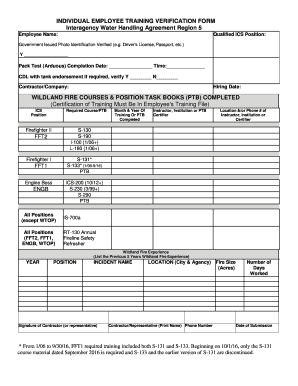
- Click ‘Get Form’ button to obtain the form and open it in the editor.
- Begin by entering the employee name in the designated field. Ensure that the name matches the official documentation for accurate identification.
- Indicate the qualified ICS position next to the employee name. This field specifies the individual's current position within the Incident Command System.
- Verify government issued photo identification by selecting ‘Y’ for yes next to the verification statement. This confirms that the required identification has been reviewed.
- Complete the Pack Test (Arduous) section by filling in the completion date and time. This is essential for confirming physical fitness for strenuous tasks.
- Check the box for CDL with tank endorsement if applicable, marking ‘Y’ for yes or ‘N’ for no to provide clarity on the individual's driving qualifications.
- Gather and enter the contractor or company name where the individual is employed.
- Record the hiring date in the corresponding field to document employment duration.
- Fill in the section for wildland fire courses and position task books completed. Record the required course or PTB, month and year completed, instructor or institution name, and the location or phone number of the instructor or certifier.
- List the previous five years of wildland fire experience in the designated table. Include the year, position held, incident name, and the fire size in acres.
- Obtain the signature of the contractor or representative in the appropriate section, and print their name and phone number for verification.
- Finally, enter the date of submission at the bottom of the form to ensure a complete record.
- Once all fields are completed, save your changes, and choose to download, print, or share the form as necessary for your records.
Get started by filling out your USDA Individual Employee Training Verification Form online today.