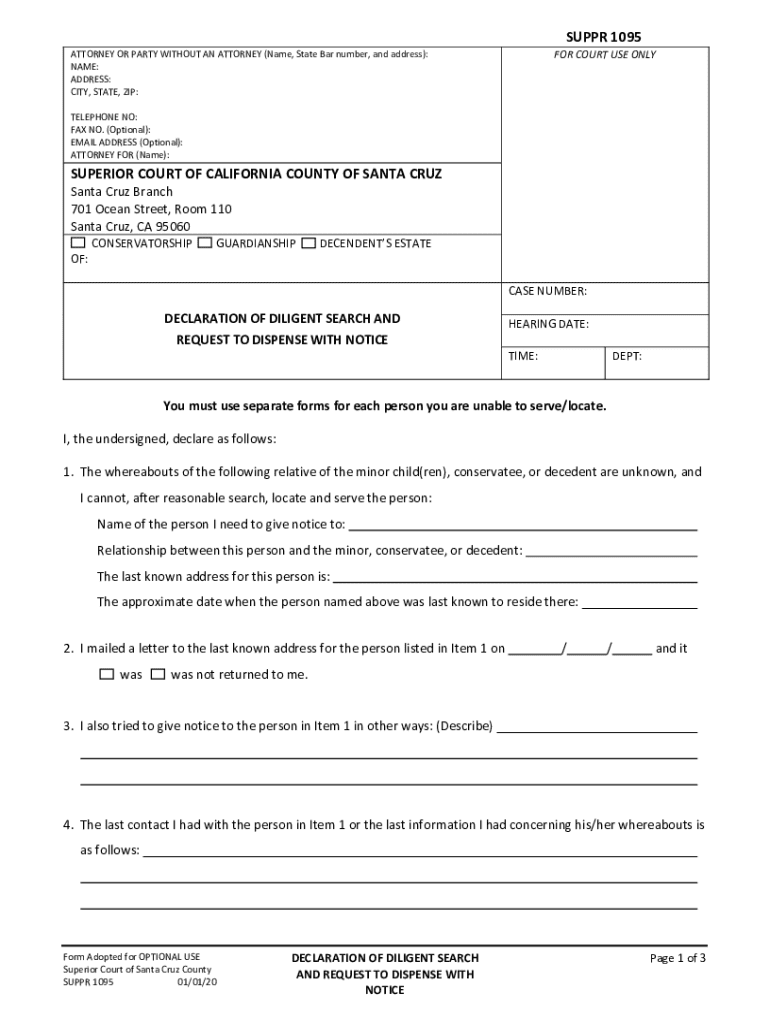
SUPER 1095ATTORNEY OR PARTY WITHOUT AN ATTORNEY (Name, State Bar number, and address): NAME: ADDRESS: CITY, STATE, ZIP:FOR COURT USE ONLYTELEPHONE NO: FAX NO. (Optional): EMAIL ADDRESS (Optional): ATTORNEY.

Open form follow the instructions

Easily sign the form with your finger

Send filled & signed form or save
How to fill out the CA SUPCV 1095 online
The CA SUPCV 1095 form is designed for individuals seeking to declare a diligent search and request to dispense with notice in conservatorship, guardianship, or decedent's estate matters. This guide provides clear, step-by-step instructions to assist users in completing the form accurately and efficiently online.
Follow the steps to fill out the CA SUPCV 1095 online.
- Press the ‘Get Form’ button to access the CA SUPCV 1095 form and open it in your preferred online editor.
- Enter your information in the 'Attorney or Party Without an Attorney' section. Include your name, State Bar number, and address, ensuring that the details are accurate.
- For court use only, provide your telephone number, optional fax number, and email address. If applicable, note the name of the person you are representing in the 'Attorney For' section.
- Indicate the specific nature of the case (conservatorship, guardianship, or decedent's estate) and enter the case number as provided by the court.
- Fill in the hearing date, time, and department number where the case will be heard, if known.
- In the declaration section, provide the name and relationship of the individual you have been unable to serve or locate. Include their last known address and the approximate date they were last known to reside there.
- Document your attempts to notify the individual in Item 1, including the date you mailed a letter to their last known address and any additional methods of contact you used.
- Record all relevant searches you conducted, including inquiries made with friends, relatives, employers, or through phone directories and the Internet.
- Detail any contact with criminal justice agencies to aid in your search and summarize the information acquired.
- Complete the declaration by providing any other relevant information, affirming your efforts, and signing the document. Be sure to include the date and city where you executed the form.
- You can then save your changes, download a copy of the filled-out form, print it, or share it as needed.
Start filling out the CA SUPCV 1095 form online today for efficient document management.
Experience a faster way to fill out and sign forms on the web. Access the most extensive library of templates available.
Related content
SUPPR-1095, DECLARATION OF DILIGENT SEARCH AND REQUEST TO DISPENSE WITH NOTICE, 1/20...
Jul 1, 2023 — Notice is governed by California Rules of Court 3.1203 et. seq. A...
Jul 1, 2023 — Electronic filing is required for civil, family, probate, LPS, appellate...
Get answers to your most pressing questions about US Legal Forms API.
Is a 1095 CA credit or deduction?
Use Form 1095-C to help determine your eligibility for the premium tax credit. If you enrolled in a health plan in the Marketplace, you may need the information in Part II of Form 1095-C to help determine your eligibility for the premium tax credit.
How do I access my 1095-A from Covered California?
If a consumer's communication preference is mail, they will receive their IRS Form 1095-A in the mail. All consumers can access their IRS Form 1095-A in their CalHEERS account “home page,” or under "Documents & Correspondence,” even if their preference is mail.
Does Medi-Cal send a 1095-A?
Form 1095-A –Individuals who enroll in health insurance through Covered California or the Federal Marketplace will get this form. Form 1095-B –Individuals who enroll in health insurance through Medi-Cal, Medicare, and other insurance companies or coverage providers will receive this form.
What happens if I didn't receive my 1095-A?
Q: What should I do if I don't receive a Form 1095-A? If you purchased coverage through the Marketplace and you have not received your Form 1095-A, you should contact the Marketplace from which you received coverage. You should wait to receive your Form 1095-A before filing your taxes.
Do you need a 1095-C to file taxes in California?
You will not need to attach your forms to your tax return or send it to the IRS. Do I need my Form 1095-B or 1095-C to file my taxes? No. Individuals do not need a copy of their 1095-B or 1095-C when filing tax returns.
How do I get a copy of my 1095-A form from Covered California?
If you need a digital copy Log in to your account at CoveredCA.com. On the homepage, click “View {Tax year} Federal Tax Form 1095-A.” To create an online account, follow the instructions at CoveredCA.com/create-account.
How do I find my 1095-A online?
Log into your Marketplace account. Under My Applications & Coverage, select your 2023 application — not your 2024 application. Select Tax forms from the menu on the left. Under Your Forms 1095-A for Tax Filing, click Download [PDF], and follow these steps based on your browser: How to find your Form 1095-A online.
What do I do if I didn't receive my 1095-A?
If you have not received your Form 1095-A or you received an incorrect 1095-A, you should contact the Marketplace from which you received coverage. If you receive a corrected or voided Form 1095-A, you may need to amend your return.
How do I get a copy of my 1095-A in California?
If a consumer's communication preference is mail, they will receive their IRS Form 1095-A in the mail. All consumers can access their IRS Form 1095-A in their CalHEERS account “home page,” or under "Documents & Correspondence,” even if their preference is mail.
Who sends 1095-a form?
By Jan. 31 of each year, Covered California sends the federal IRS form 1095-A Health Insurance Marketplace statement to members. This form is used to: Provide information for your federal taxes.
Use professional pre-built templates to fill in and sign documents online faster. Get access to thousands of forms.
If you believe that this page should be taken down, please follow our DMCA take down process here.