Loading
Get Hr Hzmo Tiskanica 1.7
How it works
-

Open form follow the instructions
-

Easily sign the form with your finger
-

Send filled & signed form or save
How to fill out the HR HZMO Tiskanica 1.7 online
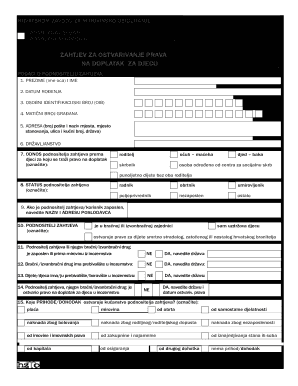
Filling out the HR HZMO Tiskanica 1.7 form is a key step in applying for child allowances. This guide provides clear instructions to help users navigate the online form effectively.
Follow the steps to complete your application successfully.
- Click ‘Get Form’ button to obtain the HR HZMO Tiskanica 1.7 and open it in the editor.
- Fill in the applicant's personal details in the 'Podaci o podnosiocu zahtjeva' section. This includes surname, first name, date of birth, personal identification number (OIB), residency address, nationality, and relationship to the child for whom the allowance is being requested.
- Indicate the applicant's status by selecting one of the options provided such as worker, self-employed, retired, unemployed, etc. Be sure to provide the employer's name and address if employed.
- Specify if the applicant or their partner is employed or receiving a pension from abroad, and fill in related details as necessary.
- Provide information on the children for whom the allowance is requested, including their names, addresses, identification numbers, and relationship to the applicant.
- If applicable, fill details regarding children without one or both parents. Select from the provided options to indicate the status of the absent parent(s).
- List any additional household members living with the applicant, including their names, relationship to the applicant, identification numbers, and income types.
- Attach documentation of the applicant’s bank account for the disbursement of the allowance. Complete the 'authorization/consent' form if this is the first request or if changing the payment bank.
- Confirm the accuracy of the information provided by signing and dating the form. Ensure to provide contact details such as phone number and email address.
- At the final step, you can save changes, download, print, or share the form electronically as needed.
Complete your HR HZMO Tiskanica 1.7 application online today!