Loading
Get Old Main Room 101
How it works
-

Open form follow the instructions
-

Easily sign the form with your finger
-

Send filled & signed form or save
How to fill out the Old Main Room 101 online
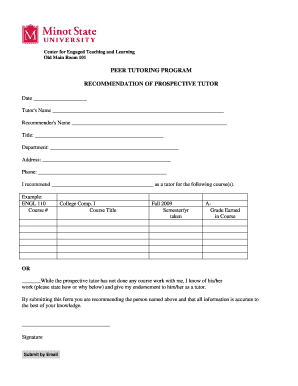
This guide provides clear and supportive instructions on filling out the Old Main Room 101 recommendation form for prospective tutors. Whether you are familiar with online forms or not, this step-by-step approach ensures a smooth completion process.
Follow the steps to complete the Old Main Room 101 form online.
- Click the ‘Get Form’ button to access the recommendation form. This action provides you with the required document in an editable format.
- Begin by entering the date at the top of the form. Make sure to provide the current date for accurate documentation.
- Fill in the tutor's name in the designated field. Ensure the spelling is correct, as this will be essential for identification.
- Next, input your name as the recommender. This step is critical for transparency and credibility, so please confirm that your name is accurately recorded.
- Provide your title and department in the corresponding sections. This information helps to establish your qualifications as a recommender.
- Complete the address and phone fields. This contact information may be necessary for follow-up or verification purposes.
- In the section where you recommend the tutor, list the specific course(s) for which you are endorsing them. Include both course numbers and titles to ensure clarity.
- If applicable, indicate the semester and year the prospective tutor took the course, along with the grade earned. This information adds context to your recommendation.
- If you do not have direct coursework experience with the prospective tutor, provide a brief explanation of how you know their work and express your endorsement in the designated space.
- Lastly, sign the form electronically where indicated. Your signature symbolizes your endorsement and confirms the accuracy of the provided information.
- Once you have completed the form, review all entries for accuracy. You can then save your changes, download the document, print a copy, or share it as required.
Complete your recommendation form online today to support prospective tutors in their educational journeys.
Making a reservation Current UTA students, faculty, and staff may reserve group study rooms with a valid UTA NetID (reserve now). A person may reserve a study room in 30-minute increments up to a maximum of 3 hours per individual per day. Reservations can be made up to 14 days in advance.
Industry-leading security and compliance
US Legal Forms protects your data by complying with industry-specific security standards.
-
In businnes since 199725+ years providing professional legal documents.
-
Accredited businessGuarantees that a business meets BBB accreditation standards in the US and Canada.
-
Secured by BraintreeValidated Level 1 PCI DSS compliant payment gateway that accepts most major credit and debit card brands from across the globe.