Loading
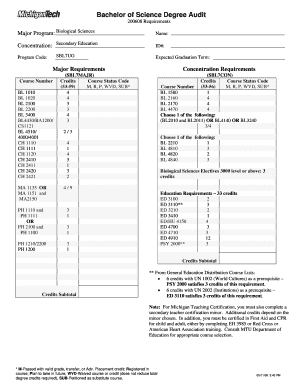
Get Bl 4510/ - Mtu
How it works
-

Open form follow the instructions
-

Easily sign the form with your finger
-

Send filled & signed form or save
How to fill out the BL 4510/ - Mtu online
Filling out the BL 4510/ - Mtu form online is a crucial step for many users pursuing their academic goals. This guide provides clear, step-by-step instructions to help you navigate the process efficiently and effectively.
Follow the steps to successfully complete the BL 4510/ - Mtu online
- Click the ‘Get Form’ button to access the form and open it in your preferred online editor.
- Begin by entering your personal information in the relevant fields, including your name and identification number (ID#). Ensure that all entries are accurate to facilitate smooth processing.
- Next, input your major program and concentration details. For this form, select 'Biological Sciences' as your major and indicate 'Secondary Education' as your concentration.
- Review the major requirements section and fill in the course status codes for each course number. Use the following codes: M for passed, R for registered, P for plan to take, WVD for waived courses, and SUB for petitioned substitute courses.
- Proceed to the concentration requirements section. Again, enter the course status codes for each listed course number following the same format.
- Complete the education requirements section, providing the course status codes for all courses listed.
- Fill in any additional fields related to general education requirements, free electives, and teaching certifications as applicable.
- Once all sections are completed and accurately filled out, review the form carefully to ensure completeness and correctness.
- Finally, save your changes, and you may download, print, or share the completed form as required.
Start filling out the BL 4510/ - Mtu form online today to take the next step in your educational journey.
Industry-leading security and compliance
US Legal Forms protects your data by complying with industry-specific security standards.
-
In businnes since 199725+ years providing professional legal documents.
-
Accredited businessGuarantees that a business meets BBB accreditation standards in the US and Canada.
-
Secured by BraintreeValidated Level 1 PCI DSS compliant payment gateway that accepts most major credit and debit card brands from across the globe.