Loading
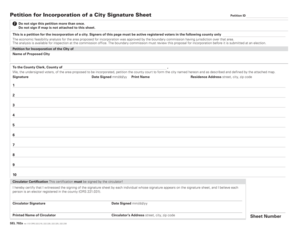
Get Or Sel 702a 2012-2026
How it works
-

Open form follow the instructions
-

Easily sign the form with your finger
-

Send filled & signed form or save
How to use or fill out the OR SEL 702a online
The OR SEL 702a form is an essential document for individuals interested in petitioning for the incorporation of a new city. This guide provides a comprehensive overview of how to fill out the form online, ensuring you meet all necessary requirements.
Follow the steps to complete the OR SEL 702a form.
- Press the ‘Get Form’ button to obtain the OR SEL 702a form and open it in your preferred editor.
- In the 'Petition ID' section, leave the field blank or enter the identifier if one is provided, as this can be used for tracking purposes.
- Ensure that the petition is signed only once by each voter. Individuals should not sign if a map is not attached to this sheet.
- In the section titled 'Petition for Incorporation of the City of', write the name of the proposed city clearly in the designated space.
- This petition requires that all signers are active registered voters in the county mentioned. Confirm your voter registration status before proceeding.
- Each signer must provide their signature, date signed (formatted as mm/dd/yy), printed name, and residence address (including street, city, and zip code) in the appropriate fields.
- Collect no more than ten signatures per sheet. Make sure to verify that each person who signs is registered in the county.
- The 'Circulator Certification' section must be completed by the circulator. They should certify they witnessed each signature and believe each signer is registered.
- The circulator must sign their name, date signed (mm/dd/yy), printed name, and address (street, city, zip code) in the designated fields.
- After ensuring all information is accurate and complete, save your changes. You can then download, print, or share the OR SEL 702a form as needed.
Complete your documents online today to ensure a smooth petition process.