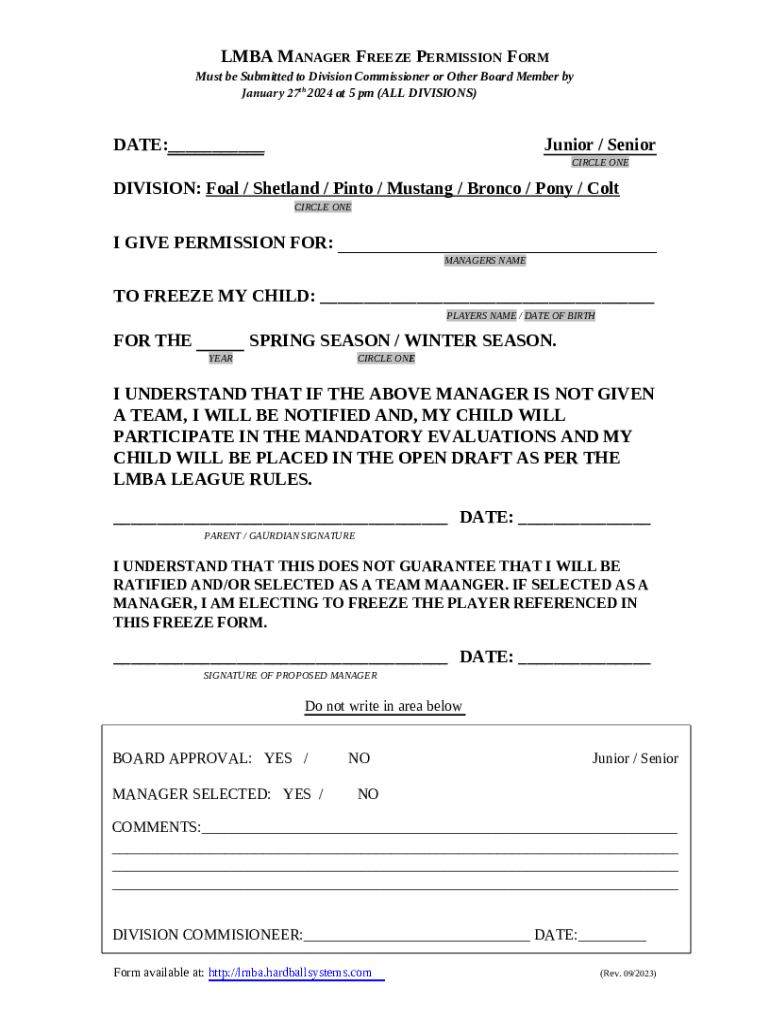
LMBA MANAGER FREEZE PERMISSION FORM Must be Submitted to Division Commissioner or Other Board Member by January 27th 2024 at 5 pm (ALL DIVISIONS)DATE: Junior / Senior CIRCLE ONEDIVISION: Foal /.
Loading

Open form follow the instructions

Easily sign the form with your finger

Send filled & signed form or save
How to fill out the CA LMBA Manager Freeze Permission Form online
Filling out the CA LMBA Manager Freeze Permission Form online is a straightforward process. This guide will provide you with detailed instructions to ensure your form is completed accurately and submitted on time.
Follow the steps to complete the form online
- Click ‘Get Form’ button to access the form and open it in your chosen online platform.
- Enter the date in the specified field to document when the form is being filled out.
- Select whether your child is a Junior or Senior by circling the appropriate option.
- Choose the division by circling one of the options: Foal, Shetland, Pinto, Mustang, Bronco, Pony, or Colt.
- In the section labeled 'I give permission for:', input the manager's name who you are granting permission to for freezing your child.
- Fill in your child's name and date of birth in the designated area.
- Indicate the season for which you are freezing your child by circling either 'Spring Season' or 'Winter Season.'
- Acknowledge the understanding about team placement and mandatory evaluations by reading the statement provided. Sign and date in the area designated for the parent/guardian’s signature.
- The proposed manager must sign and date the form to acknowledge their understanding that they are not guaranteed to be selected as a team manager.
- Fill in the comments section if you have additional notes to add regarding the freeze permission.
- Once all sections are filled out, save your changes, and proceed to download, print, or share the completed form as needed.
Complete your CA LMBA Manager Freeze Permission Form online today to ensure your child's team placement!
Experience a faster way to fill out and sign forms on the web. Access the most extensive library of templates available.
Related content
Jan 1, 2024 — ... 2023. David Cheng, Staff Attorney. Hayley Goodson, Managing Attorney...
Jun 5, 2024 — Coordinates and supervise the daily administrative activities of the...
Jul 7, 2017 — Initial Release. • Accountability guidance awaiting NYS State Plan under...
Get answers to your most pressing questions about US Legal Forms API.
How do I put a freeze on all three credit bureaus?
Contact each of the three major credit bureaus — Equifax, Experian and TransUnion — individually to freeze your credit: Equifax: Call 800-349-9960 or go online. ... Experian: Go online to initiate, or for information call 888‑397‑3742. ... TransUnion: Call 888-909-8872 or go online.
Is freezing your credit a good idea?
A credit freeze may be one of the best, free ways to help protect you from identity thieves opening new accounts in your name. But there are other options as well: Credit lock: A credit lock is similar to a credit freeze, but it's often offered as a feature in a paid subscription program from a credit bureau.
How do I freeze users permissions in Salesforce?
Required Editions and User Permissions From Setup, enter Users in the Quick Find box, then select Users. Click the username of the account you want to freeze. Click Freeze to block access to the account or Unfreeze to allow access to the account again.
How much does a credit freeze cost?
A credit freeze is free and prevents lenders from checking your credit in order to open a new account.
What is the difference between freezing and locking your credit?
While credit lock vs. freeze might sound different, they function similarly: A credit freeze is a free service that stops new accounts from being opened, while a credit lock is a service from the credit bureaus that lets you lock and unlock your credit faster than a freeze.
How much does it cost to freeze your credit in California?
If you are not an identity theft victim and you are under 65 years of age, it will cost you $10 to place a freeze with each of the three credit bureaus. That's a total of $30 to freeze your files. If you are 65 years of age or older, placing the security freeze is free.
Use professional pre-built templates to fill in and sign documents online faster. Get access to thousands of forms.
If you believe that this page should be taken down, please follow our DMCA take down process here.