Loading
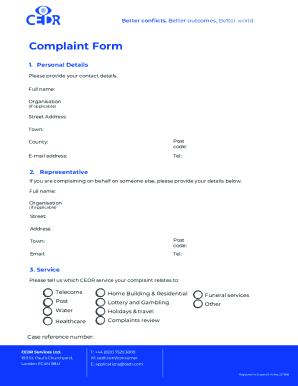
Get Uk Cedr Complaint Form 2020-2026
How it works
-

Open form follow the instructions
-

Easily sign the form with your finger
-

Send filled & signed form or save
How to fill out the UK CEDR Complaint Form online
Filing a complaint can be a daunting process, but completing the UK CEDR Complaint Form online is straightforward and user-friendly. This guide provides step-by-step instructions to ensure you accurately fill out the form and effectively communicate your concerns.
Follow the steps to complete the form successfully.
- Click ‘Get Form’ button to access the form and open it in your chosen editor.
- In the 'Personal Details' section, provide your full name, organization (if applicable), street address, town, county, postcode, email address, and telephone number. Ensure all information is accurate to facilitate communication.
- If you are submitting a complaint on behalf of someone else, fill out the 'Representative' section with your full name, organization (if applicable), street address, town, postcode, email, and telephone number.
- Indicate which CEDR service your complaint is related to by selecting one or more options from the list provided, such as telecoms, healthcare, or holidays and travel.
- In the 'Your complaint' section, clearly describe the nature of your complaint. You may continue on a separate page if necessary. Be concise and specific, but remember that decisions made by an adjudicator or arbitrator cannot be reviewed.
- Next, specify the desired outcome you hope to achieve from your complaint. This helps CEDR understand your expectations.
- Read through the declarations carefully and tick both boxes to confirm that you understand them before signing the form. This includes acknowledging the CEDR Complaints Procedure and confirming you have attempted to resolve the matter previously.
- Finally, print your name, provide your signature, and date the form. After completing all sections, submit your complaint either by post or email as specified at the end of the form.
Complete your UK CEDR Complaint Form online today for a prompt resolution to your concerns.
How to make a complaint. You can also telephone the government switchboard on 020 7035 4848. The switchboard handles calls for many departments and will try to put you through to the appropriate member of staff.