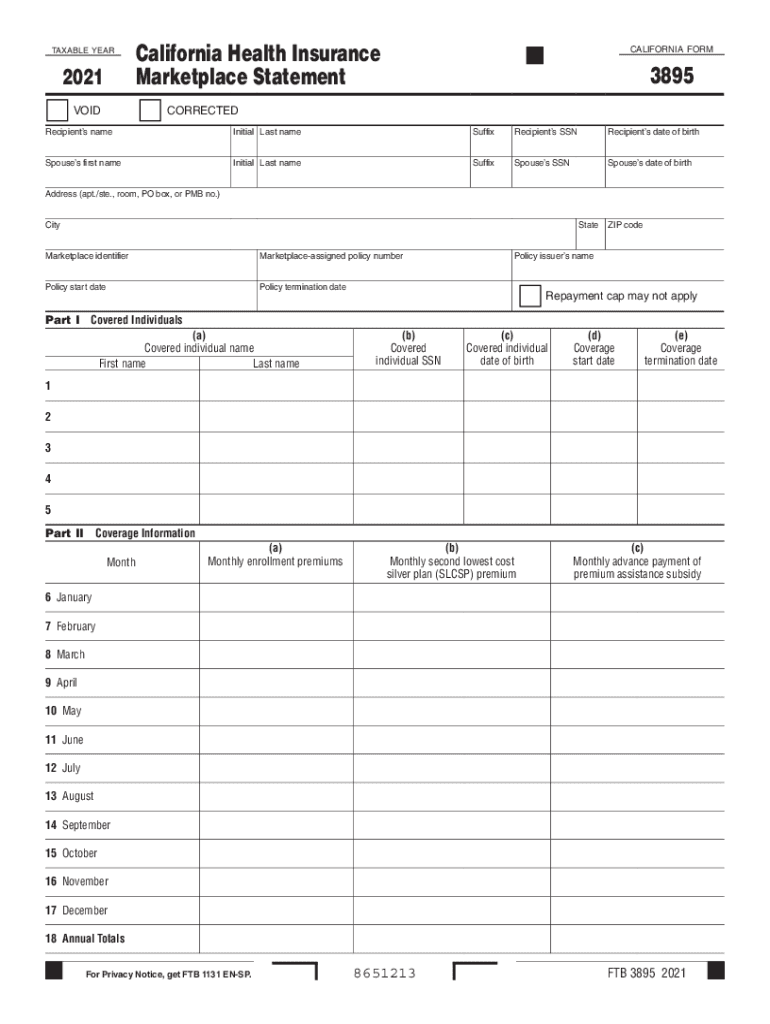
Of birth Spouse s first name Initial Last name Suffix Spouse s SSN Spouse s date of birth Address (apt./ste., room, PO box, or PMB no.) City State Marketplace identifier Marketplace-assigned policy number Policy start date Policy termination date ZIP code Policy issuer s name Repayment cap may not apply Part I Covered Individuals (a) Covered individual name First name Last name (b) Covered individual SSN (c) Covered individual date of birth (d) Coverage start date (e).
Loading

Open form follow the instructions

Easily sign the form with your finger

Send filled & signed form or save
How to fill out the CA FTB 3895 online
Filling out the CA FTB 3895 is essential for reporting health insurance coverage during the taxable year. This guide will provide you with step-by-step instructions to ensure the form is completed accurately and efficiently.
Follow the steps to fill out the CA FTB 3895 online.
- Click the ‘Get Form’ button to access the form and open it in your online editor.
- Begin by entering the recipient’s information. This includes the recipient’s name, social security number (SSN), and date of birth. Ensure all details are entered accurately in the corresponding fields.
- Next, input the spouse’s information, if applicable. Fill out the first name, initial, last name, suffix, SSN, and date of birth.
- Complete the address section, providing your residence information including apartment or suite number, city, state, and ZIP code.
- Enter the marketplace identifier and the policy number assigned by the marketplace. Specify the policy's start and termination dates.
- Proceed to Part I, where you will list covered individuals. For each person covered, enter their name, SSN, date of birth, and the coverage start and termination dates.
- In Part II, provide coverage information for each month. Enter the monthly enrollment premiums, the monthly second lowest cost silver plan (SLCSP) premium, and the monthly advance payment of premium assistance subsidy for each month.
- Once all fields are complete, review your entries for accuracy. This is crucial to avoid any discrepancies.
- Finally, save your changes. You can download, print, or share the form from your online editor.
Complete your CA FTB 3895 online today for accurate health coverage reporting.
Experience a faster way to fill out and sign forms on the web. Access the most extensive library of templates available.
Related content
FTB 3895 2021. 8651213. TAXABLE YEAR. 2021. California Health Insurance. Marketplace...
Forms 1095-A, B and C, Health Coverage Statements; If applicable, the California Form FTB...
This form FTB 3895 provides information you need to complete form FTB 3849, Premium...
Get answers to your most pressing questions about US Legal Forms API.
What is California form 3895?
The Form FTB 3895 is a state tax document that basically shows the same information confirming that you had health insurance coverage, received or did not receive any Premium Assistance Subsidy (state subsidy), and it will help you reconcile any advanced state subsidy received, and file an accurate tax return to avoid ...
How to get a copy of 3895 form from Covered California?
All consumers can access their Form FTB 3895 in their CalHEERS account “home page,” or under "Documents & Correspondence,” even if their preference is mail.
What is form ftb 3895?
The term “Marketplace” refers to the California state Marketplace, Covered California. This form FTB 3895 provides information you need to complete form FTB 3849, Premium Assistance Subsidy (PAS) (do not use federal Form 1095-A, Health Insurance Marketplace Statement to complete form FTB 3849).
What happens if I don't have form 3895?
You will need these forms when completing your taxes! If you didn't have health insurance, you won't have this form. And therefore, you may be paying a state penalty when filing your taxes. The penalty is either 2.5% of your Adjusted Gross Income or $750/per person.
Is form 3895 the same as 1095-A?
@sam125 1095-A is the federal form, 3895 is the CA form, so the columns should be different depending on the tax credit from fed or state.
How do I get my 3895 form from Covered California?
If a consumer's communication preference is mail, they will receive their Form FTB 3895 in the mail. All consumers can access their Form FTB 3895 in their CalHEERS account “home page,” or under "Documents & Correspondence,” even if their preference is mail.
Do you need both 1095 and 3895?
The forms IRS Form 1095-A and FTB 3895 are important forms that you will need to process (or provide to your tax preparer) when filing taxes if you had health insurance on the marketplace and received subsidies.
Is form 3895 being discontinued?
Starting tax year 2022 Covered California consumers will no longer get a FTB Form 3895. This is because they did not receive the California Premium Assistance Subsidy (state subsidy) in 2022. This subsidy was discontinued due to the passage of the Inflation Reduction Act.
Use professional pre-built templates to fill in and sign documents online faster. Get access to thousands of forms.
If you believe that this page should be taken down, please follow our DMCA take down process here.