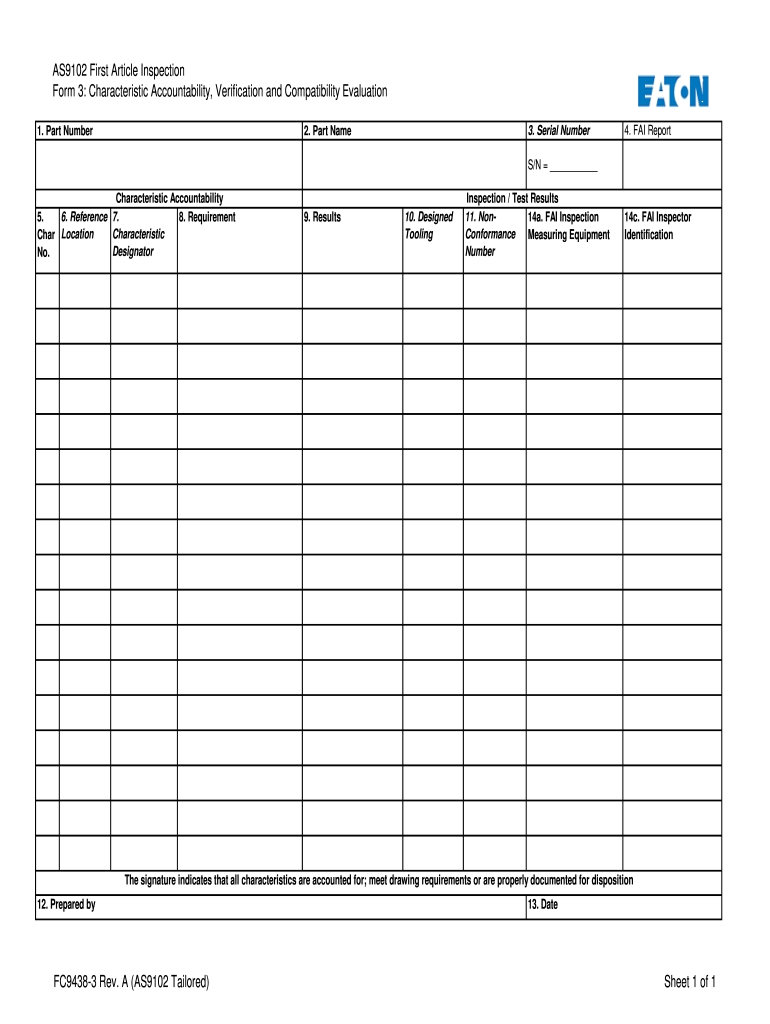
Tic Accountability 6. Reference 7. 5. 8. Requirement Characteristic Char Location Designator No. 9. Results 10. Designed Tooling Inspection / Test Results 11. Non14a. FAI Inspection Conformance Measuring Equipment Number 14c. FAI Inspector Identification The signature indicates that all characteristics are accounted for; meet drawing requirements or are properly documented for disposition 12. Prepared by FC9438-3 Rev. A (AS9102 Tailored) 13. Date Sheet 1 of 1 .
Loading

Open form follow the instructions

Easily sign the form with your finger

Send filled & signed form or save
How to fill out the EATON FC9438-3 online
Filling out the EATON FC9438-3 form is an essential process for ensuring the accuracy and verification of product specifications. This guide provides a clear and supportive approach to completing the form online, making it accessible to all users regardless of their prior experience.
Follow the steps to accurately complete the form
- Click the ‘Get Form’ button to obtain the EATON FC9438-3 form and open it in your selected editing medium.
- In the 'Part Number' field, enter the specific part number related to the inspection. Ensure that this number matches the official documentation to avoid errors.
- Fill in the 'Part Name' field with the designated name of the part being inspected. This information is crucial for identifying the component in question.
- Enter the 'Serial Number' of the part in the corresponding field. This unique identifier is essential for tracking and verification purposes.
- In the 'FAI Report' section, provide the relevant details that indicate the findings and data gathered during the First Article Inspection process.
- Complete the 'Characteristic Accountability' section by listing characteristics as per requirements, including the 'char location' and 'designator number.' Each entry should have associated details that comply with design requirements.
- Record the results of the inspection or test in the 'Results' field, ensuring accuracy and detail in this critical area.
- For 'Designed Tooling,' specify any tools employed in the inspection process, which plays a critical role in verifying conformity.
- In 'FAI Inspection Non-Conformance,' detail any discrepancies found during the inspection, if applicable.
- Fill out the 'Measuring Equipment Number' to identify the tools used during your evaluation, reinforcing accuracy and reliability.
- Provide the 'FAI Inspector Identification,' which includes the name or identification number of the individual or team that performed the inspection.
- Indicate the name of the person who prepared the form in the 'Prepared by' section.
- Finally, enter the current date in the designated field to document when the form was completed.
- Once all fields are complete, you may save changes, download, print, or share the filled-out EATON FC9438-3 form as needed.
Complete your documents online to ensure compliance and accuracy in your inspections.
Experience a faster way to fill out and sign forms on the web. Access the most extensive library of templates available.
Related content
Nov 13, 2008 — Copies of Eaton Forms FC 9438-1, - 2 and - 3 are available on the Eaton...
Get answers to your most pressing questions about US Legal Forms API.
What is Eaton auto shift code 43?
Eaton auto shift code 43 suggests an issue with the neutral start switch or the transmission control in the EATON FC9438-3. This can prevent the vehicle from starting or shifting properly. To fix this, check the neutral start switch for faults and ensure all connections are clean and secure. Troubleshooting this code quickly will help restore your vehicle’s functionality and safety.
What is fault code 46 Eaton Gen 3?
Fault code 46 on the Eaton Gen 3 generally indicates a problem with the clutch system affecting your EATON FC9438-3. This may relate to insufficient clutch pressure or a fault within the clutch mechanism itself. To resolve this code, it is advisable to check the hydraulic fluid levels and examine the clutch components. Maintain a routine inspection schedule to catch such faults early and ensure reliable operation.
What is the fault code 45 on the Eaton Ultrashift?
Fault code 45 on the Eaton Ultrashift relates to an issue with the transmission control module calibration in the EATON FC9438-3. This can arise from a mismatch between the control module and the data it receives from the vehicle's sensors. To rectify this, ensure that the module has the correct software update and recalibrate it accordingly. Keeping your control module updated is crucial for your transmission's functionality.
What is Eaton transmission fault code 37?
Eaton transmission fault code 37 usually points to a problem with the transmission range sensor in the EATON FC9438-3. This sensor manages the gear selection and informs the control system about the current gear state. If this code appears, check the sensor and its wiring for damage or loose connections. Addressing this fault promptly will help maintain optimal transmission performance and reliability.
What is Eaton transmission fault code 42?
Fault code 42 in your Eaton transmission signifies an issue with the vehicle speed sensor or the signal it sends to the EATON FC9438-3. This can lead to erratic shifting, which affects the overall performance of your vehicle. To troubleshoot, inspect the sensor wiring, connections, and the sensor itself for defects. Resolving this issue will ensure that your transmission operates smoothly and efficiently.
What is the code 33 on the Eaton transmission?
Code 33 indicates a problem with the Eaton transmission, specifically related to an overtemperature condition in the EATON FC9438-3. This issue generally occurs when the transmission fluid temperature is too high for effective operation. To address this code, check your fluid levels, ensure proper cooling, and assess the condition of the cooling system. Ignoring this fault can lead to significant damage, so prompt attention is essential.
How do I clear my Eaton fault code?
To clear your Eaton fault code, start by diagnosing the fault using a diagnostic tool compatible with the EATON FC9438-3. Once you identify the specific fault, follow the troubleshooting recommendations in your user manual. After correcting the underlying issue, you can clear the code through the diagnostic tool or by disconnecting the transmission control module's battery for a few minutes. Always ensure you understand the cause of the fault before clearing it to avoid future problems.
What is the last article inspection?
Last article inspection (LAI) is the process of taking precise measurements of parts coming off the line at the end of production. These undergo comparison with the FAI reports for consistency.
What brand is Eaton?
Today, Eaton Electrical manufactures electrical distribution and control products branded "Eaton" or "Cutler-Hammer", which can replace Westinghouse products in commercial and industrial applications. Eaton spun off its semiconductor manufacturing equipment business as Axcelis Technologies in 2000.
What is Eaton most known for?
We are a power management company doing business in more than 175 countries. Our energy-efficient products and services help our customers effectively manage electrical, hydraulic and mechanical power more reliably, efficiently, safely and sustainably. By giving people tools to use power more efficiently.
Use professional pre-built templates to fill in and sign documents online faster. Get access to thousands of forms.
If you believe that this page should be taken down, please follow our DMCA take down process here.