Loading
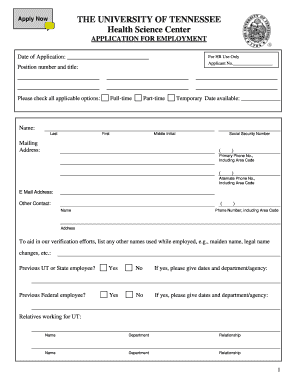
Get Empapp03.doc. Residency Application
How it works
-

Open form follow the instructions
-

Easily sign the form with your finger
-

Send filled & signed form or save
How to use or fill out the EmpApp03.doc. Residency Application online
Filling out the EmpApp03.doc. Residency Application is an essential step in your journey to secure a position. This guide will provide you with straightforward instructions to navigate each section of the application form successfully, ensuring that you provide all necessary information accurately and efficiently.
Follow the steps to complete your residency application with ease.
- Press the 'Get Form' button to access the EmpApp03.doc and open it in your document editor of choice.
- Begin by entering the date of your application in the designated field at the top of the form. This helps track your application status.
- Fill out the applicant number field, which will be assigned by human resources once your application is submitted.
- In the position number and title section, include the specifics of the job you are applying for, ensuring clarity on the position.
- Indicate your availability by checking the appropriate options—full-time, part-time, or temporary—followed by entering your available start date.
- Complete your personal information, including your full name, mailing address, and social security number. Ensure this information is accurate to avoid any delays in processing.
- Provide your primary and alternate phone numbers with the area codes, along with your email address for communication purposes.
- List any other names you have used, if applicable, and answer the questions regarding previous employment with UT or the federal government.
- In the education section, detail your educational background, including schools attended, degrees earned, and the timeframe of your education. Be sure to indicate if you graduated.
- Outline any relevant skills, licenses, certifications, and training that are pertinent to the position.
- Provide your employment history, starting with the most recent job first. Include all employment related to your work experience for at least the past ten years.
- List three references who can vouch for your work and educational history, making sure to include their contact details and your relationship with them.
- Review the certification statement at the bottom of the application. You will need to confirm that all information provided is truthful and complete.
- Finally, save your changes, and download, print, or share the completed form as necessary to submit your application.
Start filling out your residency application online today to take the first step towards your new career.
"Once you have certified and submitted your application, it will be irrevocably locked and no changes will be permitted.
Industry-leading security and compliance
US Legal Forms protects your data by complying with industry-specific security standards.
-
In businnes since 199725+ years providing professional legal documents.
-
Accredited businessGuarantees that a business meets BBB accreditation standards in the US and Canada.
-
Secured by BraintreeValidated Level 1 PCI DSS compliant payment gateway that accepts most major credit and debit card brands from across the globe.