Loading
Get De Familienkasse Kg 53e 2012-2026
How it works
-

Open form follow the instructions
-

Easily sign the form with your finger
-

Send filled & signed form or save
How to fill out the DE Familienkasse KG 53e online
Filling out the DE Familienkasse KG 53e is essential for individuals claiming child benefits in Germany. This guide will walk you through each section of the form to ensure you provide accurate information, enabling a smoother application process.
Follow the steps to effectively complete the form online.
- Press the ‘Get Form’ button to obtain the form and open it in your preferred digital interface.
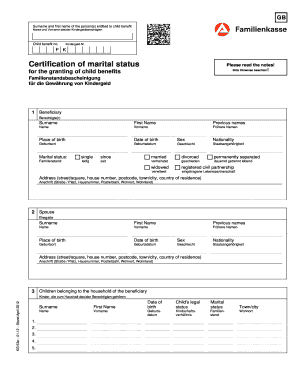
- Begin by entering the surname and first name of the individual entitled to child benefit in the designated field.
- Next, input the child benefit number in the corresponding field titled 'Kindergeld-Nr.'.
- Indicate your marital status by selecting one of the options, such as 'single', 'married', 'divorced', or others provided. Fill in the date since you have held this status, if applicable.
- Complete the section regarding the beneficiary's personal details, including place of birth, date of birth, sex, and nationality.
- If applicable, provide the details of the spouse, using the same format as for the beneficiary. Ensure to fill in their surname, first name, previous names, place of birth, date of birth, sex, nationality, and address.
- List the children belonging to the beneficiary's household. Provide the surname, first name, date of birth, legal status, marital status, and town/city of residence for each child in the allocated fields.
- In the remarks section, add any additional information relevant to your application, ensuring that you keep it concise and to the point.
- Finally, ensure that all information under parts 1-4 is accurate and can be confirmed by official documents. Once completed, save your changes, download, print, or share the form as required.
Complete the DE Familienkasse KG 53e online today to ensure your eligibility for child benefits.