Loading
Get Customers Energy 1258 2016-2026
How it works
-

Open form follow the instructions
-

Easily sign the form with your finger
-

Send filled & signed form or save
How to fill out the Customers Energy 1258 online
This guide provides step-by-step instructions on how to accurately complete the Customers Energy 1258 form online. By following these guidelines, users can ensure they provide the necessary information for a smooth processing experience.
Follow the steps to complete the Customers Energy 1258 form online.
- Press the ‘Get Form’ button to access the Customers Energy 1258 form. This will allow you to open and fill out the document in an online format.
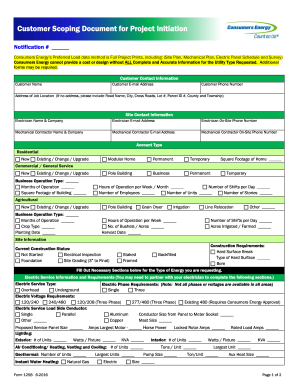
- Begin by entering customer contact information. This includes providing the customer's name, email address, phone number, and the address of the job location. If the address is not available, include road names, cross roads, lot numbers, parcel ID numbers, county, and township.
- Fill in the site contact information by providing the names and contact details for the electrician and mechanical contractor involved in the project. Ensure that their company names, email addresses, and on-site phone numbers are included.
- Specify the account type. Choose between residential, business, or agricultural options and indicate if the project is new or an upgrade. Provide details such as square footage, months of operation, and hours of operation.
- Detail the site information by selecting the current construction status and outlining any construction requirements needed for the project.
- Complete the electric service information. Specify the type and phase requirements for the electric service, including voltage requirements, conductor size, and service panel size. Collaborate with your electrician to gather this information.
- Enter pump information if there are pumps involved in the project. This includes details about horsepower, pressure, maximum startup amps, and any variable frequency drive motor information.
- Provide gas service information, including gas service load requirements. Fill out any applicable load tables and detail equipment loads, mentioning type, load size, and operation hours.
- Complete the customer task section by ensuring property lines are marked, proposed building corners are staked, and that all necessary pre-site tasks are performed.
- Include any additional documents that might be required, such as environmental site conditions, property descriptions, or soil erosion permits.
- Finalize the form by certifying ownership or authorization of the property, ensuring all information is accurate. Provide your signature, printed name, and the date to complete the application.
- Upon finishing all sections, save any changes made to the form. You can also download, print, or share the completed document as needed.
Start completing the Customers Energy 1258 form online today to ensure a smooth project initiation process.
Related links form
Consumers Energy is a dedicated utility provider focused on delivering electricity and natural gas services to various customers. The company aims to promote sustainable energy practices while offering reliable service. With Customers Energy 1258, you can rest assured that you are working with a reputable company committed to serving your energy needs effectively.