Loading
Get Return To Active Status Application For Undergraduate Students.doc - Pacific
How it works
-

Open form follow the instructions
-

Easily sign the form with your finger
-

Send filled & signed form or save
How to fill out the Return To Active Status Application For Undergraduate Students.doc - Pacific online
This guide provides a clear and supportive approach to completing the Return To Active Status Application for Undergraduate Students. Follow these instructions to ensure that all necessary information is accurately submitted online for a smooth transition back to active status.
Follow the steps to complete your application online.
- Click ‘Get Form’ button to obtain the application and open it in the editor.
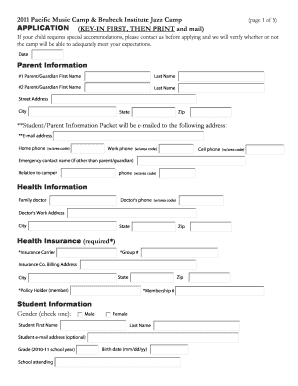
- Carefully review the document. Start by entering the date on the designated line. Ensure that you fill out the parent information section with the first and last names of both parents or guardians.
- Complete the street address, city, state, and zip code fields. Double-check for accuracy to avoid processing delays.
- Input the email address where the Student/Parent Information Packet should be sent, along with the home, work, and cell phone numbers.
- If there is an emergency contact who is not one of the parents or guardians, include their name, relationship to the camper, and phone number.
- In the health information section, provide the name and phone number of the family doctor, including the doctor’s work address.
- Fill out the health insurance details, including the insurance carrier, group number, and billing address, while ensuring to list the policyholder.
- Proceed to the student information section to enter the student's gender, first and last name, email address, grade for the current school year, and school name.
- Input the student's birth date and provide the primary instrument or voice type; include any secondary instrument if applicable.
- Indicate if a scholarship tape or honor group discount is being submitted, along with the roommate request and previous camp attendance.
- Complete the student health history questions by answering all yes or no prompts regarding disabilities, medical care, allergies, and any recurring health problems.
- In the admission section, note the date of the last tetanus shot. Remember that admission is based on first-come, first-served.
- Check the camp selection, carefully choosing the appropriate camp your child wishes to attend and noting any additional options.
- Select a payment option and fill in the necessary payment details. Ensure compliance with any additional notes related to payment methods.
- Review the entire form for any missing information or errors. Once everything is complete, you can save the changes, download, print, or share the form as needed.
Complete your application online today to ensure a smooth return to active status.
With a GPA of 3.7, Pacific University requires you to be above average in your high school class. You'll need at least a mix of A's and B's, with more A's than B's.
Industry-leading security and compliance
US Legal Forms protects your data by complying with industry-specific security standards.
-
In businnes since 199725+ years providing professional legal documents.
-
Accredited businessGuarantees that a business meets BBB accreditation standards in the US and Canada.
-
Secured by BraintreeValidated Level 1 PCI DSS compliant payment gateway that accepts most major credit and debit card brands from across the globe.