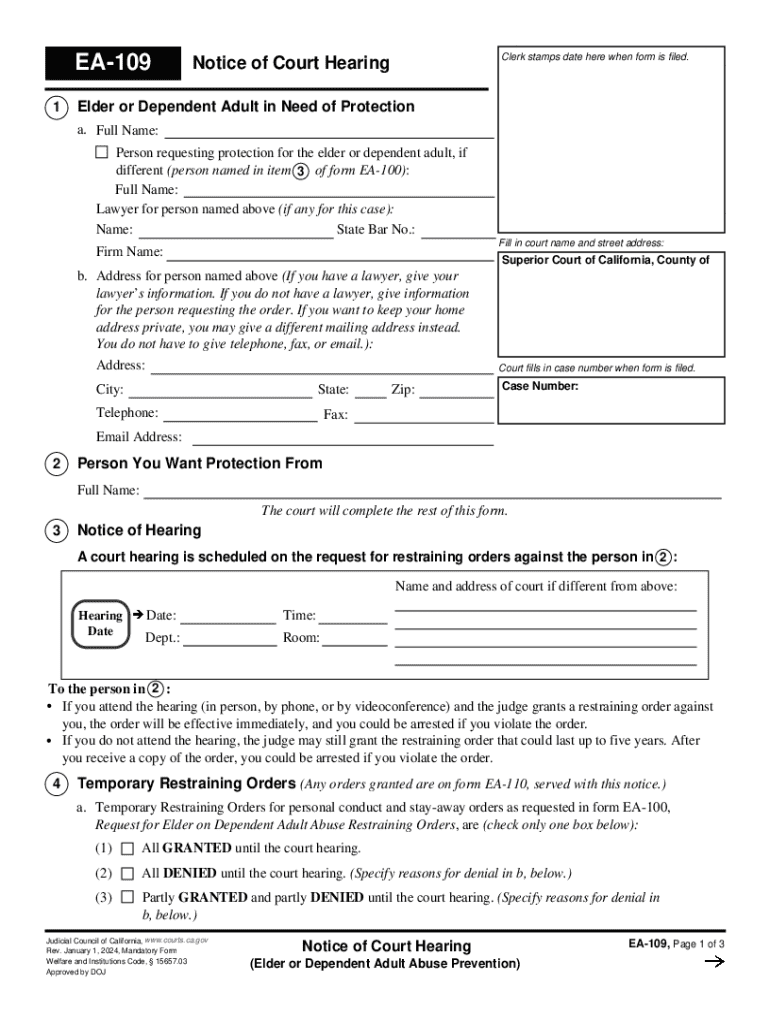
Adult, if different (person named in item 3 of form EA-100): Full Name: Lawyer for person named above (if any for this case): Name: State Bar No.: Fill in court name and street address: Firm Name: Superior Court of California, County of b. Address for person named above (If you have a lawyer, give your lawyer s information. If you do not have a lawyer, give information for the person requesting the order. If you want to keep your home address private, you may give a different mailing addre.
Loading

Open form follow the instructions

Easily sign the form with your finger

Send filled & signed form or save
How to fill out the CA EA-109 online
Filing the CA EA-109, also known as the Notice of Court Hearing for Elder or Dependent Adult in Need of Protection, is an essential step in seeking protection for an elder or dependent adult. This guide provides detailed, step-by-step instructions to help you complete the form accurately and efficiently online.
Follow the steps to effectively fill out the CA EA-109 online.
- Click the ‘Get Form’ button to access the form, allowing you to open it in the designated online editor.
- In section 1a, enter the full name of the person requesting protection for the elder or dependent adult. If the person requesting protection differs from the individual named, include their full name.
- In section 1a, if applicable, include the lawyer's name and their State Bar number. Provide the court name and street address in the appropriate fields.
- In section 1b, provide the address for the person named above. If a lawyer is involved, include their information instead. If you prefer not to disclose your home address, you may enter a different mailing address. Telephone, fax, and email are optional.
- Note the case number, which will be assigned by the court once the form is filed.
- In section 2, input the full name of the person from whom you are seeking protection.
- Review section 3, which outlines the scheduled court hearing date, time, department, and room. Ensure all this information is filled in correctly.
- For section 4, indicate whether Temporary Restraining Orders have been granted, denied, or partly granted by checking the appropriate box.
- If some or all requests are denied, provide the reasons in section 4b, as per the instructions.
- In section 5, confirm that a person over 18 years old will serve documents to the individual in section 2 at least five days before the hearing.
- After completing the form, be sure to save your changes. You can choose to download, print, or share the completed document as needed.
Complete your documents online to ensure timely protection for those in need.
Experience a faster way to fill out and sign forms on the web. Access the most extensive library of templates available.
Related content
Notice of Court Hearing (EA-109). Tells you when your court date is and whether the judge...
EA Lang 109: History of the Culture of Tea in China and Japan. In this course we compare...
This is a one-time edition in 2024. The car is finely imprinted. Length ... CA-3/CA-4...
Get answers to your most pressing questions about US Legal Forms API.
How to respond to a restraining order in California?
How to respond to a request for a restraining order Fill out the Response form (CH-120) Fill out the form, called the Response to Request for Civil Harassment Restraining Orders (form CH-120) ... Make copies of your forms. After you've filled out and signed the Response, form CH-120, make two copies. ... File your forms.
What is an elder or dependent adult?
An elder is a person of age 60 or older. A dependent adult is a person between the ages of 18 and 59 with physical, mental, or developmental disabilities. The full scope of elder and dependent abuse is limited due to the problem's hidden and complex nature.
What is a dependent adult in California?
Who is a dependent adult? A dependent adult is someone aged 18-64 who has mental or physical limitations that limit their ability to carry out normal activities or protect their own rights, regardless of whether they live independently or not.
What is a vulnerable adult in California?
Each California County has an Adult Protective Services (APS) agency to help elder adults (60 years and older) and dependent adults (18-59 who are disabled), when these adults are unable to meet their own needs, or are victims of abuse, neglect or exploitation.
What counts as a dependent adult?
Section 15610.23 - Dependent adult (a) "Dependent adult" means a person, regardless of whether the person lives independently, between the ages of 18 and 64 years who resides in this state and who has physical or mental limitations that restrict his or her ability to carry out normal activities or to protect his or her ...
What is the penal code for dependent adult abuse in California?
There are many ways to run afoul of Penal Code 368. In general, any person who willfully inflicts physical or emotional abuse, neglect or endangerment falsely imprisons and/or financially exploits an elderly person or dependent adult can be found guilty of elder abuse.
Use professional pre-built templates to fill in and sign documents online faster. Get access to thousands of forms.
If you believe that this page should be taken down, please follow our DMCA take down process here.