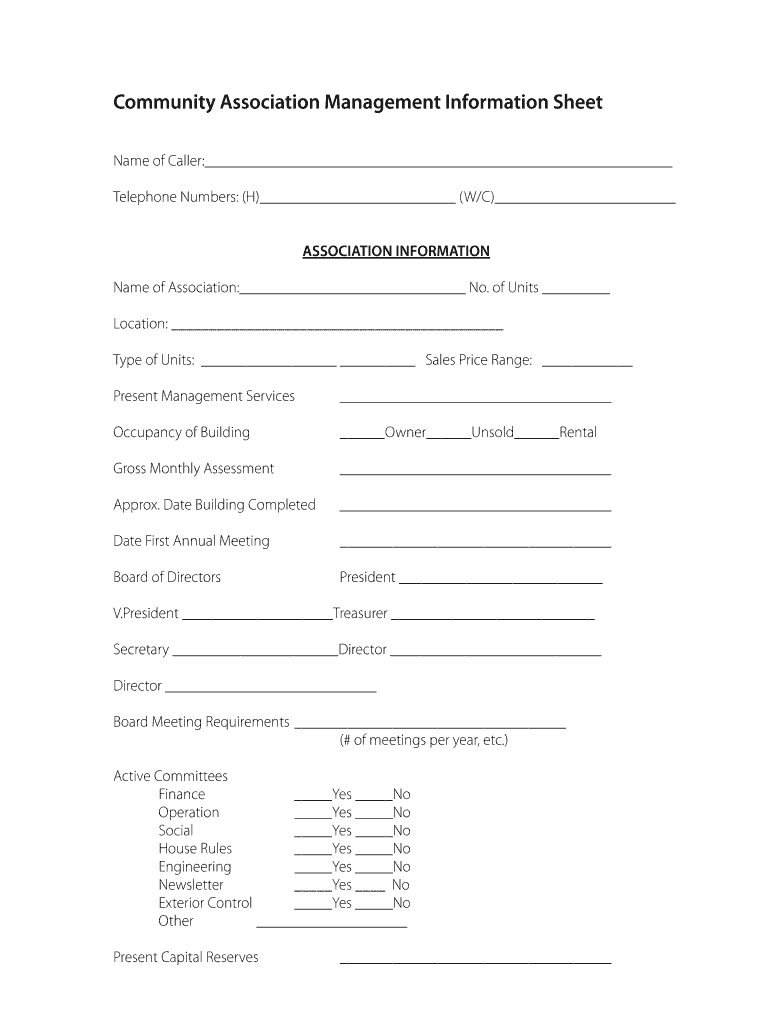
__________ ASSOCIATION INFORMATION Name of Association:______________________________ No. of Units _________ Location: ____________________________________________ Type of Units: __________________ __________ Sales Price Range: ____________ Present Management Services ____________________________________ Occupancy of Building ______Owner______Unsold______Rental Gross Monthly Assessment ____________________________________ Approx. Date Building Completed ___________________________________.

Open form follow the instructions

Easily sign the form with your finger

Send filled & signed form or save
How to fill out the Community Association Management Information Sheet online
This guide provides step-by-step instructions for effectively completing the Community Association Management Information Sheet online. By following these directions, users can ensure that they accurately provide all necessary information in a clear and organized manner.
Follow the steps to complete the form successfully.
- Click ‘Get Form’ button to obtain the form and open it in the editor.
- Begin by entering the caller's name and telephone numbers in the designated fields. Ensure to include both home and work or cell numbers as applicable.
- Fill out the association information section. Enter the name of the association, the number of units, the location, type of units, and the sales price range.
- Provide details about the present management services in the appropriate field. Be as descriptive as possible.
- Indicate the occupancy status of the building by selecting from owner, unsold, or rental options.
- Complete the gross monthly assessment and approximate date the building was completed.
- Fill in the date of the first annual meeting and provide details of the board of directors including their titles and names.
- Outline the board meeting requirements, noting how many meetings are held per year.
- Answer questions about active committees by marking 'yes' or 'no' for each listed committee.
- Enter the present capital reserves and indicate whether there are on-site management facilities.
- Specify the on-site office requirements by indicating the availability of furniture, telephone, copy machine, typewriter, and communication equipment.
- List any building employees and their roles, if applicable.
- Provide information on any professional agreements and existing contracts, filling in names of providers where relevant.
- Report any physical problems, building code violations, lawsuits, insurance claims, and their counts.
- Assess the physical condition of common areas by selecting from excellent, good, or fair.
- Complete the additional information section, including meeting availability, association attorney, and auditor details.
- Address reasons for change and what is being sought in management.
- Finally, fill out the selection process, including where the name was obtained and the decision-making process.
- Review all entries for accuracy, then save changes, download, print, or share the form as needed.
Complete your Community Association Management Information Sheet online today!
Experience a faster way to fill out and sign forms on the web. Access the most extensive library of templates available.
Related content
Please allow 2-4 business days for your license to post in our systems and your license...
by BP ANDERSON · Cited by 1 — Abstract. Homeowner associations (“HOAs”) operate...
Feb 13, 2025 — A multi-year plan that captures change we expect from Wikimedia in...
Get answers to your most pressing questions about US Legal Forms API.
What does a community manager do for an HOA?
A community manager serves as the operational backbone of the HOA, handling day-to-day tasks such as communications, maintenance coordination, and financial oversight. They act as a liaison between the board and residents, ensuring that community needs are met. By taking care of routine issues, a community manager allows board members to focus on bigger, strategic goals. Learn more about these functions by checking the Community Association Management Information Sheet.
What are the goals for being on an HOA board?
The primary goals of an HOA board typically include enhancing property values and fostering a strong sense of community. Board members often aim to create fair and effective rules that meet the needs of all residents. Additionally, a board will focus on maintaining common areas and providing community events to enrich residents' experiences. For more detailed insights into these objectives, see the Community Association Management Information Sheet.
Why would someone want to be on an HOA board?
Serving on the HOA board can foster a connection with neighbors and provide a deeper understanding of community dynamics. As a board member, you can lead initiatives that directly improve quality of life. Furthermore, it provides an opportunity to gain valuable leadership experience. To explore the roles and responsibilities further, refer to the Community Association Management Information Sheet.
Why would anyone want to be on an HOA board?
Joining the HOA board offers a chance to make a direct impact on the community. Board members help shape policies and enhance neighborhood living standards. It's a way to advocate for residents and ensure their voices are heard. For insights on responsibilities and rewards, consult the Community Association Management Information Sheet.
Are HOA management companies worth it?
HOA management companies can offer significant benefits, including professional expertise and more efficient operations. They handle administrative tasks, financial management, and enforcement of community rules. This allows board members to focus on community engagement and improvements. To learn more about the advantages of using a management company, check the Community Association Management Information Sheet.
What are some basic HOA rules?
Basic HOA rules typically include guidelines on property maintenance, noise levels, and the use of shared spaces. While rules vary by community, they often aim to promote harmony and protect property values. Common rules might specify landscaping requirements or restrict certain types of construction. For a comprehensive list of potential regulations, refer to the Community Association Management Information Sheet.
Why would anyone want to join an HOA?
Many people choose to join a Homeowners Association (HOA) for a sense of community and to maintain property values. Participating in an HOA can provide access to amenities such as pools and parks. Additionally, HOAs often establish rules that help keep neighborhoods looking orderly and attractive. For more detailed insights, explore our Community Association Management Information Sheet.
How to request for financial statements?
To request financial statements, you should contact your HOA management or board members directly. Specify the period and type of statements you require in your correspondence. For efficiency, refer to your community association management information sheet as a resource to strengthen your request for timely access to these important documents.
Should HOA file 1120H or 1120?
Whether your HOA should file Form 1120-H or Form 1120 depends on its specific income and operational status. Generally, Form 1120-H is simpler and is often the preferred choice for HOAs. For a detailed comparison and guidance on which form to use, consult your community association management information sheet or a qualified accountant.
Can you request an audit of your HOA?
Yes, homeowners have the right to request an audit of their HOA financial records. This process usually involves submitting a formal request to the HOA board, which is often discussed in meetings outlined in the community association management information sheet. Regular audits can promote transparency and ensure the management is accountable.
Use professional pre-built templates to fill in and sign documents online faster. Get access to thousands of forms.
If you believe that this page should be taken down, please follow our DMCA take down process here.