Loading
Get Smc Id #
How it works
-

Open form follow the instructions
-

Easily sign the form with your finger
-

Send filled & signed form or save
How to fill out the SMC ID # online
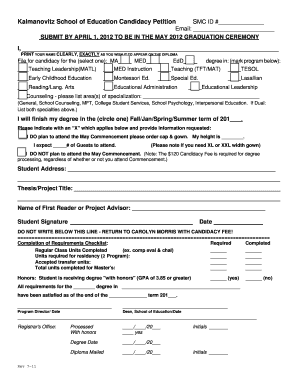
This guide provides detailed instructions on how to accurately fill out the SMC ID # form online. Whether you are applying for candidacy or preparing for graduation, follow these steps to ensure that your submission is complete and compliant.
Follow the steps to complete the SMC ID # form online.
- Click ‘Get Form’ button to obtain the form and open it in the editor.
- Enter your SMC ID # in the designated field at the top of the form.
- Provide your email address in the appropriate section to receive updates on your candidacy status.
- Move to the section that requires your name. Print your name clearly as it should appear on your diploma.
- Select your degree by marking the appropriate box: MA, MED, or EdD.
- Indicate the degree program by marking the program you are enrolling in from the list provided.
- If applicable, fill in the specialization area for Counseling by listing the specific areas.
- Indicate the term you expect to complete your degree by circling either Fall, January, Spring, or Summer.
- Choose your attendance plans for the May Commencement and fill in your height for the cap and gown order.
- If you do not plan to attend, acknowledge that the candidacy fee is still required.
- Complete your student address and thesis/project title in the respective sections.
- Fill in the name of your first reader or project advisor.
- Sign and date the form to authenticate your submission.
- After completing the form, save your changes and utilize the options to download, print, or share as needed.
Complete your candidacy petition online today to ensure timely graduation.
How Add Yourself to a Waitlist Sign in to Corsair Connect at smc.edu/cc (opens in new window) Click “Classes & Enrollment” from the left-side menu. Use the "Select Term" drop-down menu for the term you would like to wait for classes. Click the "Wait For Classes" button at the top.
Industry-leading security and compliance
US Legal Forms protects your data by complying with industry-specific security standards.
-
In businnes since 199725+ years providing professional legal documents.
-
Accredited businessGuarantees that a business meets BBB accreditation standards in the US and Canada.
-
Secured by BraintreeValidated Level 1 PCI DSS compliant payment gateway that accepts most major credit and debit card brands from across the globe.