Loading
Get Benefitseducational Assistancestaffform1tf.doc
How it works
-

Open form follow the instructions
-

Easily sign the form with your finger
-

Send filled & signed form or save
How to fill out the BenefitsEducational AssistanceStaffForm1tf.doc online
Filling out the BenefitsEducational AssistanceStaffForm1tf.doc online is a straightforward process designed to help users navigate the application for educational assistance. This guide will provide step-by-step instructions to ensure all necessary information is completed accurately and submitted in a timely manner.
Follow the steps to fill out your educational assistance application easily.
- Click ‘Get Form’ button to obtain the form and open it in the editor.
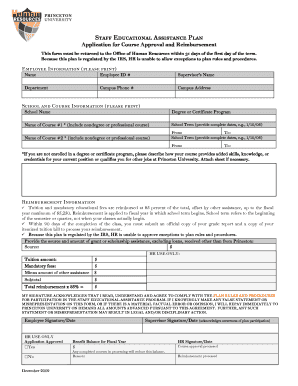
- In the 'Employee Information' section, clearly print your name, employee ID number, supervisor’s name, department, campus phone number, and campus address.
- Proceed to the 'School and Course Information' section. List the school name, complete the degree or certificate program details, and provide the name of your first course. Be sure to include any non-degree or professional courses.
- If you are not enrolled in a degree or certificate program, describe how your chosen course will enhance your skills or knowledge relevant to your current role or other positions at Princeton University.
- In the 'Reimbursement Information' section, input your tuition amount and any mandatory fees. Ensure you account for other assistance received, such as grants or scholarships.
- Provide your signature and date in the designated area to acknowledge your understanding of the plan rules and your agreement to comply.
- After completing the form, review your entries for accuracy. Save your changes and then proceed to download, print, or share the completed form as needed.
Start filling out your BenefitsEducational AssistanceStaffForm1tf.doc online today for your educational advancement.
Through the University's tuition waiver program, eligible employees can have the tuition waived for a course taken at any of the constituent institutions of the University of North Carolina System. Participation in this program is voluntary, and courses may be taken for career development or for personal interest.
Industry-leading security and compliance
US Legal Forms protects your data by complying with industry-specific security standards.
-
In businnes since 199725+ years providing professional legal documents.
-
Accredited businessGuarantees that a business meets BBB accreditation standards in the US and Canada.
-
Secured by BraintreeValidated Level 1 PCI DSS compliant payment gateway that accepts most major credit and debit card brands from across the globe.