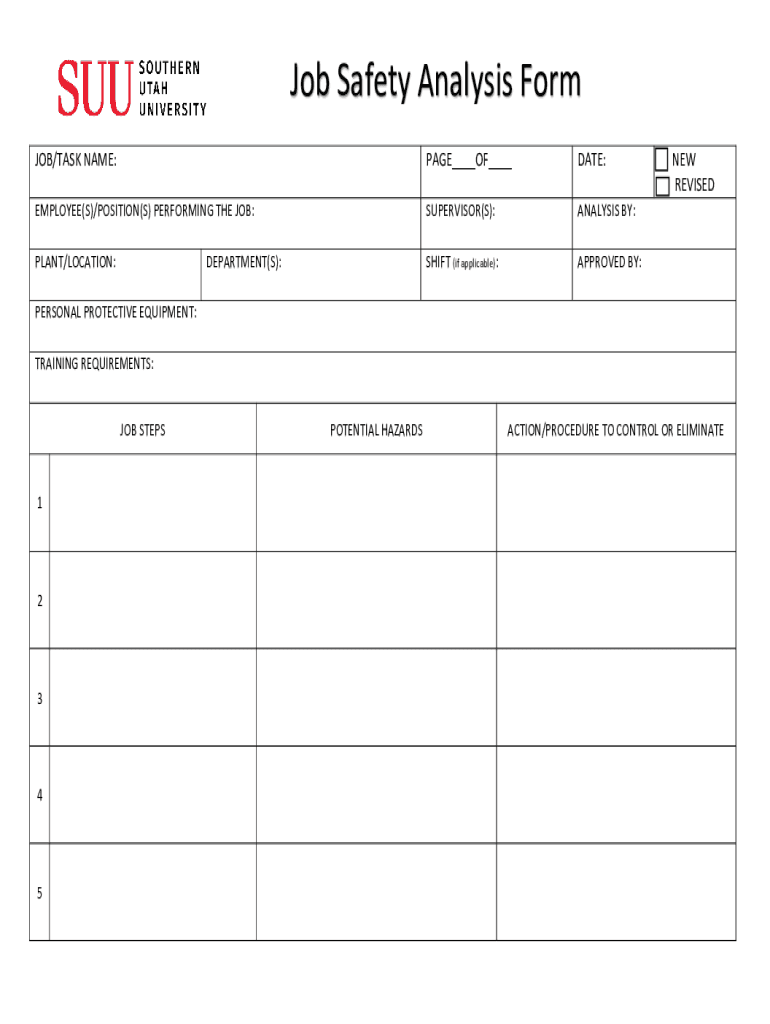
: NEW REVISED PERSONAL PROTECTIVE EQUIPMENT: TRAINING REQUIREMENTS: JOB STEPS 1 2 3 4 5 POTENTIAL HAZARDS ACTION/PROCEDURE TO CONTROL OR ELIMINATE Job Safety Analysis Form JOB/TASK NAME: Fill in the name of the job or task being analyzed PAGE OF Indicate what page of the form this is DATE: Fill in the date here EMPLOYEE(S)/POSITION(S) PERFORMING THE JOB: Fill in the applicable name(s)/position(s) performing the job SUPERVISOR(S): Put the names of the supervisor on the job.
Loading

Open form follow the instructions

Easily sign the form with your finger

Send filled & signed form or save
How to fill out the SUU Job Safety Analysis Form online
Filling out the SUU Job Safety Analysis Form online is an essential process for ensuring workplace safety. This guide provides clear and detailed instructions to help users navigate each section of the form effectively.
Follow the steps to complete the form accurately.
- Press the 'Get Form' button to obtain the Job Safety Analysis Form and open it in the online editor.
- In the 'Job/Task Name' field, enter the name of the job or task that is being analyzed.
- For 'PAGE __ OF __', indicate the page number and total pages of the form to keep track of the document.
- In the 'Date' section, fill in the current date when the analysis is being performed.
- Under 'Employee(s)/Position(s) Performing the Job', input the names and/or positions of individuals carrying out the job.
- List the names of the supervisors overseeing the job in the 'Supervisor(s)' section.
- If applicable, note the shift during which the job is performed in the 'Shift' section.
- Indicate the name of the person or group carrying out the analysis in the 'Analysis By' field.
- Input the name of the individual who approves the job safety analysis in the 'Approved By' section.
- Fill in the 'Plant/Location' field with the name and specific location where the job is to be performed.
- In the 'Department(s)' section, indicate the departments relevant to the job.
- Specify the required personal protective equipment (PPE) in the 'Personal Protective Equipment' field.
- Indicate any training requirements that must be completed before the job can be performed in the 'Training Requirements' section.
- For the 'Job Steps' section, fill in the job tasks sequentially, detailing the potential hazards associated with each step.
- Describe actions or procedures that can be utilized to control or eliminate hazards identified previously.
- Once you have completed all sections of the form, save your changes and choose to download, print, or share the form as necessary.
Complete your Job Safety Analysis Form online now to ensure a safe working environment.
Experience a faster way to fill out and sign forms on the web. Access the most extensive library of templates available.
Related content
The SUU Police Department officers offer information and guidance to victims when they...
The SUU Career Center offers services to help current SUU students and SUU alumni improve...
... job market and enhances communication and teamwork skills. It ... This report shows...
Get answers to your most pressing questions about US Legal Forms API.
What is the check list for job safety analysis?
Safety Equipment Required To Do This Job. Environmental Conditions. Body Position/Movement. Wind Speed and Direction. Weather. Temperature. Light Conditions. Lifting. Permits. Pre-Job Hazard Assessment. Hazards. Simultaneous Operations.
How do you fill out a job safety analysis?
Step-by-Step Guide to Conducting Effective JHA Step 1: Choose a Job Hazard Analysis Procedure. The first step in performing a JSA is identifying where to focus. ... Step 2: Break the JHA Into Steps. ... Step 3: Identify Hazards and Risks. ... Step 4: Implement Solutions. ... Step 5: Communicate the Findings. ... Step 6: Review and Update.
What is a job safety analysis sheet?
What is a Job Safety Analysis. Job Safety Analysis (JSA) is a systematic procedure that breaks each job/task into key training sequences, identifies safety elements of each job/task step and coaches the employee on how to avoid potential safety hazards.
What is included in a job safety analysis?
Job safety analysis (JSA) defines and controls the hazards of processes, jobs, and procedures. JSAs are systematic examinations and documentation of every task within jobs to identify hazards and how to control tasks.
What is the safety checklist?
Safety checklists typically include items such as proper storage of materials, clear pathways, proper equipment operations, proper lighting, and safety procedures. Regular use of a checklist can help employers and employees maintain a safe and healthy work environment.
What is the checklist for job safety analysis?
Proper Tool/Material Placement Hot/Cold Surface or Material Inadequate Lighting Fall Protection/Anchor Points Pinch Points Hand & Finger Hazards Electrical Hazards Welding/Flame Cutting Mechanical Equipment Is H S Present? Are simultaneous operations occuring on site?
What are the 5 steps of a JSA?
Steps for Completing an Effective JSA Step 1: Select the Job to Be Analysed. ... Step 2: Break Down the Job Into a Sequence. ... Step 3: Identify Prospective Hazards. ... Step 4: Determine Preventive Measures. ... Step 5: Document and Report Hazards. ... Step 6: Receive Assistance When Necessary.
Use professional pre-built templates to fill in and sign documents online faster. Get access to thousands of forms.
If you believe that this page should be taken down, please follow our DMCA take down process here.