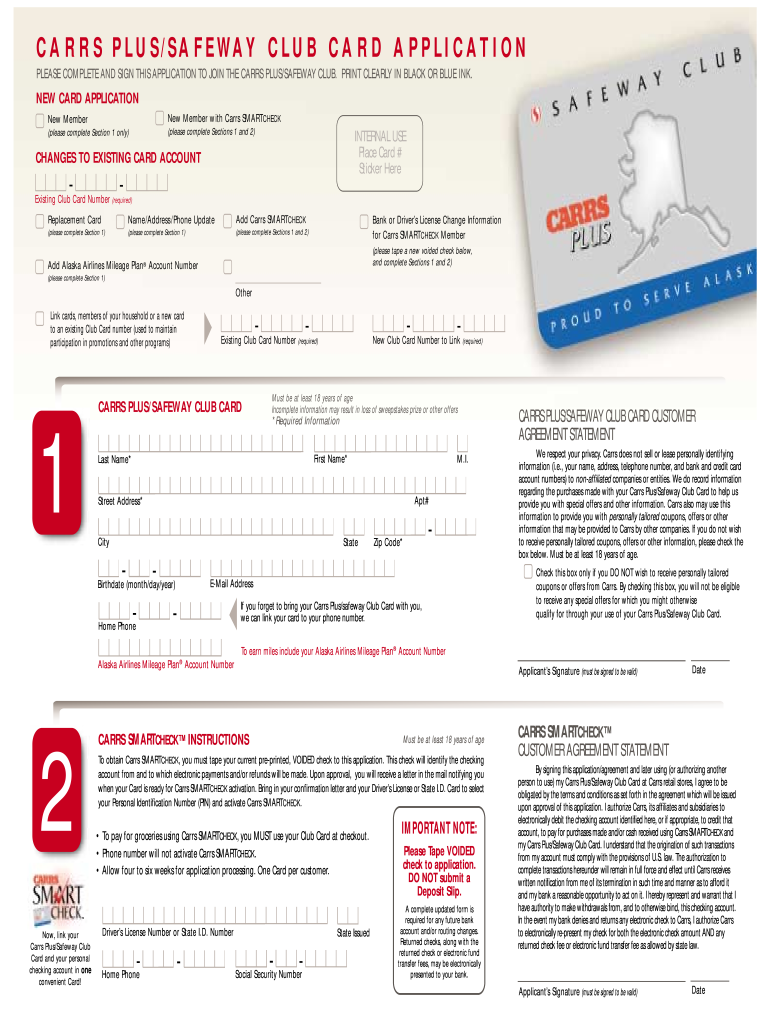
Card at checkout. • Phone number will not activate Carrs SMARTCHECK. • Allow four to six weeks for application processing. One Card per customer. ™ Now, link your Carrs Plus/Safeway Club Card and your personal checking account in one convenient Card! Driver’s License Number or State I.D. Number Home Phone State Issued Social Security Number IMPORTANT NOTE: Please Tape VOIDED check to application. DO NOT submit a Deposit Slip. A complete updated form is required for any future bank.

Open form follow the instructions

Easily sign the form with your finger

Send filled & signed form or save
How to fill out the CARRS Plus/Safeway Club Card Application online
Completing the CARRS Plus/Safeway Club Card Application online can be a straightforward process if you follow the steps carefully. This guide will help you understand each section of the application and provide clear instructions for filling it out successfully.
Follow the steps to complete your application
- Press the ‘Get Form’ button to retrieve the application form and open it for editing.
- Indicate if you are applying for a new card or making changes to an existing account. For new card applications, complete Section 1 only. If you are changing information, follow the instructions specific to your request.
- Fill in your personal information in Section 1. This includes your first name, last name, middle initial, address, date of birth, email address, and phone number. Ensure all fields marked with an asterisk (*) are completed as they are mandatory.
- If you are a Carrs SMARTCHECK member, you will need to complete Section 2, which requires additional information, including a voided check for banking details.
- Review the customer agreement statement and check the relevant box if you do not wish to receive personalized coupons or offers. Remember, checking this box may affect your eligibility for certain promotions.
- Sign the application at the designated area to confirm that all provided information is accurate and that you agree to the terms outlined in the agreement.
- After completing the form, save your changes. You can choose to download a copy, print it for personal records, or share it as needed.
Complete your CARRS Plus/Safeway Club Card Application online today!
Experience a faster way to fill out and sign forms on the web. Access the most extensive library of templates available.
Related content
... Card. MalEM customizable egift cards are also available online. The health and...
Feb 4, 2025 — Your Safeway discount card from the Pacific Northwest or California will...
Membership requirements: None! Got something better to do: No problem! WCSFAzine IS a...
Get answers to your most pressing questions about US Legal Forms API.
How do I get a Safeway Club card?
To get a Safeway Club card, you can either apply online or visit a Safeway store near you. The process is quick when you use the CARRS Plus/Safeway Club Card Application available on their website. After filling out the necessary details, you will receive your card promptly. Don't miss the chance to benefit from incredible savings and rewards.
How to become a Carrs member?
Becoming a Carrs member is easy and convenient. You can sign up online through the CARRS Plus/Safeway Club Card Application on their website or in-store at your local Carrs. Membership provides you with exclusive deals, promotions, and personalized offers tailored to your shopping preferences. It's a great way to save while enjoying necessary grocery items.
How to apply for a Safeway Club card?
To apply for a Safeway Club card, visit your nearest Safeway store or go online to their official site. The CARRS Plus/Safeway Club Card Application is straightforward and user-friendly. You will need to provide some personal information, such as your name, address, and phone number. Once submitted, you can start enjoying the discounts and benefits right away.
Is Safeway Club card discontinued?
No, the Safeway Club card is not discontinued. It continues to offer benefits and discounts for loyal customers. However, it is essential to stay updated on any changes, as policies can evolve. To learn about the latest status and options, check reliable resources or visit the official website.
Does Safeway still give gas discounts?
Yes, Safeway continues to offer gas discounts as part of its rewards program. You can earn discounts on fuel purchases by using your Safeway Club card when you shop. To maximize these savings, ensure you have an active card and consider the CARRS Plus/Safeway Club Card Application for enrollment and updates.
Is Safeway changing their rewards program?
Yes, Safeway is modifying its rewards program to provide more value to its members. These changes might include new incentives or enhancements that help you save more on your grocery shopping. Staying informed about these updates will help you take full advantage of the benefits offered through the CARRS Plus/Safeway Club Card Application.
Can I use my phone number instead of my Safeway Club card?
Yes, you can use your phone number at checkout instead of the physical Safeway Club card. Simply provide your registered phone number to the cashier, and your rewards will be applied automatically. This option adds convenience and enhances your shopping experience, especially for users who have completed the CARRS Plus/Safeway Club Card Application.
How do I add my Safeway Club card to my account?
You can easily add your Safeway Club card to your account by logging into your online profile. Once logged in, navigate to the rewards section and follow the prompts to link your card. Making this connection will allow you to maximize your savings and rewards through the CARRS Plus/Safeway Club Card Application.
Is the Safeway Club card being discontinued?
No, the Safeway Club card is not being discontinued. It continues to be an essential part of Safeway’s rewards program. Users can still enjoy savings on groceries and earn rewards with their active cards. For those interested in maximizing savings, consider the CARRS Plus/Safeway Club Card Application to get started.
How to get Safeway Club card without app?
You don’t need the app to obtain a Safeway Club card. You can complete the CARRS Plus/Safeway Club Card Application online through the Safeway website. Simply provide the required information, and you will receive your card details via email, which you can use immediately.
Use professional pre-built templates to fill in and sign documents online faster. Get access to thousands of forms.
If you believe that this page should be taken down, please follow our DMCA take down process here.