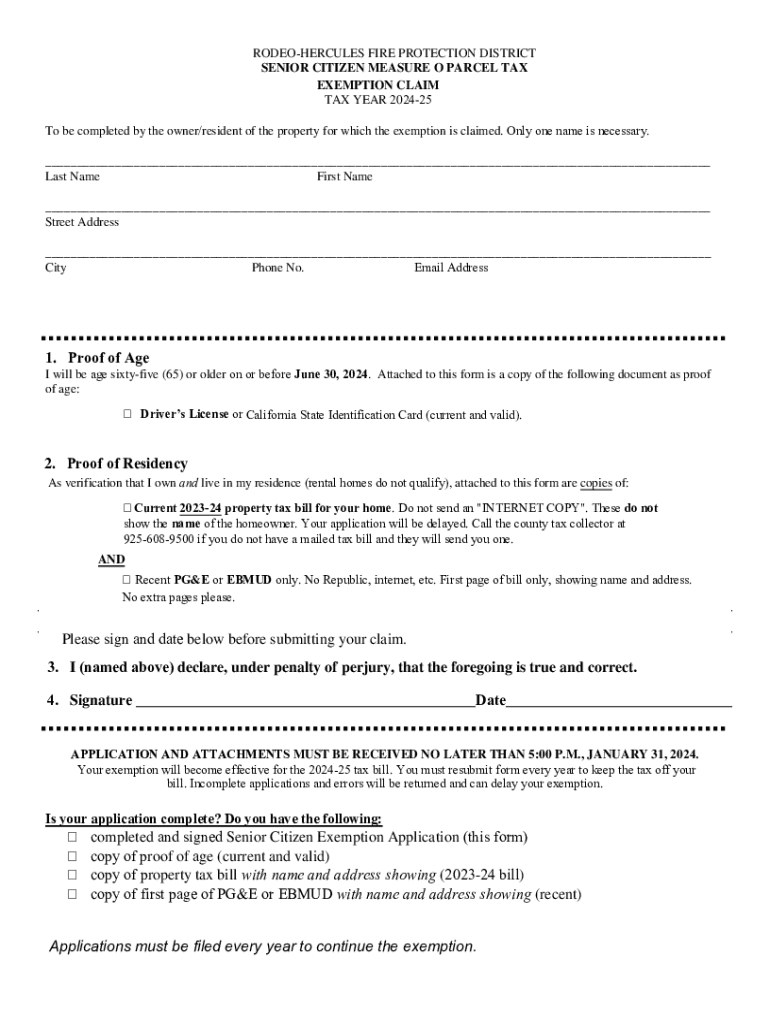
MEASURE O SENIOR CITIZEN EXEMPTION CLAIM INFORMATION What is Measure O? Measure O is a parcel tax specific to the RodeoHercules Fire Protection District. Passed on the November 2016 ballot, the parcel.
Loading

Open form follow the instructions

Easily sign the form with your finger

Send filled & signed form or save
How to fill out the MEASURE O SENIOR CITIZEN EXEMPTION CLAIM online
This guide provides clear and comprehensive instructions on how to complete the Measure O Senior Citizen Exemption Claim online. By following these steps, you can ensure that your exemption application is completed accurately and submitted on time.
Follow the steps to successfully complete your exemption claim online.
- Click ‘Get Form’ button to obtain the form and open it in the editor.
- Provide your last name and first name in the designated fields.
- Enter your street address, including city, phone number, and email address in the appropriate sections.
- In the proof of age section, confirm that you will be sixty-five (65) or older by June 30, 2024, and attach a current copy of your driver’s license or California State ID as proof.
- For proof of residency, attach a current property tax bill from the year 2023-24 that shows your name and address. Ensure it is not an internet copy. Additionally, include the first page of a recent utility bill (PG&E or EBMUD) showing your name and address.
- Sign and date your completed application before submitting it.
- After filling out all fields, save your changes, and choose to download, print, or share the completed form as needed.
Complete your MEASURE O SENIOR CITIZEN EXEMPTION CLAIM online today to ensure you receive your tax exemption.
Experience a faster way to fill out and sign forms on the web. Access the most extensive library of templates available.
Related content
Please remember: NO SENIOR EXEMPTION ON ANY G.O.BOND - (those bonds based on value on...
OH, Senior Property Tax Homestead Exemption, 25,000, $ Exemption, 65, Yes, 59, State...
claim for exemption is not accepted by the Commission. If information is not exempt under...
Get answers to your most pressing questions about US Legal Forms API.
At what age do you stop paying property taxes in New York state?
All owners of the property must be 65 or older, unless the owners are spouses or siblings. If you own the property with a spouse or sibling, only one of you must meet this age requirement. The total combined annual income of the property owner and spouse or co-owner cannot exceed $58,399.
Who qualifies for the CT property tax credit?
To qualify for the credit, you must own your primary residence; that is, the title to your primary residence must be in your name (or, if you along with another person or persons own the residence, the title must be in your names) and your primary residence must be located within Connecticut.
Do seniors get a property tax break in Connecticut?
State law provides a property tax credit program for Connecticut owners in residence of real property, who are elderly (65 and over) or totally disabled, and whose annual incomes do not exceed certain limits.
Can you write off property taxes in CT?
Yes. If your filing status for Connecticut income tax purposes is filing jointly or qualifying widow(er) with dependent child, you may include qualifying property tax payments on up to two motor vehicles you own or lease.
At what age do seniors stop paying property taxes in CT?
Optional municipal property tax relief program for certain homeowners age sixty-five or over or permanently and totally disabled. Sec. 12-129b. Real property tax relief for certain persons sixty-five years of age or over.
What is the property tax exemption in Santa Cruz County?
If you own a home and it is your principal place of residence on January 1, you may apply for an exemption of $7,000 from your assessed value. New property owners will automatically receive an exemption application.
Are seniors exempt from parcel tax in Santa Cruz County?
School Parcel Tax are a non ad valorem tax. They appear as a flat fee in the “OTHER CHARGES” section of your property tax bill. Taxpayers age 65 and older may be exempted from paying some parcel taxes, provided that an enabling exemption is included in the wording approved by the ballot measure.
What tax relief do retirees get in CT?
State law provides income tax exemptions for Social Security benefits, railroad retirement benefits, military retirement pay, pension and annuity income, teacher pension income, and individual retirement account (IRA) distributions.
Use professional pre-built templates to fill in and sign documents online faster. Get access to thousands of forms.
If you believe that this page should be taken down, please follow our DMCA take down process here.